80
RecordingGeoTagsusingtheapp
1.TaptheRECkey
tostarttheGPSrecording.TheRECkeywillturnintotheSTOPkey
whilerecordingGeoTags.
2.OneGeoTagwillberecordedevery1minute.Youmaycontinuerecordingtagsforaslongasyou
want.
3.Whilerecordingtags,takeoneormorepicturesusingtheappRemotemodeorCameramode.
4.TaptheSTOPkey(
)tostoprecordingGeoTags.TheappwillalsostoprecordingGeoTagsif
youclosetheApp,turnoffGPSfromthesmartdeviceorpoweroffthesmartdevice.
Note:Today’stagquantitywillbedisplayedbelowtheREC/STOPkeyandthetotalquantityoftags
willalsobedisplayedonscreen.
UploadingGeoTagsfromapptothecamera
1.AfterrecordingGeoTags,tapthe“UploadtoCamera”keytouploadallthetagstothecamera.
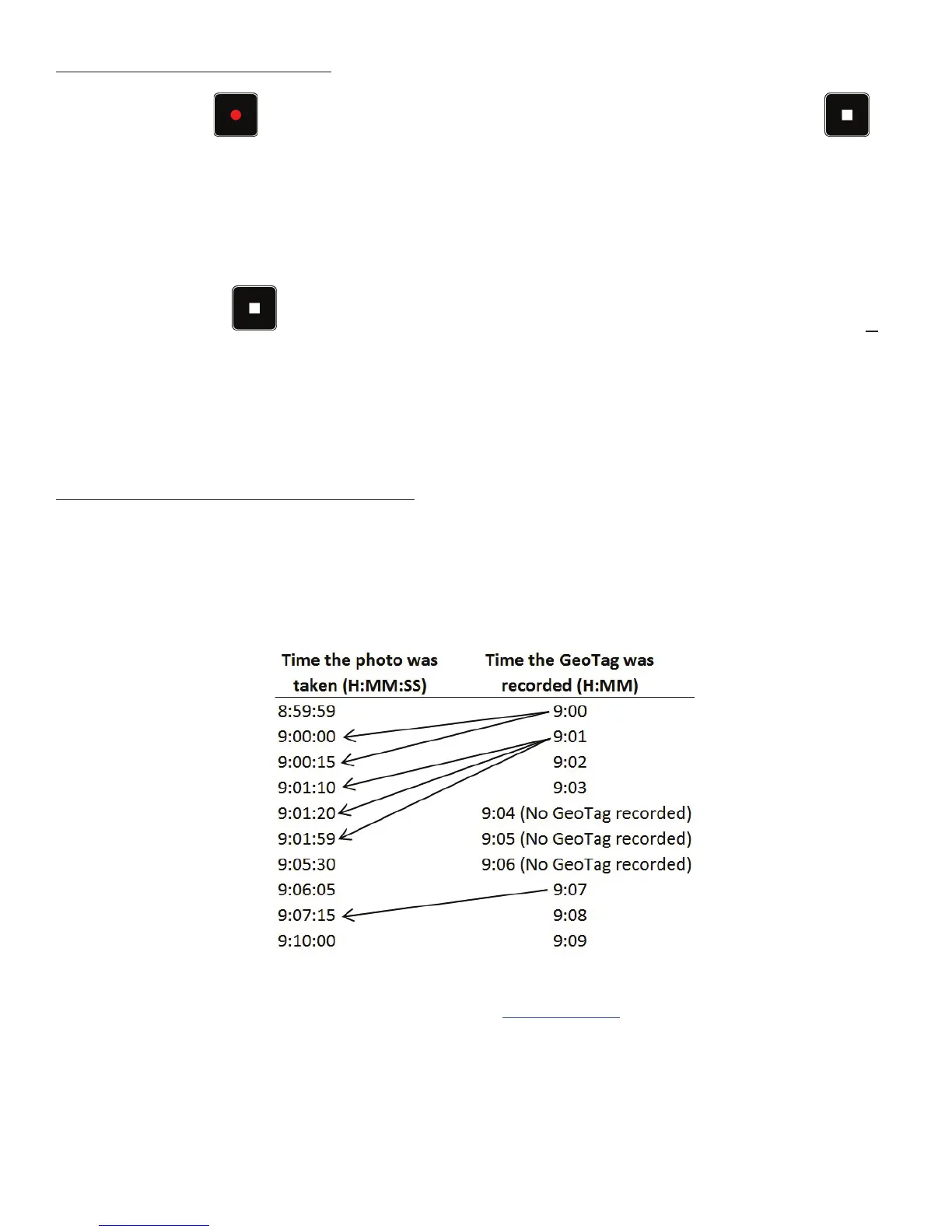
2.Afteruploadingiscomplete,thecamerawillcomparethetagswiththephotossavedinmemory
andmatchtheGeoTagwiththecorrespondingphotobasedonthedate/timestamp.Thefollowing
chartdemonstrateshowGeoTagsarematchedwiththephotos.
OncetheGeoTagsareembeddedintothephotos,youcanuseanygeotaggingsoftwaretoseethe
locationofwherethephotowastaken.Forexample,www.geoimgr.comisafreeonlinesoftwarethat
allowsyoutouploadphotosandseethelocationonamap.
Note:Wirelessconnectionbetweentheappandcamerawillstopwhenthecameraiscomparing
theGeoTagswiththephotossavedinmemory.GeoTagsarerecordinginGPXformat,whichincludes
latitude,longitude,altitudeandtime.Theappcanrecordupto30calendardaysofGeoTags.After
30calanderdaysarerecorded,newGeoTagrecordingswilloverwritetheoldestGeoTags.



 To Next Page