- 131 -
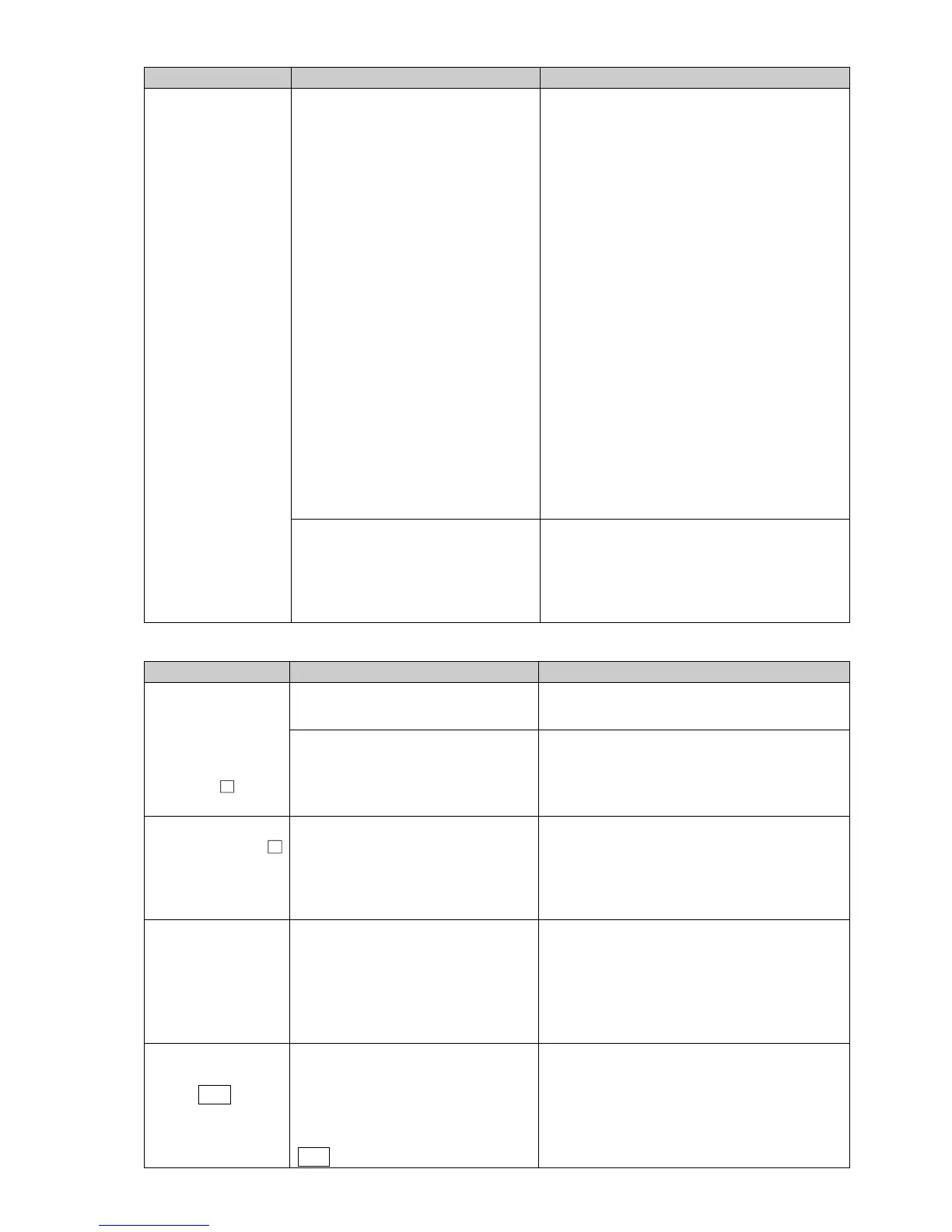
Problem Possible Cause Solution
The PV Display
keeps indicating
the value set in
[Scaling low limit].
Check whether the input signal
wire for direct current (0 to 20 mA
DC) and DC voltage (0 to 5 V DC,
0 to 10 V DC) is disconnected.
Check the input signal wires of direct
current (0 to 20 mA DC) and DC voltage
(0 to 5 V DC, 0 to 10 V DC).
How to check whether the input signal
wire is disconnected:
[Direct current (0 to 20 mA DC)]
If the input to the input terminal of this
controller is 4 mA DC, and if a value
(converted value from scaling high, low limit
setting) corresponding to 4 mA DC is
indicated, the controller is likely to be
operating normally, however, the input
signal wire may be disconnected.
[DC voltage (0 to 5 V DC, 0 to 10 V DC)]
If the input to the input terminal of this
controller is 1 V DC, and if a value
(converted value from scaling high, low
limit setting) corresponding to 1 V DC is
indicated, the controller is likely to be
operating normally, however, the input
signal wire may be disconnected.
Check whether the input terminals
for direct current (0 to 20 mA DC)
or DC voltage (0 to 5 V DC, 0 to 10
V DC) are securely connected to
the instrument input terminals.
Connect the input terminals of direct current
or DC voltage to the input terminals of this
instrument securely.
12.2 Key Operation
Problem Possible Cause Solution
The following
values cannot be
set:
Step SV,
OUT1 proportional
band, EV alarm
value, etc.
Set value lock (Lock 1 or
Lock 4) is selected.
Release the lock in [Set value lock].
AT is performing.
Cancel AT.
Only step SV, step
time and EV
Alarm value can be
set. Other settings
are not possible.
Set value lock (Lock 2 or
Lock 5) is selected.
Release the lock in [Set value lock].
The setting
indication does not
change in the input
range, and new
values are unable
to be set.
Scaling high or low limit value may
be set at the point where the value
does not change.
Set it to a suitable value.
A pattern number
cannot be selected
by the PTN key.
A pattern number might be
selected by means of Event input.
The pattern number selected via
Event input has priority over a
pattern number selected by the
PTN key.
Open (OFF) the SG terminal and any one
terminal of Event input (DI1, DI2).



 To Next Page