- 92 -
9.1.3 Suspending Program Control (Program Control Hold Function)
During program control, progress of current step can be suspended (paused).
Fixed value control is performed using the SV at the point of suspension.
Pressing the RUN key cancels suspension, and program control resumes.
To suspend program control, there are 2 methods:
Using the key, or using Event input
• Using the key
Pressing the key for approx. 1 second during program control.
Progress of current step is suspended, and then Fixed value control is performed
using the SV from the point of suspension.
The PV Display and RUN indicator flash.
• Using Event input
If
/004
(Program control Holding/Not holding) is selected in [Event input DI allocation],
Program control Holding/Not holding can be switched, depending on ON (Closed) or OFF
(Open) status between Event input DI terminal and SG terminal.
If
/004
(Program control Holding/Not holding) is selected in [Event input DI1 allocation],
close (ON)
9
and
12
.
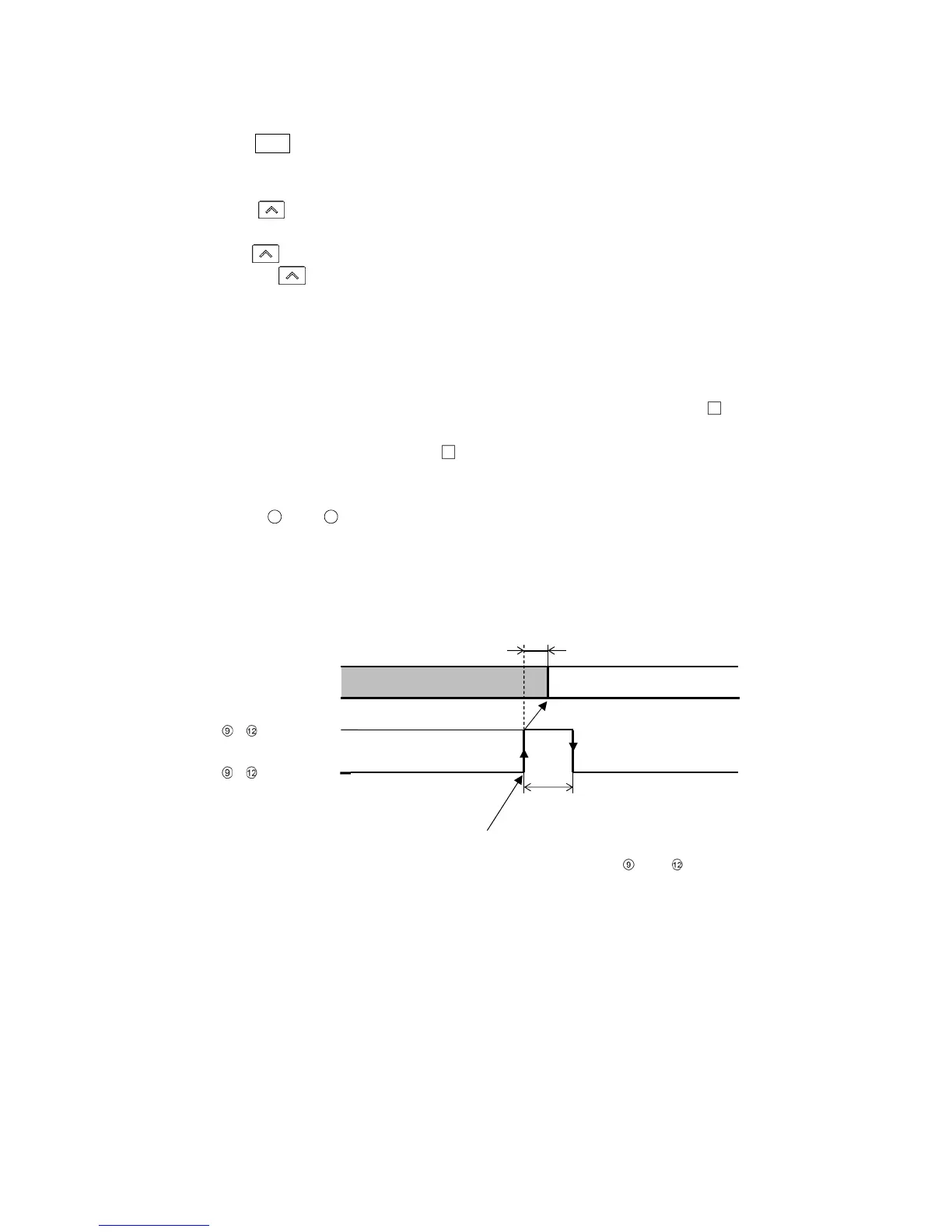
Progress of current step is suspended, and then Fixed value control is performed using
the SV at the point of suspension.
The PV Display and RUN indicator flash.
(Fig. 9.1.3-1)
Program control RUN
Program control suspends.
Within 0.1 sec
0.1 sec min.
,
ON (Closed)
,
OFF (Open)
Controller action
Program control suspends by detecting rising signal edge action
from OFF (Open) to ON (Closed) of terminals and



 To Next Page