User Manual For - CONTROLLER/DATA RECORDER MultiCon CMC-99/141
7. CONFIGURATION OF THE MultiCon CMC-99/141
7.1. EDIT DIALOGUES
Configuration process are based on edit dialogues. Some of the dialogues are common
to different menus, such dialogues are:
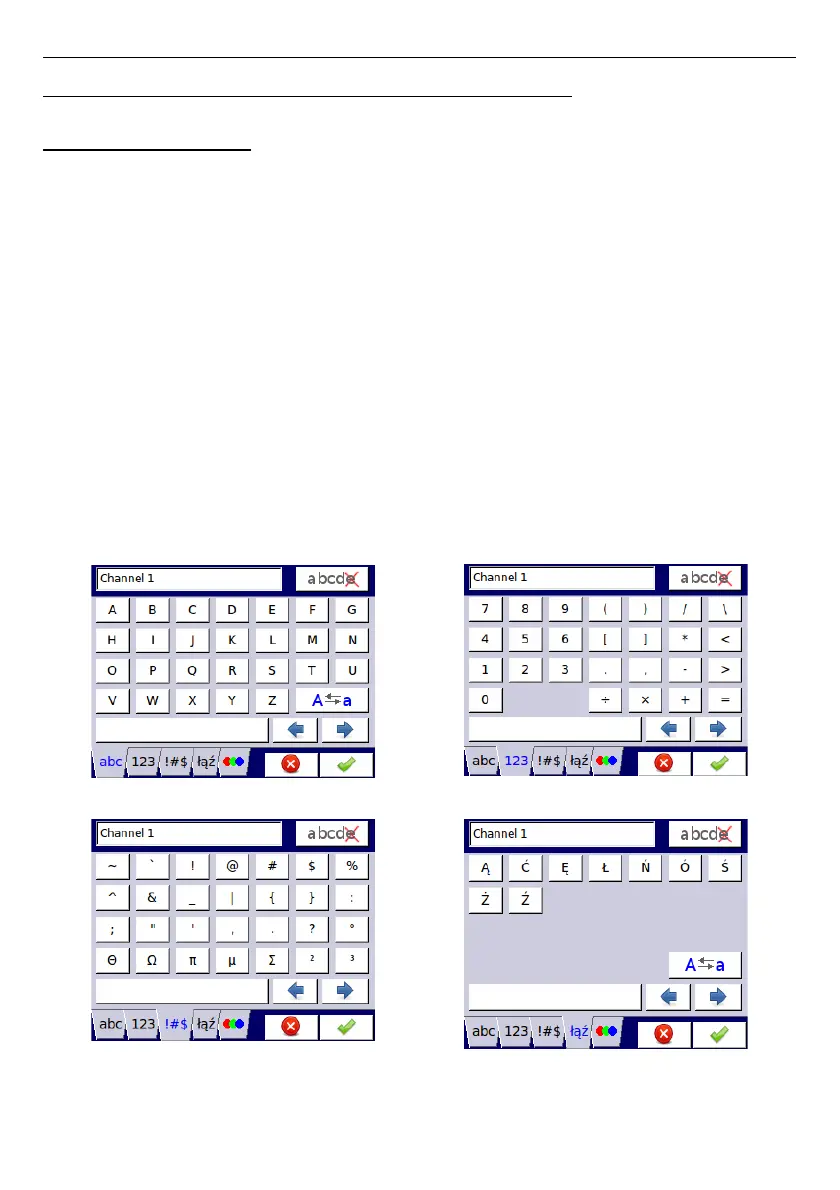
– text editor, which is divided into tabs:
• letters, see
Fig.
7.1
,
• numbers and arithmetic signs, see
Fig.
7.2
,
• the special symbols, see
Fig.
7.3
,
• diacritical letters,
Fig.
7.4
,
• font and background colors, see
Fig.
7.5
,
– values editor, which is divided into tabs:
• decimal form, see
Fig.
7.6
,
• hexadecimal form, see
Fig.
7.7
,
• binary form, see
Fig.
7.8
,
– switch editor, which is divided:
• single choice type options, see
Fig.
7.9
,
• multiple choice type options, see
Fig.
7.10
,
– file editor, which is divided:
• single file selection, see
Fig.
7.11
,
• multiple files selection, see
Fig.
7.12
,
Fig. 7.1. Text editor – letters Fig. 7.2. Text editor – numbers
Fig. 7.3. Text editor – special symbols Fig. 7.4. Text editor example – diacritical
letters
43



 To Next Page