11. System configuration
Lube Control => Main Line Timings / Proximity Switch
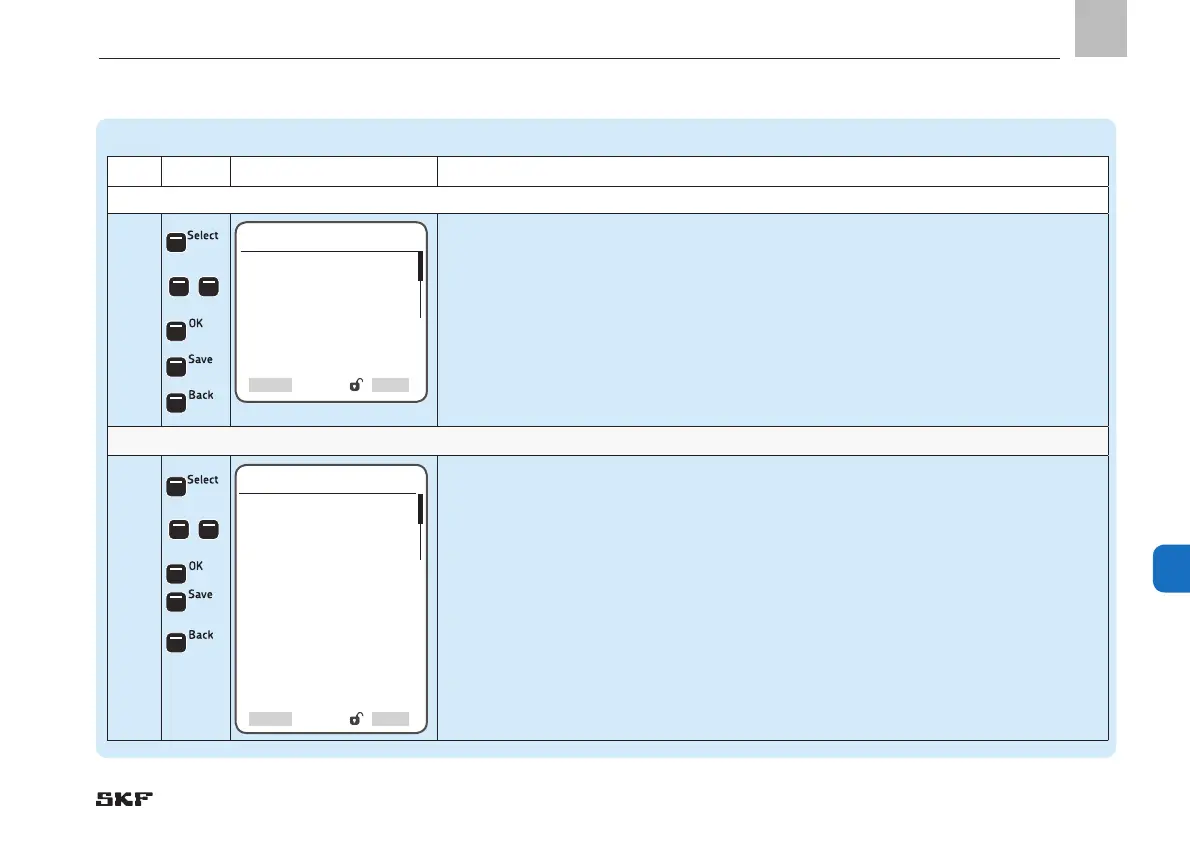
Step Key Display Description
Monitoring Time Monitoring of pressure build-up time
1.4
• Press <Select control key>
• Use <right/left arrow key> to enter the monitoring time for zone 1
• Press <OK control key>
• Press <Save control key>
• Use <down arrow key> to select the Holding time menu item
• Press <Select control key>
• Use <right/left arrow key> to enter the holding time
• Press <Back control key>
Proximity switch
1.5
• Press <Select control key>
• Use <down/up arrow key> to enter the amount of proximity switches for zone 1
• Press <OK control key>
• Press <Save control key>
• Use <down arrow key> to select the Input No Type menu item
)The following settings are available:
o disabled / normally open / normally closed / counter
• Use <down/up arrow key> to enter the input type of the proximity switch
• Press <Save control key>
Main Line Timings
Monitoring Time
[00: 00: 00]
Holding Time
[00: 00: 00]
SelectBack
Proximity switch
No. of proximity switches
[ 2 ]
Input No. 1 Type
<< normally open >> << normally closed>>
<< counter>> << disabled>>
]
Input No. 1
[ 1.04 ] DI
Input No. 2 Type
<< normally open >> << normally closed>>
<< counter>> << disabled>>
]
Input No. 2
[ 1.04 ] DI
Select


 To Next Page
 Loading...