6. Configuration by operator/local admin
Status overview and triggering a remote manual lube
Symbol Status Function
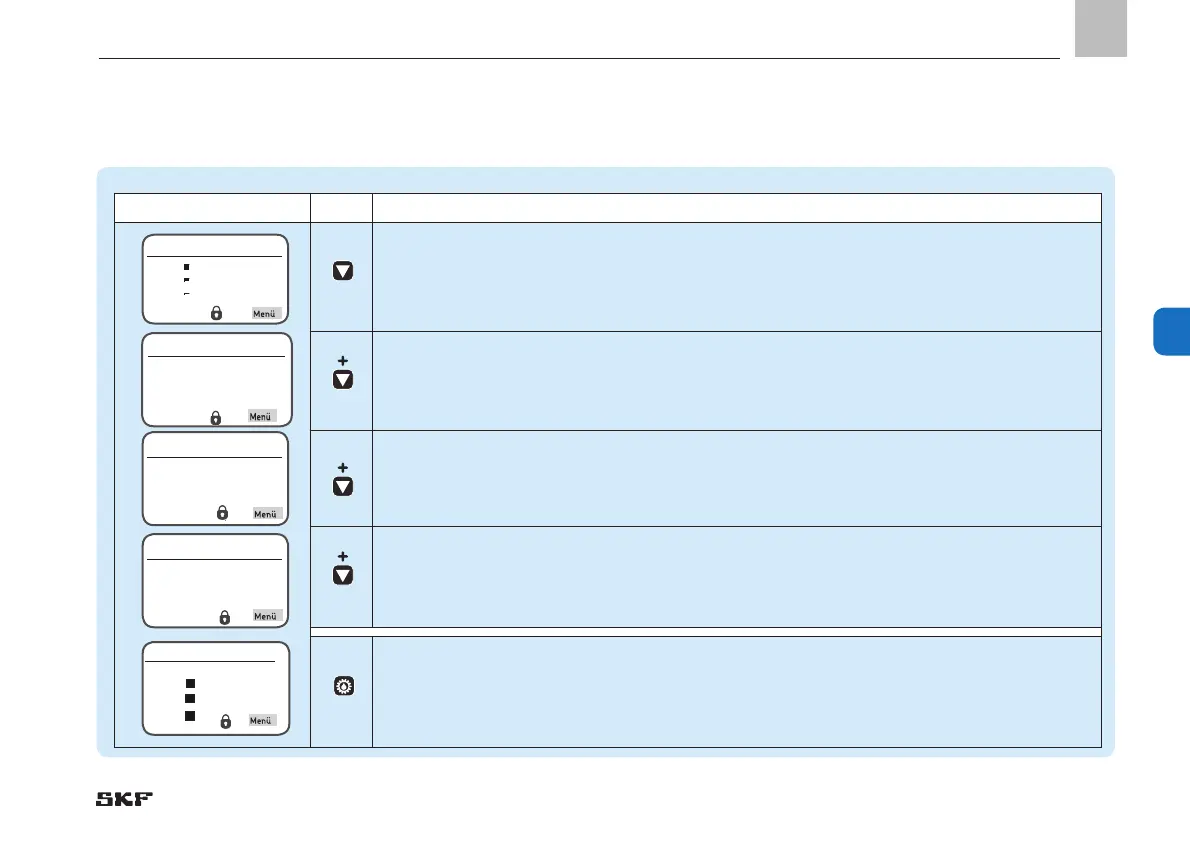
Pressing the down arrow key provides a status overview of the pumps and zones
(P1Z1 = pump 1/zone 1 to max. P3Z3 pump 3/zone 3).
Pressing the down arrow key again displays the remaining interval time or remaining runtime for the
currently selected pump/zone (for example, P1Z1).
Pressing the down arrow key again displays the activated inputs for the currently selected pump/zone.
Pressing the down arrow key again displays the activated outputs for the currently selected pump/zone.
Pressing the Remote Manual Lube button for five seconds causes an interim lubrication to be performed on
the complete system or the activated zones (P1Z1 = pump 1/zone 1 to max. P3Z3 pump 3/zone 3).
Remote Manual Lube
Complete
P1Z1
P1Z2
P1Z3
Overview States
P1Z1
P1Z2
P1Z3


 To Next Page
 Loading...