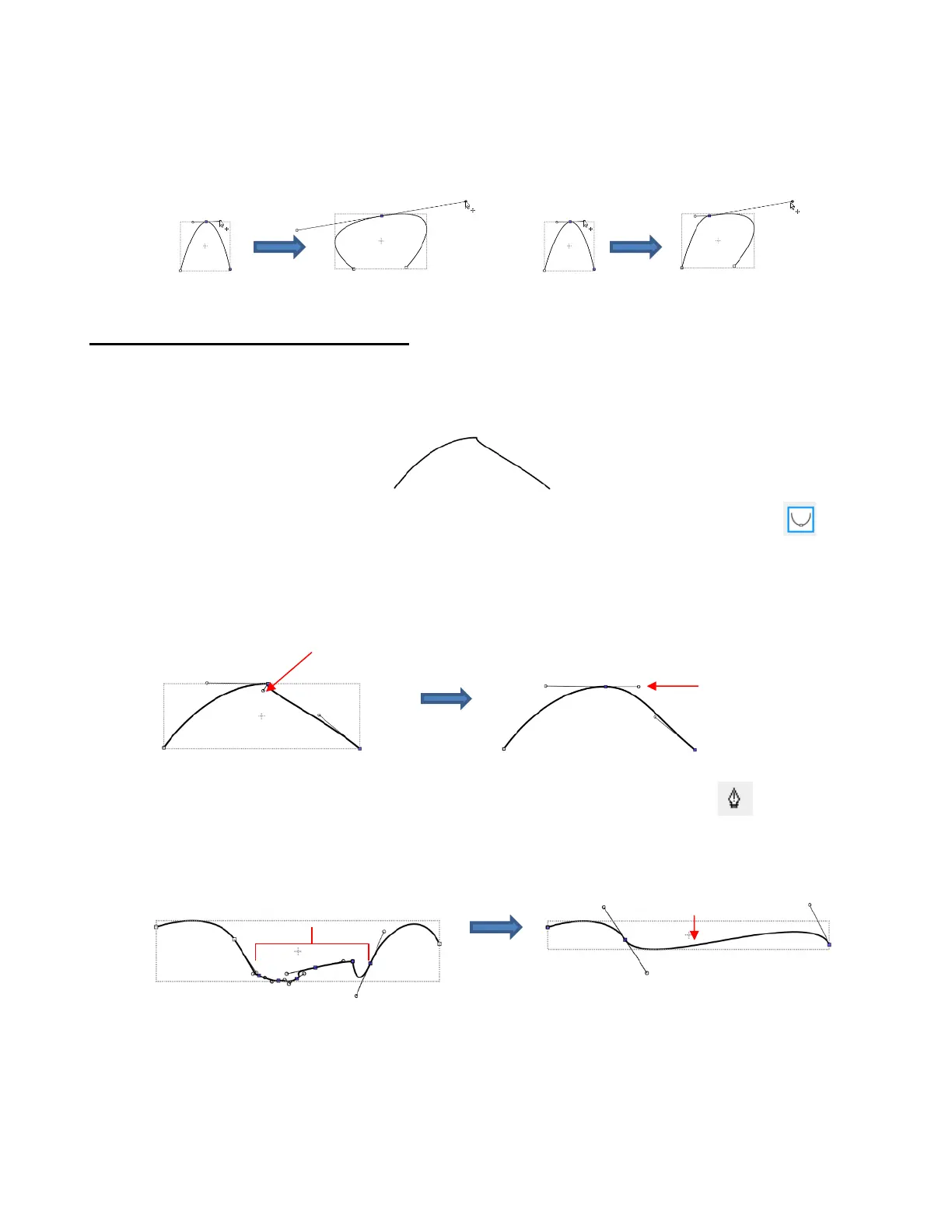
• You will recall that when a node is in either Smooth or Symmetric mode, adjusting one Bézier control point
will automatically affect the other one and the curves on either side will change. To avoid this, hold the Alt
key while dragging the control point and the other control point will remain in place:
For example, with the following Smooth node shape, the same change is made with and without
holding the Alt key during the adjustment:
10.10.3 Examples of Smoothing Curves
• The last method shown in the prior section can be used to correct kinks in what should be a smooth curve.
For example, let’s say you want to make the following shape have a nice smooth curve:
Using the Shape Tool, click on the curve to reveal the node. Then click on the third icon , if
needed, so that option will be highlighted. Hold the Alt key and drag the Bezier control point that’s
closest to the curve needing adjustment until the two control points are in a straight line:
• In Section 9.04.1, you were shown how to add or delete nodes while in the Draw Tool mode. Any
time you want to add nodes to an existing path, you will need to be in this mode. However, you can delete
nodes while in the Shape Tool mode. Select a node or marquee-select a group of nodes and press the
Delete key on your keyboard:
• Based on such a drastic change, it’s worth noting that deleting smaller numbers of nodes at a time is usually
advisable to avoid losing the original structure of the shape.
As a practical example, here is a traced image of a cat. Note the right side of the cat’s head is not
smooth and rounded like the left side:



 To Next Page