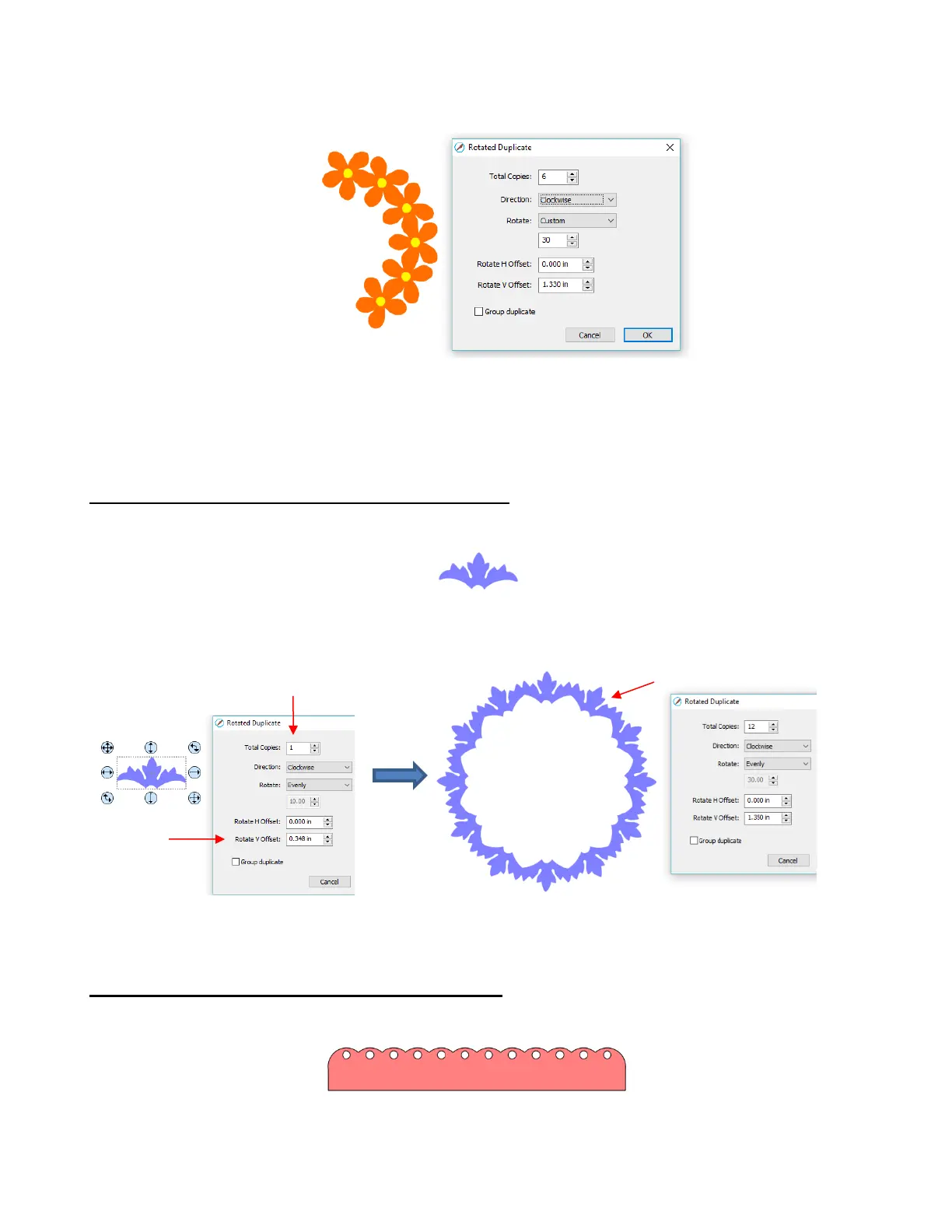
o Change the Rotate to Custom and then, because you want a semi-circle of shapes, divide that
value by 2. Thus, in this example, it will be changed to 30:
o If you want the shapes to be grouped, mark the Group duplicate box. Otherwise leave it
unchecked.
11.08.2 Using Duplicate Rotated to Design a Wreath
• Begin with a desired shape. In this example, a shape from the Library’s Swirls folder will be used.
• Select and go to Object>Duplicate Rotated. Begin increasing Total Copies and the Rotate V Offset until
a desired overlapping pattern is obtained:
• After creating the pattern, go to Path>Union to remove the overlap and the shape is ready to cut.
11.08.3 Using Duplicate Rotated to Design a Frame
• In Section 11.06.1, the Duplicate and Union functions were used to create this scalloped border:
• Select the shape, go to Object>Duplicate Rotated, and enter 4 for Total Copies:



 To Next Page