4.04.1 Engraving a Metal Tag
• When engraving items that are already cut (such as metal tags, trophy plates, charms, etc.), it’s very
important to have precise alignment before proceeding. Therefore, the camera on the Skycut will be used to
set the origin for engraving. If you haven’t already calibrated the camera, go to Section 3.03.
• The following is a list of the items you’ll need for this kind of an application:
The item to be engraved
The Skycut engraving tool
Double sided tape to secure the item to the cutting mat. Thermo-web is perfect for this.
• Create a replica of the item to be engraved:
If it’s something simple, like a square or a rectangle, use the basic shapes available in SCAL:
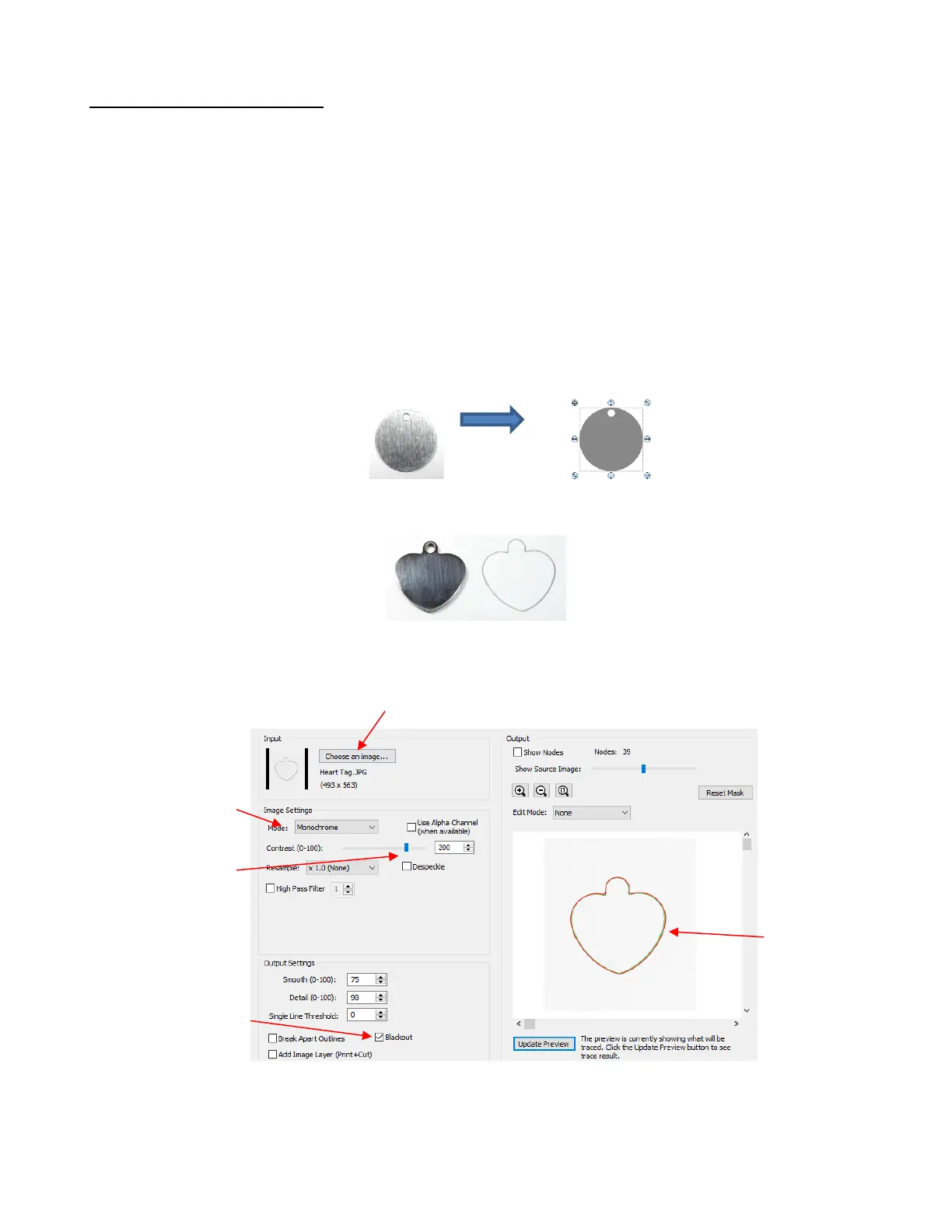
If it’s not a shape that can easily be recreated in SCAL, then trace it onto paper:
o Scan or photograph the trace and import into the Trace Image window in SCAL (refer to Section
9.03). The following settings were used:
• In both cases, measure the dimensions of the actual shape and compare it to the image in SCAL.
Resize if needed.
• On the Fill & Stroke Panel, change the Fill color to None or just change to white so that you will be able to
see the design you’re adding on top:



 To Next Page