EasyManua.ls Logo

Skycut D Series - Canned

Skycut D Series
389 pages
Print Icon
To Next Page IconTo Next Page
To Previous Page IconTo Previous Page
Loading...
310
Or just have some fun with it:
11.18 Canned
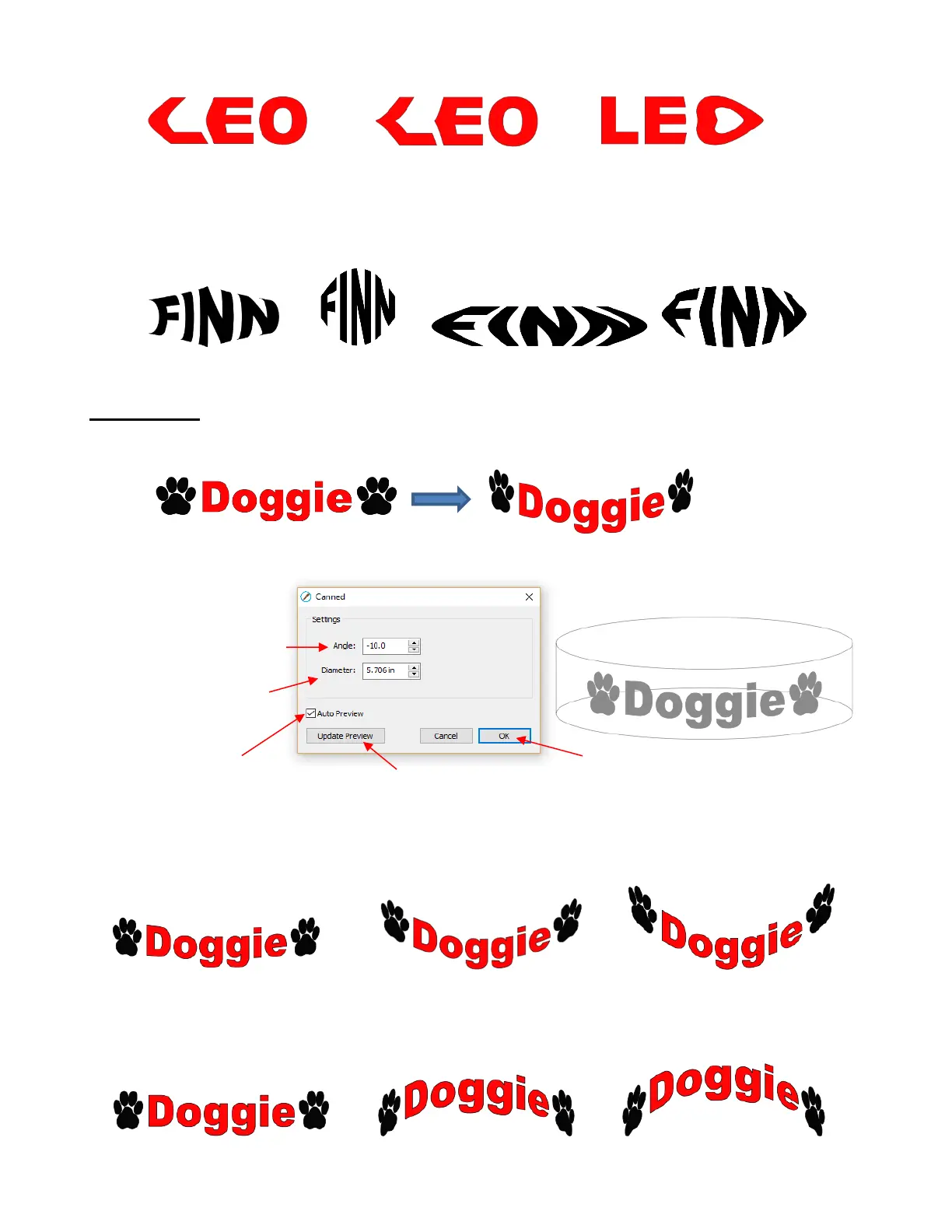
The Canned effect will curve lettering as if it were wrapped around a cylinder (can) and viewed at an angle:
To open the Canned window, select the shape and go to Effects>Canned:
Decreasing the Angle setting (i.e. making the setting more negative) will increase the perspective and
cause a greater roundness to the lettering.
Increasing the Angle has the opposite effect. At an Angle of 0, the lettering is horizontal. A positive Angle
setting results in curving the lettering in the other direction:

Left Offset = 1.0
Left Curve = 50
Left Offset = 1.0
Left Curve = 90
Right Offset = 1.0
Right Curve = 75
Enter viewing angle
Click OK when done
Click here to manually
update the preview
Check this box to have
the preview update with
changes
Enter diameter
of the cylinder
Angle = -10
Angle = -45
Angle = -90
Angle = 0
Angle = 45
Angle = 90

Table of Contents

Other manuals for Skycut D Series

Related product manuals