• You have a choice of three blade types to use in your Skycut blade holder, as was covered in Section
1.07.3. Based on the blade type, you will need to set a Blade Offset value for that type of blade (refer to
Section 2.03.3).
Pen (or Engraving Tool or Embossing Tool)
• There are two options for setting up SCAL to either draw with a pen or use one of the accessory tools:
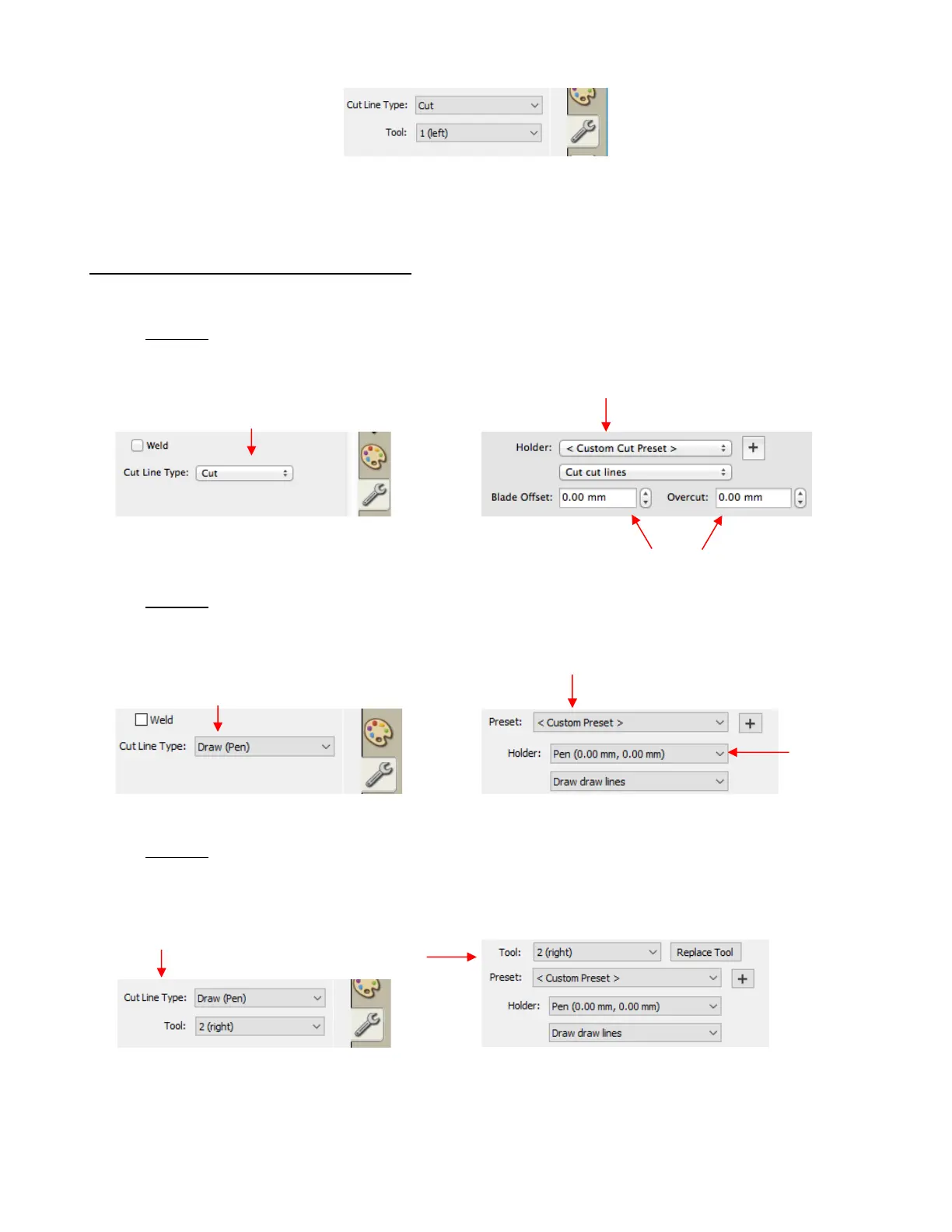
Option 1: When only using a single pen or tool, you can leave the Cut Line Type, on the Style Panel,
set to Cut, as with the blade holder. You will then need to change the Blade Offset and Overcut to 0:
Option 2: When only using a single pen or tool, change the Cut Line Type on the Style Panel to Draw
(Pen) and then change the Holder to Pen, just as you did in when you first tested the Skycut (Section
1.13.2):
Option 3: If, however, you are using both the blade holder (on the left side) and a pen (on the right side),
then, for the layers that will be drawn, you will set the Cut Line Type to Draw (Pen) and change the
Tool setting to 2 (right). Also, in the Cut Settings window, select Pen under Holder and also select
Draw draw lines:
• When using both the pen and the blade holder (or other combination) of two tools, calibrations must be
made to ensure accurate alignment. This is covered in Section 4.01. You will also need to select the Use
Double Head option on the control panel.



 To Next Page