Operation Spectroquant
®
Pharo 300
122
ba75703d07 04/2014
Zoom
Edit Open the selection of mathematical functions with [Edit]:
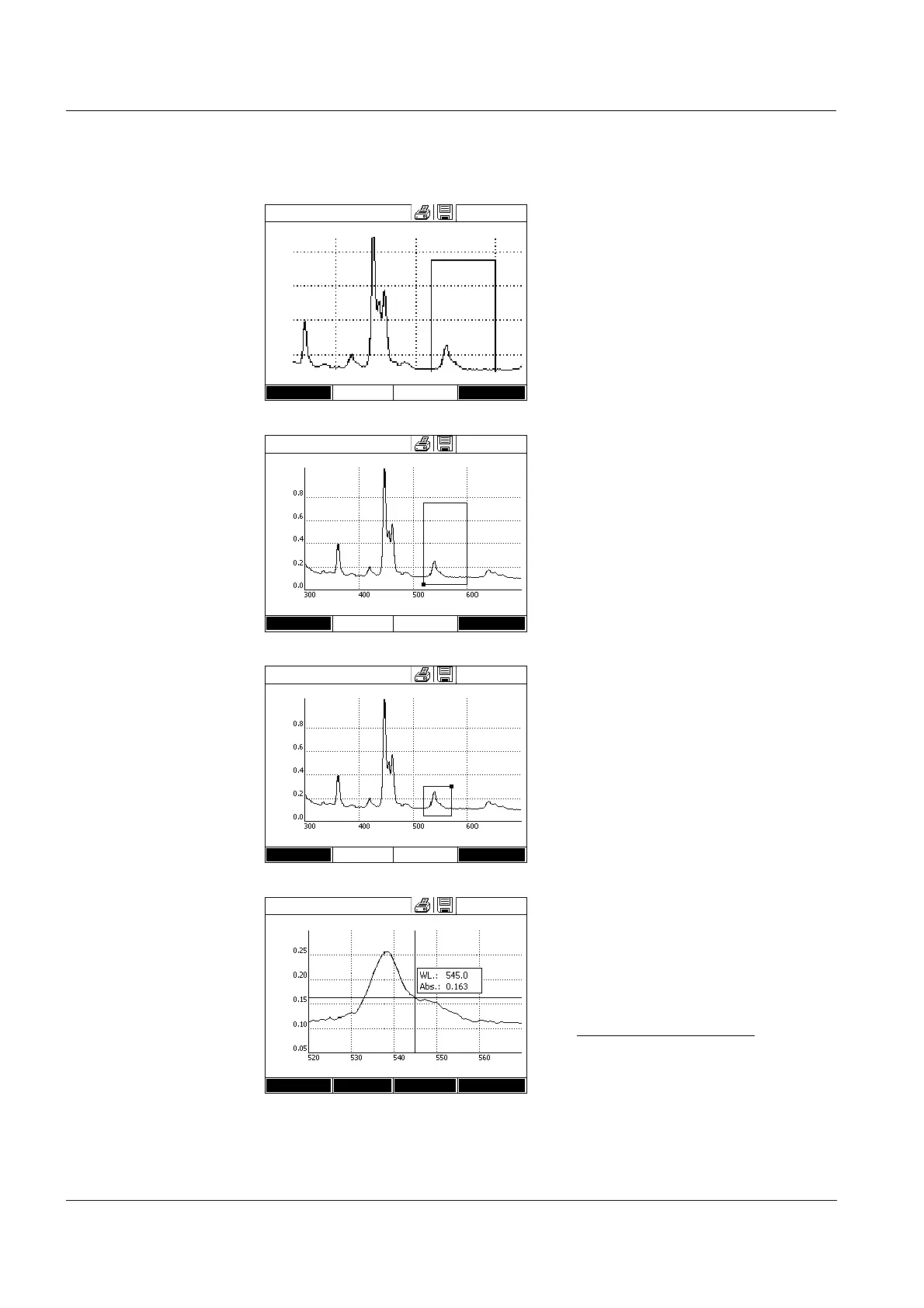
1 Press [Zoom].
The zoom window appears. The
bottom left corner of the zoom win-
dow is marked by a small black
square.
– You can return to the original
view of the spectrum with [Orig-
inal] at any time.
2 Adjusting the zoom window:
– Define the bottom left corner of
the zoom window with <><>
and <▲><▼>.
–Use [xy max] to mark the top
right corner of the zoom window
(small black square).
– Define the top right corner of the
zoom window with <><>
and <▲><▼>.
3 Scaling up the zoom window:
– Press the <START ENTER>
key. The zoom window is scaled
up on the entire diagram area.
Leaving the zoom view:
– You can return to the original
view of the spectrum with
<ESC> at any time.
Spectrum
16.04.07 9:52
Wavelength [nm]
Setup xy min
Spectrum
16.04.07 9:52
Wavelength [nm]
Setup xy min
Spectrum
16.04.07 9:52
Wavelength [nm]
Setup xy max
Spectrum
16.04.07 9:52
Wavelength [nm]
Setup Edit Zoom Open



 To Next Page