Black plate (127,1)
一般Model "A2520GE-A" EDITED: 2015/ 10/ 22
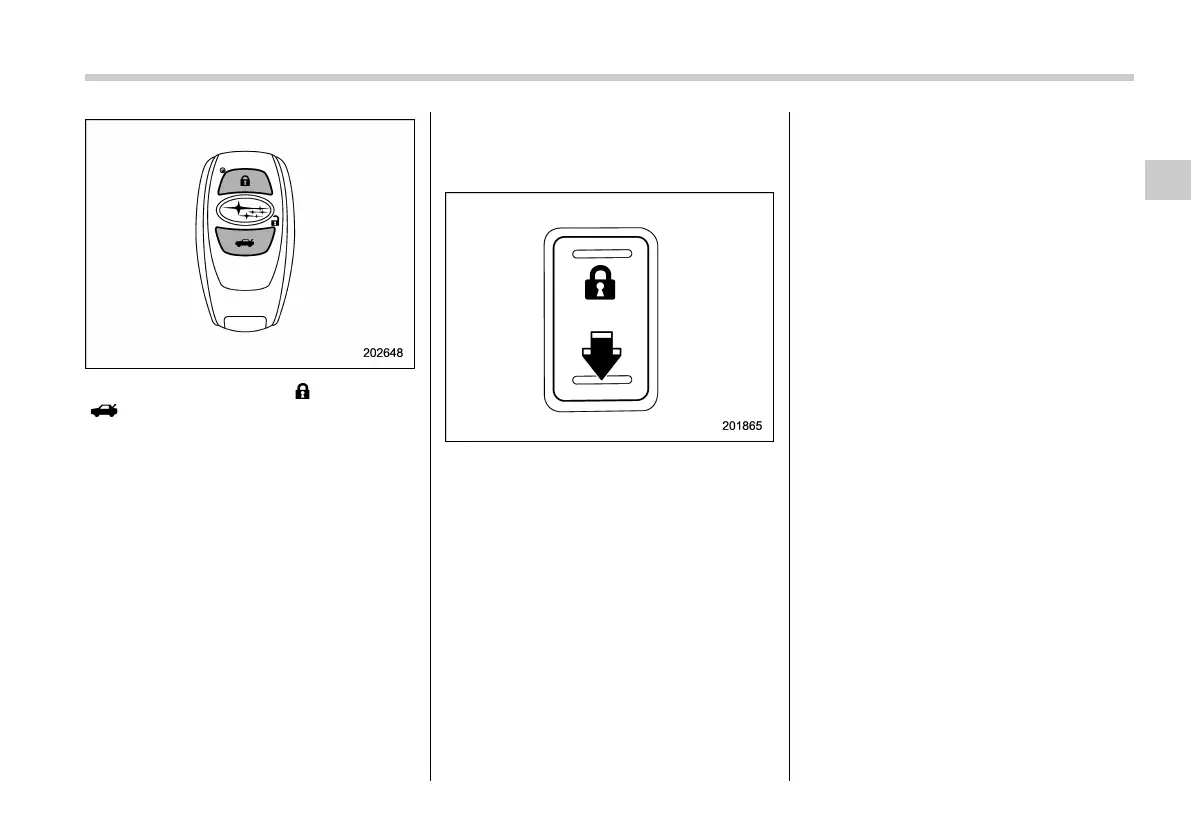
3. Press and hold the “ ” button and
“
” button on the access key simulta-
neously for more than 5 seconds.
A chirp sound will be heard, and the
function will be disabled.
! By operating the driver’s door
1. Sit in the driver’s seat, and close the
door.
2. Push the rear side (unlock side) of the
power door locking switch.
3. Within 5 seconds a fter step 2 is
performed, open the driver’s door.
4. Within 5 seconds a fter step 3 is
performed, push the rear side (unlock
side) of the power door locking switch
twice while the door is open.
5. Within 10 se conds after step 4 is
performed, close and open the driver’s
door twice.
6. Within 10 se conds after step 5 is
performed, push the rear side (unlock
side) of the power door locking switch
twice while the door is open.
7. Within 10 seconds after step 6 is
performed, close and open the driver’s
door once.
8. Within 5 seconds after step 7 i s
performed, close the door.
A chirp sound will be heard, and the
functions will be disabled.
NOTE
In steps 4 and 6, press the power door
locking switch firmly. If the switch is
not pressed firmly, the functions may
not be disabled.
! Enabling functions
When the procedure to disable the func-
tions is performed again, a chirp sound will
be heard, and the functions are enabled.
& When access key does not
operate properly
Refer to “Access key – if access key does
not operate properly” F9-28.
& Replacing battery of access
key
Refer to “Replacing battery of access key”
F11-62.
Keys and doors/Keyless access with push–button start system
2-17
– CONTINUED –
2












 To Next Page