Black plate (272,1)
一般Model "A2520GE-A" EDITED: 2015/ 10/ 22
5-30
Audio/Media operation
Media operation
& CD
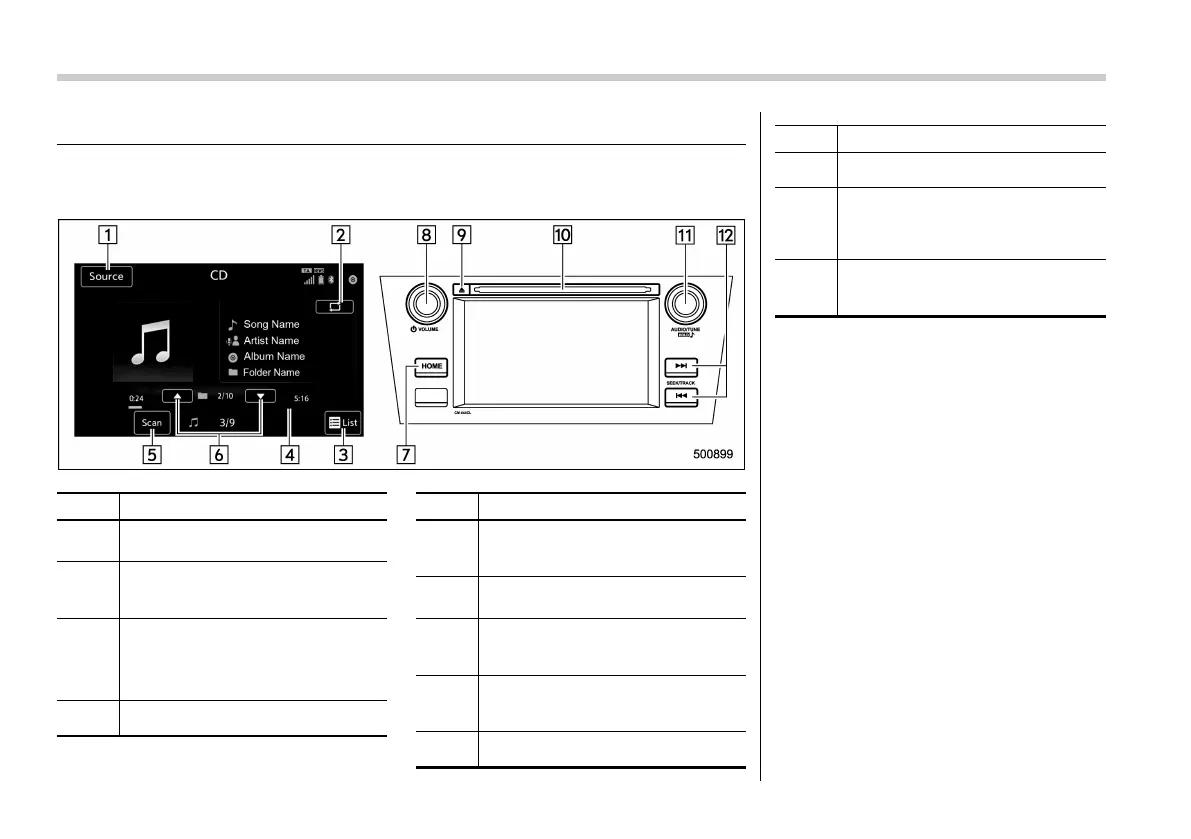
! Control screen and panel
No. Function
&
1
Select to display the audio source
selection screen.
&
2
Select to display the play mode
currently selected. Refer to “Select
play mode” F5-31.
&
3
Audio CD:
Select to display a track list.
MP3/WMA/AAC disc:
Select to display a folder list.
&
4
Shows progress.
No. Function
&
5
The tracks in the disc are played
back for 10 seconds each from the
beginning of the track.
&
6
MP3/WMA/AAC disc:
Select to choose a folder.
&
7
Select to display the sound setting
screen. Refer to “Unit settings” F5-
18.
&
8
Turn to adjust volume.
Press to turn the audio system on/
off.
&
9
Press to eject a disc.
No. Function
&
10
Disc slot
&
11
Turn to select a track/file.
Press to select an audio source.
Refer to “Selecting an audio source”
F5-17.
&
12
Press to select a track/file.
Press and hold to fast forward/re-
wind.
NOTE
. Depending on the compression data
format of the inserted CD, some keys
may not be displayed on the screen.
. If a disc contains CD-DA files and
MP3/WMA/AAC files, only the CD-DA
files can be played back.
. If a CD-TEXT disc is inserted, the
title of the disc and track will be
displayed. Up to 32 characters can be
displayed.
. If the disc contains no CD-TEXT,
only the track number would be dis-
played on the screen.
. If you press the mute switch on the
steering wheel during playback, the
audio will be muted. If you press the
mute switch once again, the volume
will return.














 To Next Page