Black plate (293,1)
一般Model "A2520GE-A" EDITED: 2015/ 10/ 22
& Making a call
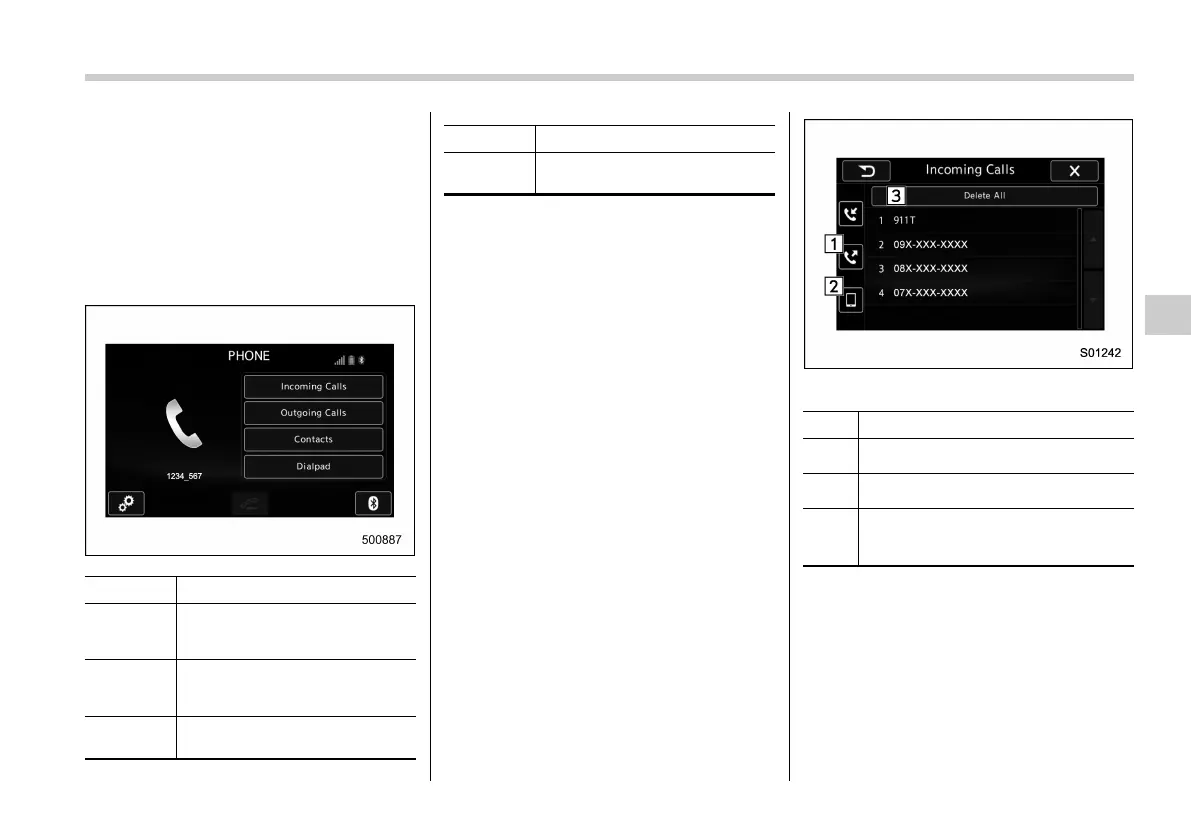
There are several methods by which a call
can be made, as described below.
1. Press the HOME button on the audio
panel.
2. Touch the “PHONE” key.
3. Select the desired key to make a call
from the following list.
Item Function
Incoming
Calls
Display the history of incoming
calls. Refer to “By incoming
calls” F5-51.
Outgoing
Calls
Display the history of outgoing
calls. Refer to “By outgoing calls”
F5-52.
Contacts
Display the phonebook. Refer to
“By contacts list” F5-52.
Item Function
Dialpad/
Keypad
Dial a phone number. Refer to
“By Dialpad” F5-53.
NOTE
You can also make a call by using the
following functions.
. Make a call using the o ff hook
switch on the steering switch. Refer to
“By off hook switch” F5-54.
. Make a call using voice operation.
Refer to “Voice command system op-
eration” F5-63.
! By incoming calls
On the PHONE screen, select “Incoming
Calls” to open the Incoming Calls screen.
You can make a call by selecting an item
in the incoming call history list.
If there is no incoming call history, a
message appears to indicate that there
is no incoming call history data.
Incoming Calls screen
No. Function
&
1
Opens the “Outgoing Calls” screen.
&
2
Opens the “Contacts” screen.
&
3
Deletes all incoming call history data.
The “Delete All” key is disabled when
there is no incoming call history.
When you select an item in the history list
on the “Incoming Calls” screen, the out-
going call screen opens.
Audio/Phone operation (Hands–free system for cellular phones)
5-51
– CONTINUED –
5














 To Next Page