Black plate (274,1)
一般Model "A2520GE-A" EDITED: 2015/ 10/ 22
5-32
Audio/Media operation
& USB memory
Audio files on the USB memory can be
played back.
WARNING
Do not operate the player’s controls
or connect the USB memory while
driving. Doing so may result in
losing control of your vehicle and
cause an accident or serious injury.
CAUTION
. Do not leave your USB memory
in the car. In particular, high
temperatures inside the vehicle
may damage the USB memory.
. Do not push down on or apply
unnecessary pressure to the por-
table player while it is connected
as this may damage the USB
memory or its terminal.
. Do not insert foreign objects into
the port as this may damage the
USB memory or its terminal.
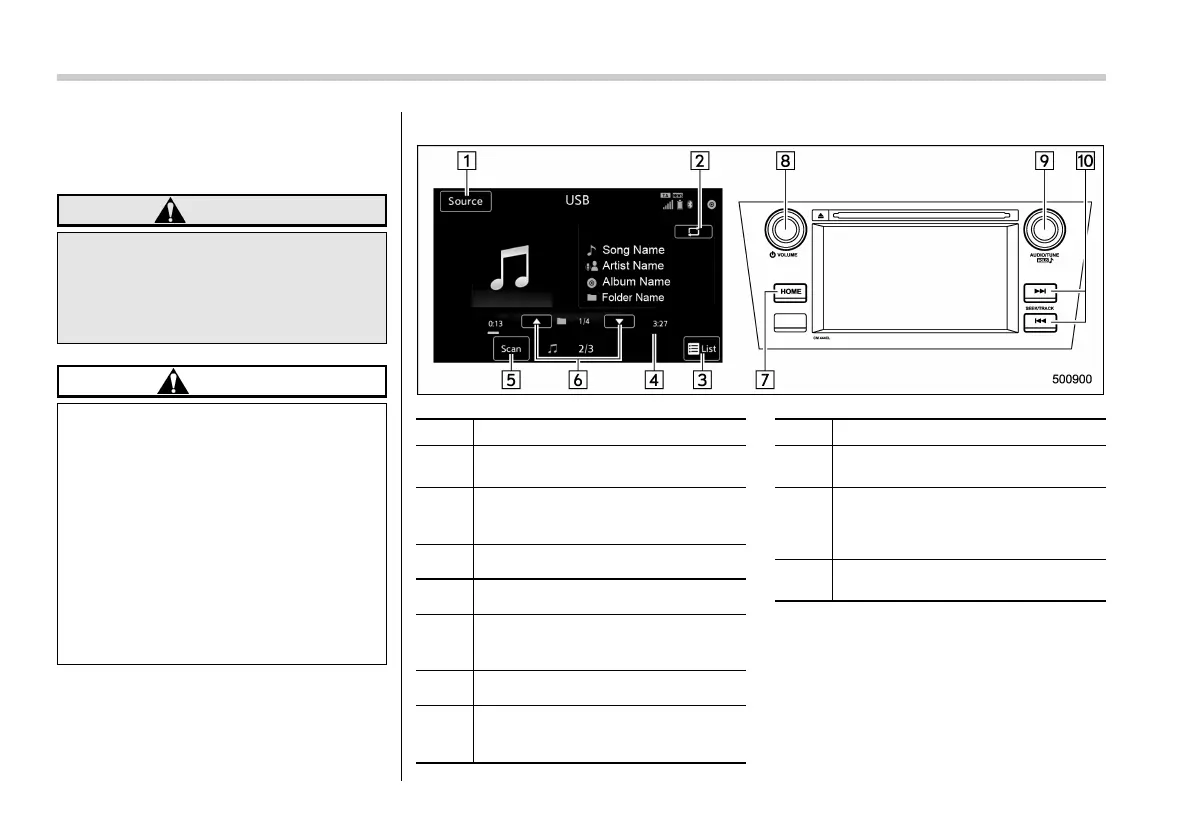
! Control screen and panel
No. Function
&
1
Select to display the audio source
selection screen.
&
2
Select to display the play mode
currently selected. Refer to “Select
play mode” F5-33.
&
3
Select to display Folders List.
&
4
Shows progress.
&
5
The tracks in the disc are played back
10 seconds each from the beginning
of the track.
&
6
Select to choose a folder.
&
7
Select to display the sound setting
screen. Refer to “Basic operation”
F5-16.
No. Function
&
8
Turn to adjust volume.
Press to turn the audio system on/off.
&
9
Turn to select a file/track.
Press to select an audio source.
Refer to “Selecting an audio source”
F5-17.
&
10
Press to select a file/track.
Press and hold to fast forward/rewind.
NOTE
If you press the mute switch on the
steering wheel during playback, the
audio will be muted. If you press the
mute switch once again, the volume
will return.














 To Next Page