Black plate (190,1)
一般Model "A2520GE-A" EDITED: 2015/ 10/ 22
3-38
Instruments and controls/Information display
Information display
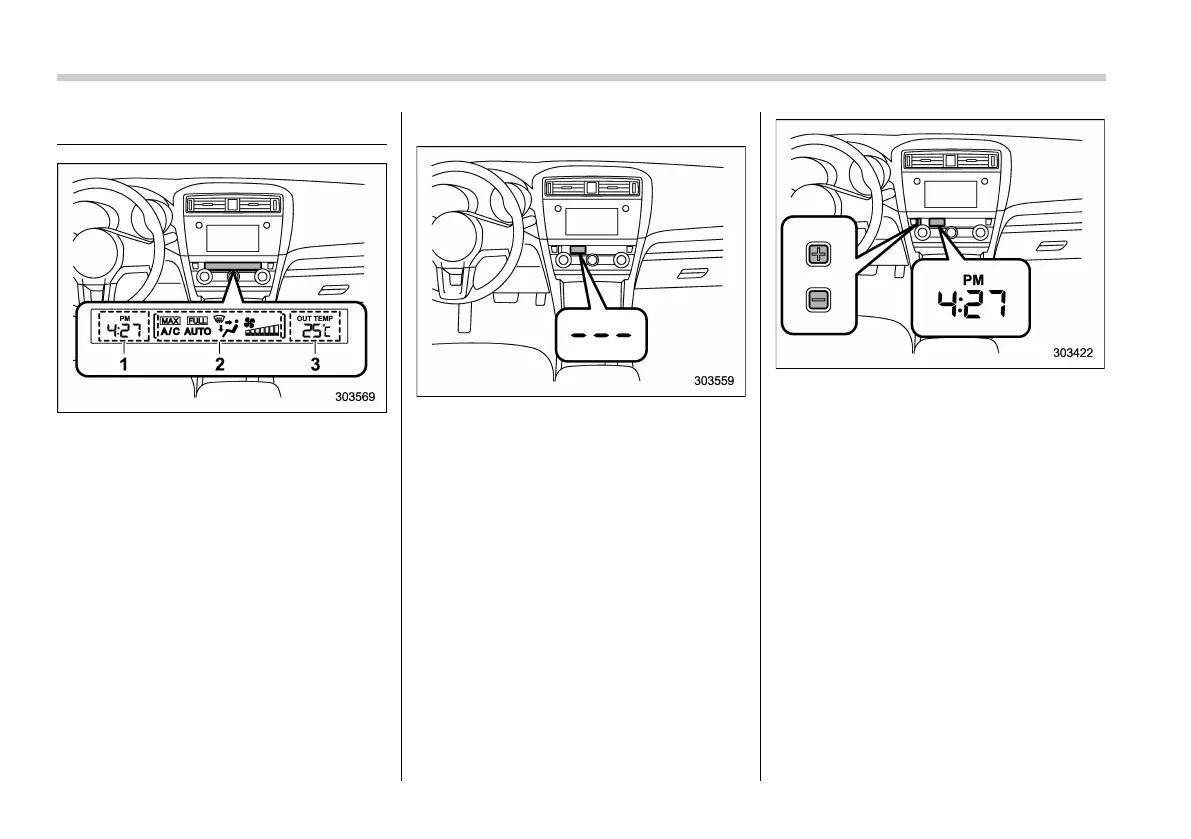
1) Clock
2) Climate control mode indicators
3) Outside temperature indicator
With the ignition switch in the “ON”
position, the following items are shown
on the information display.
. Clock
. Climate control mode indicators
. Outside temperature indicator
& Clock
NOTE
Your SUBARU dealer can change the
settings of activating/deactivating the
automatic adjustment of the clock by
the GPS (Global Positioning System)
(for models with the genuine SUBARU
navigation system). While the auto-
matic adjustment is activated, you
cannot adjust the time shown on the
clock manually. If you press the “+”
button or “-” button, the “--- ” indication
will be displayed to inform you that you
cannot adjust it manually. We recom-
mend that you contact your SUBARU
dealer for details.
The clock shows the time while the
ignition switch is in the “ACC” or “ON”
position.
To adjust the time shown by the clock,
press the “+” button or the “−” button. If
you press the “+” button, the indicated
time will change in one-minute incre-
ments. If you press the “−” button, the
indicated time will change in one-minute
decrements. If you keep the butto n
pressed, the rate at which the indicated
time changes will speed up.
The clock can be set to 12-hour or 24-hour
clock displa ys. Perform the following
procedure to switch the display format.
1. Turn the ignition switch to the “LOCK”/
“OFF” position.
2. Press and hold the “−” button that is














 To Next Page