Black plate (191,1)
一般Model "A2520GE-A" EDITED: 2015/ 10/ 22
located near the clock display. The clock
display will then start to flash for 5
seconds.
3. While the clock display is flashing,
press and hold the “+” button. The clock
format will then change.
4. The clock display will continue to flash
for approximately 3 seconds to inform you
that the clock display has been changed.
If you want to change the clock display
again, press and hold the “+” button while
the clock display is flashing.
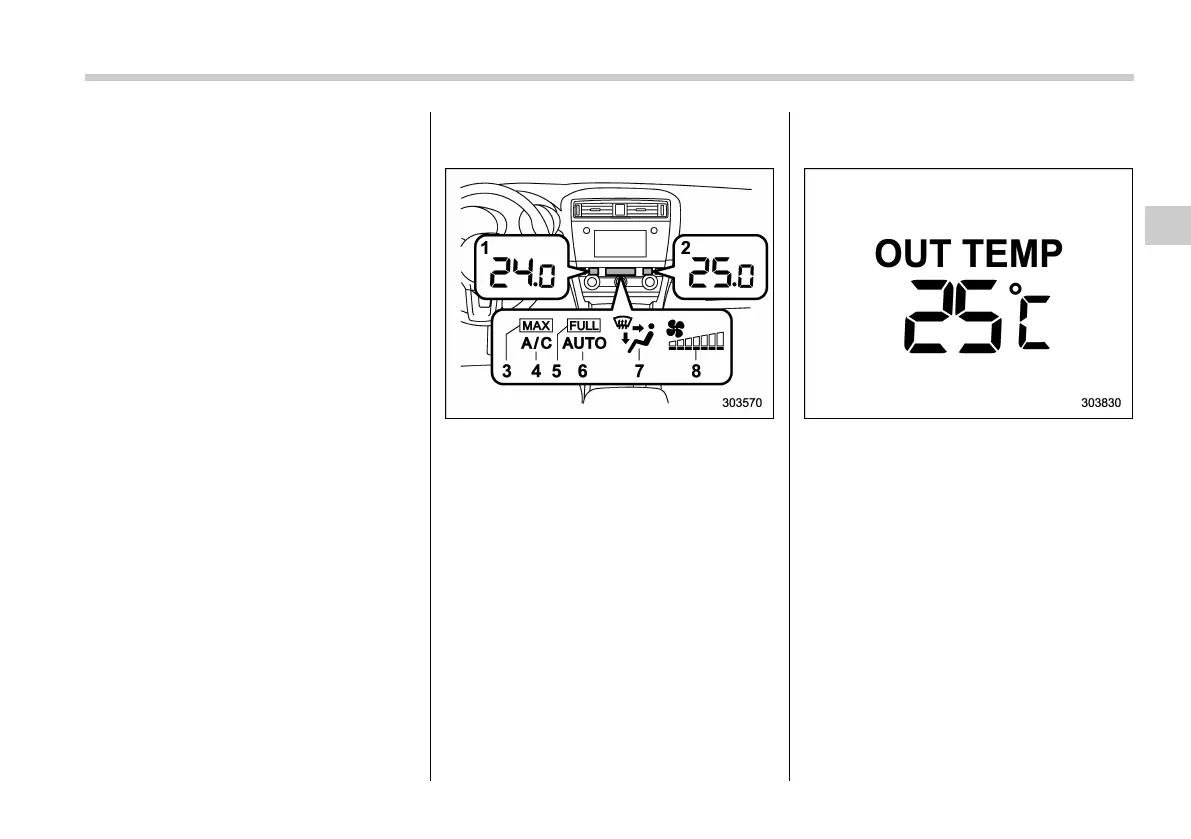
& Climate control mode indica-
tors
1) Set temperature indicator (left-hand side)
2) Set temperature indicator (right-hand
side)
3) Maximum air conditioner ON indicator
4) Air conditioner ON indicator
5) FULL AUTO indicator
6) AUTO indicator
7) Airflow mode indicator
8) Fan speed indicator
& Outside temperature indica-
tor
The outside temperature indicator shows
the outside temperature in a range from
−30 to 508C(−22 to 1228F).
The indicator can give a false reading
under any of the following conditions:
. When there is too much sun.
. During idli ng; while ru nning at low
speeds in a traffic jam; when the engine
is restarted immediately following a shut-
down.
. When the actual outside temperature
falls outside the specified indicator range.
Instruments and controls/Information display
3-39
3














 To Next Page