Black plate (247,1)
一般Model "A2520GE-A" EDITED: 2015/ 10/ 22
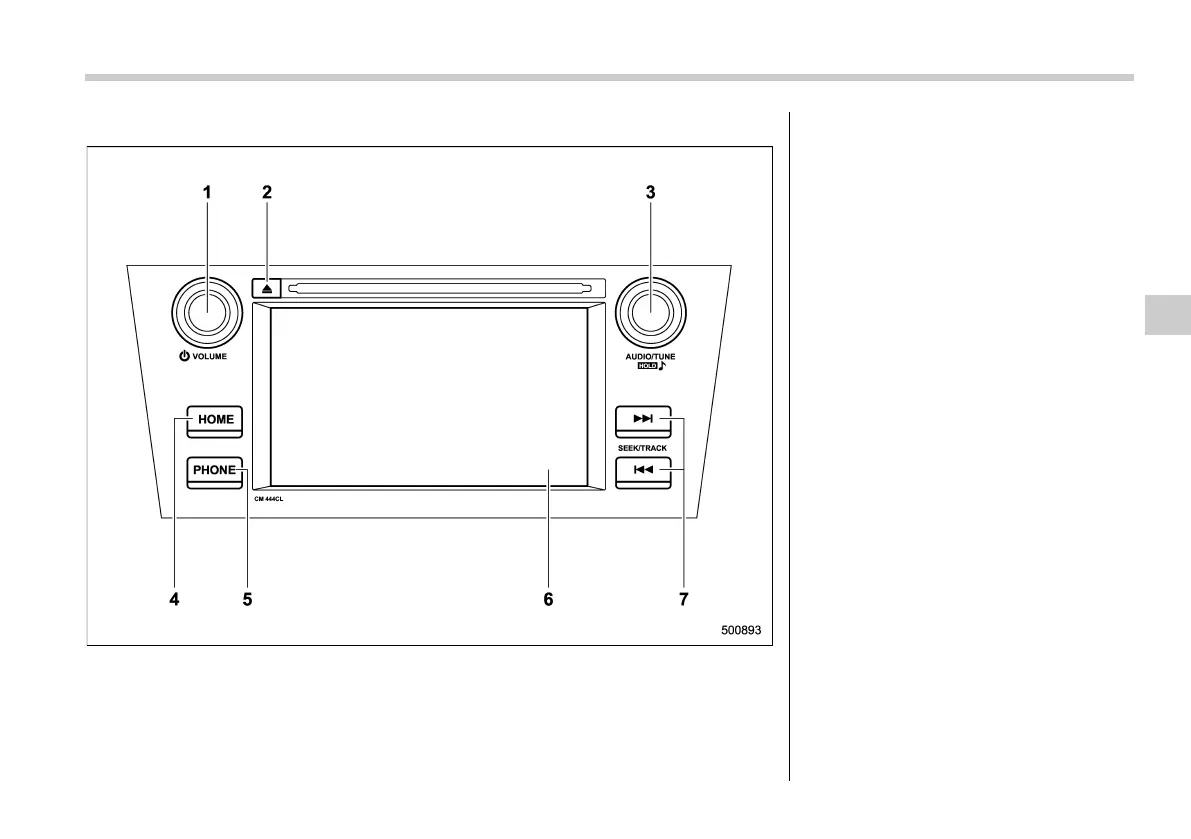
& Base display audio set (except for Europe)
1) Power/VOLUME knob
2) Eject button
3) AUDIO/TUNE knob
4) HOME button
5) PHONE button
6) Display
7) SEEK/TRACK buttons
The audio set will operate only when the
ignition switch is in the “ACC” or “ON”
position.
. Power and audio controls: refer to
“Basic operation” F5-16.
. Radio operation: refer to “AM/FM radio”
F5-27.
. CD (compact disc) player operation:
refer to “CD” F5-30.
. USB storage device: refer to “USB
memory” F5-32.
. iPod operation: refer to “iPod” F5-33.
. Bluetooth
®
audio: refer to “Bluetooth
audio” F5-35.
. Auxiliary input jack: refer to “AUX” F5-
38.
. Hands-fre e system: refer to “Voice
command system operation” F5-63.
NOTE
. The illustration on the left is a typical
example for left-hand drive models. For
right-hand drive models, some of the
switch locations are the opposite of
those shown in the illustration.
Audio/Audio set
5-5
– CONTINUED –
5














 To Next Page