Black plate (263,1)
一般Model "A2520GE-A" EDITED: 2015/ 10/ 22
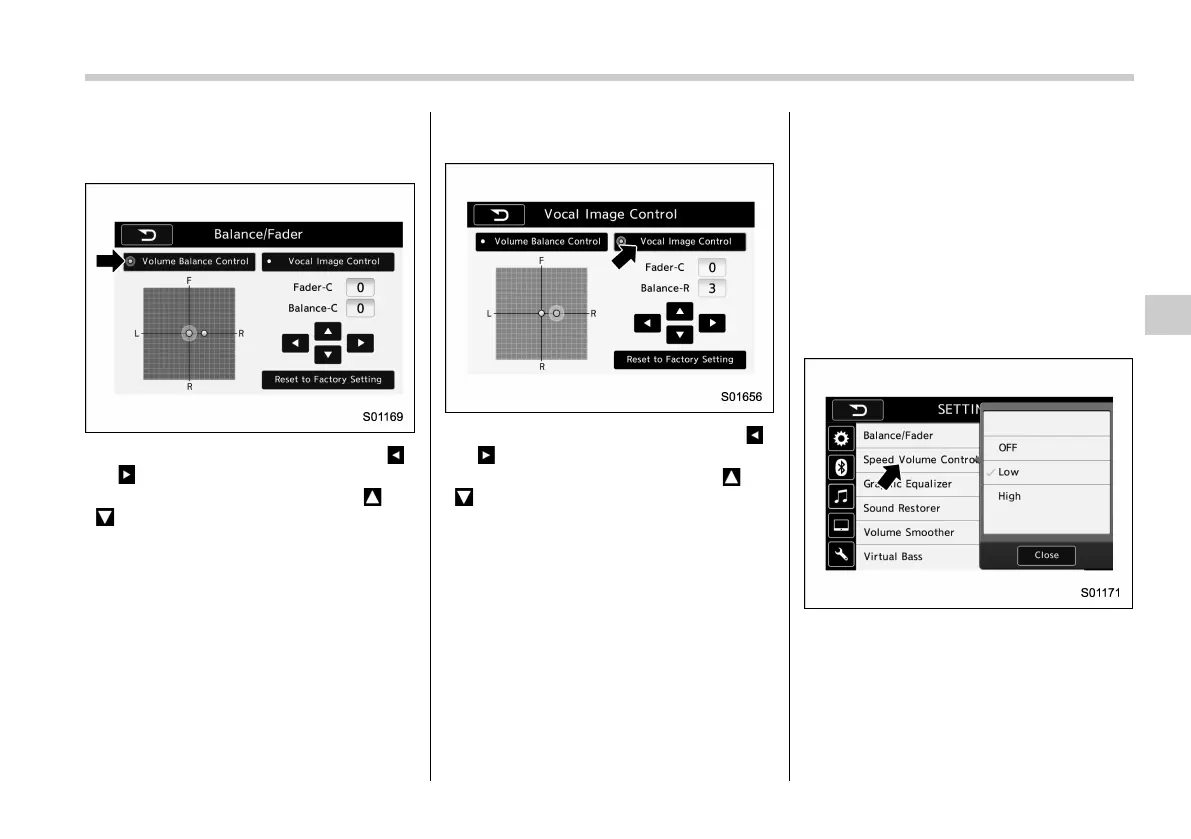
. Volume Balance setting
1. Select the “Volume Balance Control”
key.
2. Adjust the balance by pressing “ ”
or “
” key.
3. Adjust the fader by pressing “
” or
“
” key.
. Vocal image setting
1. Select the “Vocal Image Control” key.
2. Adjust the balance by pressing “ ”
or “
” key.
3. Adjust the fader by pressing “
” or
“
” key.
! “Speed Volume Control”
The system adjusts to the optimum
volume and tone quality according to
vehicle speed to compensate for in-
creased vehicle noise.
1. Touch the right side key of the “Speed
Volume Control” key.
2. Select the desired item. The “High”
key comes to have a bigger effect. When
the “OFF” key is selected, the speed
volume control function is cancelled.
Audio/Audio set
5-21
– CONTINUED –
5














 To Next Page