Black plate (291,1)
一般Model "A2520GE-A" EDITED: 2015/ 10/ 22
– The roof or windows are open.
– The air conditioning vents are
pointed towards the microphone.
– The sound of the air conditioning
fan is loud.
– Thereisanegativeeffecton
sound quality due to the phone
and/or network being used.
. When another phone is connected,
the following registered data cannot be
read:
– Contact data
– Call history data
– All phone settings
. When selling or disposing of the
vehicle, initialize the data. Refer to
“Unit settings” F5-18.
. Once initialized, the data and set-
tings will be erased. Take extra caution
when initializing the data.
. The voice command system sup-
ports phone commands, so dialing a
phone number usin g your voi ce is
possible. Refer to “ Voice command
system operation” F5-63.
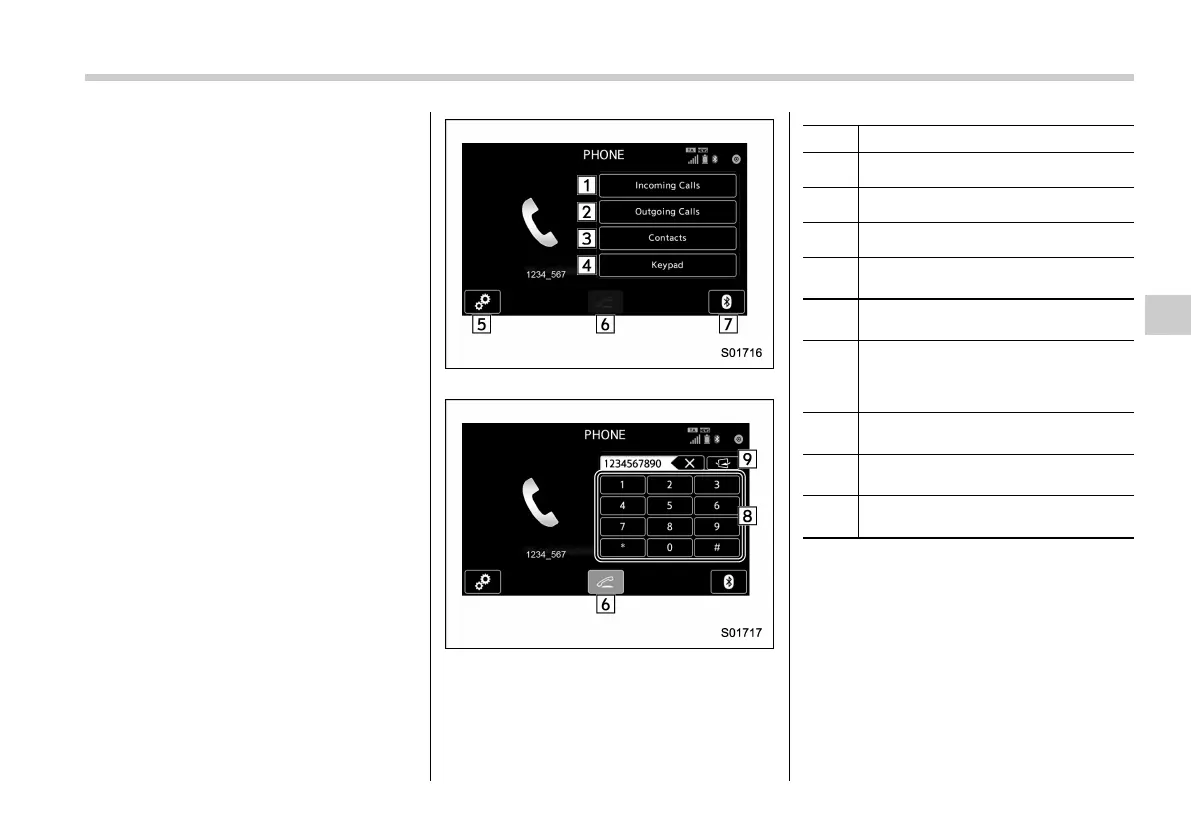
Phone (Menu) screen
Phone (Dialpad) screen
No. Function
&
1
Open the Incoming Calls screen.
&
2
Open the Outgoing Calls screen.
&
3
Open the Contacts screen.
&
4
Changes the screen from the Menu
screen to the Dialpad screen.
&
5
Open the phone volume setting
screen.
&
6
Use to make a phone call. You cannot
press this key until you open the
Dialpad screen and enter a phone
number.
&
7
Open the BT Devices Connection
screen.
&
8
Enter the phone number that you
want to call.
&
9
Switch the screen to the Phone
(Menu) screen.
NOTE
When the cell phone is not registered
and the Bluetooth setting is off, a
message is displayed instead of menu
items.
Audio/Phone operation (Hands–free system for cellular phones)
5-49
– CONTINUED –
5














 To Next Page