12 Software description
78 CyFlow
®
Cube 8 | Operating Manual | May 2018 | Revision 032
The "Displayed Label" column displays the name as selected in the
"Display Name" column. In the "Displayed Label" column, you can also
enter a custom label for the parameter. The default used for the custom
name is the Stain name ($PnS). The custom name has to be unique. It
cannot start with a space, and it has to be a minimum of 1 character and
can be a maximum of 50 characters.
The Customize tab contains the following buttons:
Select All: Click the button to select all parameters.
Select None: Click the button to de-select all parameters.
Default Names: Click the button to reset the display names for all
parameters to Stain.
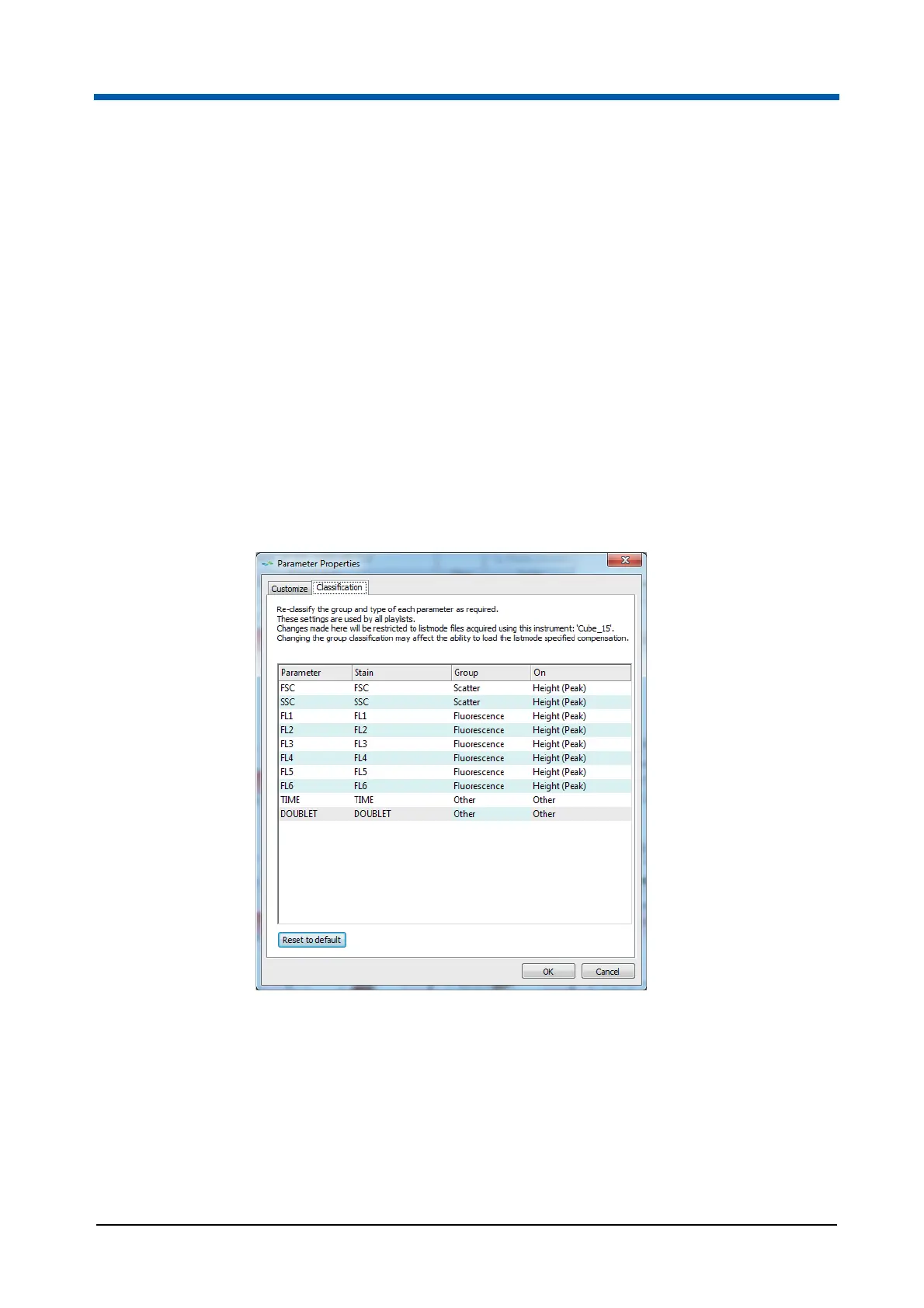
On the Classification tab of the Parameter Properties dialogue, you can
re-classify the group and type of a parameter. This classification is based on
cytometer type. Modifications made here will be stored for future use of files
from that cytometer type.
The Classification tab contains the following columns:
The "Parameter" column displays the parameter name for each of the
parameters available in the currently loaded listmode file.
The "Stain" column displays the stain name for each parameter.
The "Group" column allows you to select whether the parameter belongs
in the Scatter, Fluorescence or Other group. Double-click in the cell or
press F2 to open a drop-down list and select the desired group for the
parameter.



 To Next Page