9-4 4157082 First Edition
MISCELLANEOUS
9
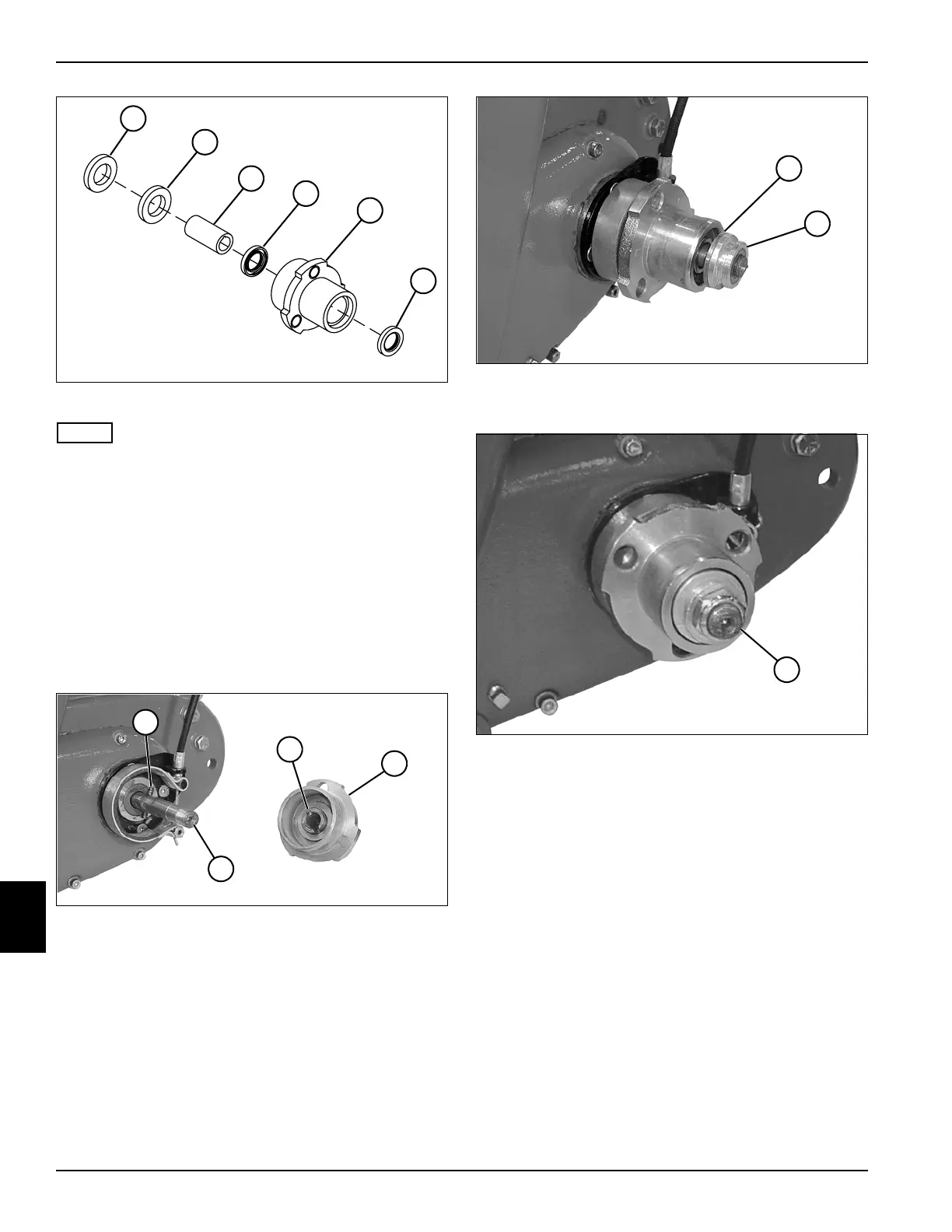
Figure 9-8
NOTE
Always use new seals.
3. Apply a thin film of lithium grease NLGI Grade 2 to
the lips of the seals (8).
4. Using a seal driver, install seals (8) in the wheel hub
(9).
5. Install clutch sleeve (7) into seals (8) and bearing (2).
6. Install bushing (6) and washer (5) over the clutch
sleeve (7).
Installation
See Figures 9-9 through 9-11.
Figure 9-9
1. Align the groove (2) in the hub (3) with the pin (1) in
the transport roller shaft (4), and install the hub
assembly on the shaft.
Figure 9-10
2. Install bushing (5) and latching collar (6).
Figure 9-11
3. Install a new lock nut (7) on the transport roller shaft.
4. Install the transport wheels (if equipped). (See
“Transport Wheels (Optional)” on page 9-2.)
Kickstand
Removal and Installation
See Figures 9-12 and 9-13.
1. Park the mower safely. (See “Park Mower Safely” on
page 1-6.)
2. Retract the kickstand and allow the mower to rest on
the traction roller or transport wheels.
5
TN0056
6
7
8
9
8
1
TN0052
2
4
3
TN0051
5
6
7
TN0132








 To Next Page