ArcLight Hub User’s Guide
Screen Descriptions for NMS Client
Rev. 001 1081006 3-23
3.3.2.2 Edit…
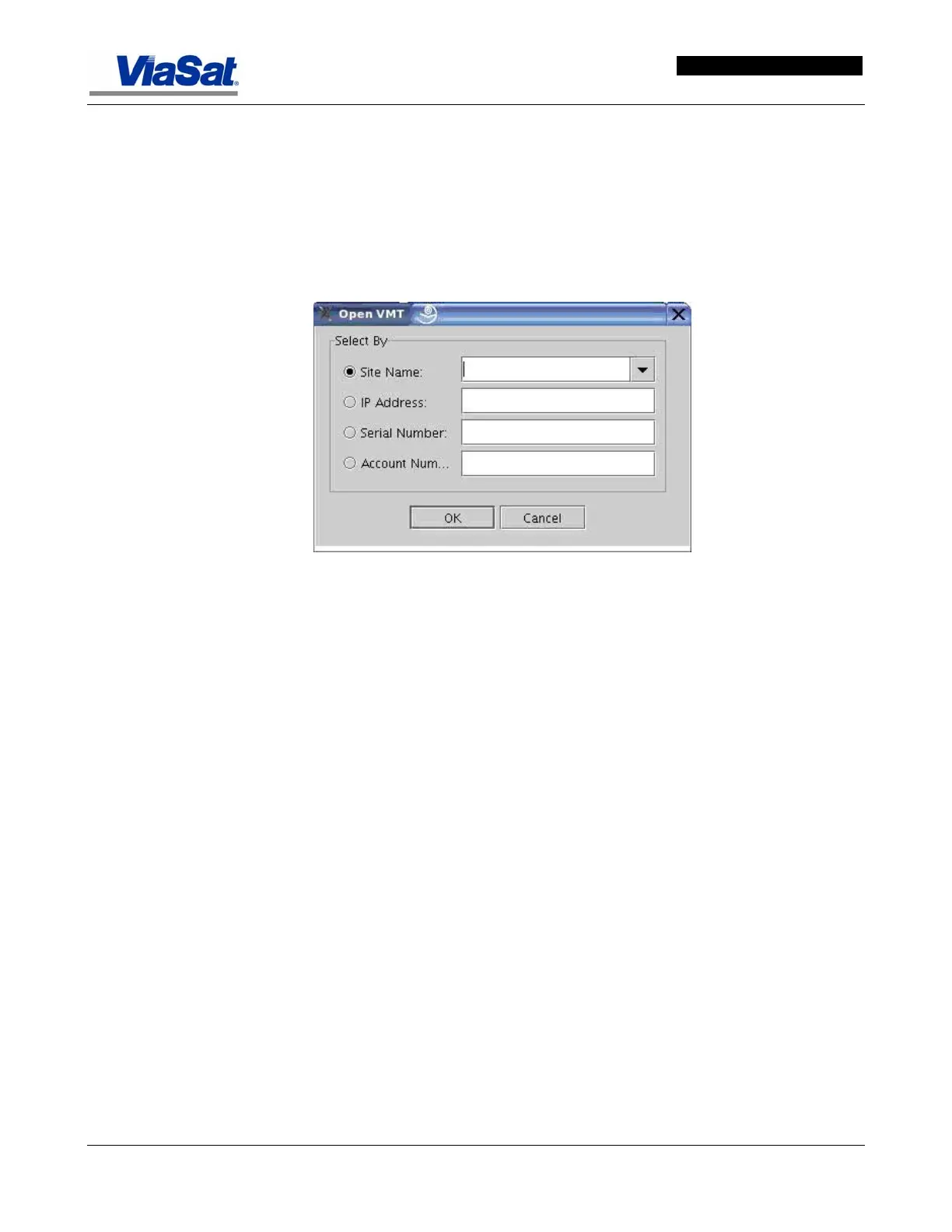
This screen is used to edit a VMT in the ArcLight network. Click on
VMTs on the main menu bar and select Edit… to display the Open
VMT screen shown in
Figure 3-17
The Open VMT screen is used to access information about a particular
VMT. Click on VMTs on the main menu bar, and select, Open… to
display the Open VMT Screen.
Figure 3-17. Open VMT Screen.
The Open VMT screen is used to identify the specific VMT the user
wants to investigate. It provides several alternatives for accessing the
desired VMT. Click on the radio button corresponding to the type of
identification for the VMT to access.
Site Name – Click on the Site Name radio button, and then click the
down arrow in the combo box to select the name of the VMT the user
wants to access. All VMTs in the system will be listed in the combo box
menu.
IP Address – Click on the IP Address radio button, and then enter the
IP Address for the VMT to access. Enter the IP Address in dotted-
decimal notation.
Serial Number – Click on the Serial Number radio button, and then
type the serial number in the field provided.
Account Number – Click on the Account Number radio button, and
then type the account number in the field provided.
After selecting and completing the field for one of the four selection
methods, then click OK. This will display the VMT Configuration
screen for the VMT just identified in the Open VMT window.



 To Next Page