To
set the clock
1. Tum the key to "ON
".
2. Push t
he
"SELECT" button and "RESET' but-
ton together f
or
at least two seconds.
3. When the hour digi
ts
sta
rt
flash
in
g, push the
"RE
SET
' button to set the hour
s.
4.
Push the "
SELECT
' button, and the minute
digits w
ill
start flas
hi
ng.
5. Push the "R
ESET
' button to set the m
in
utes.
6. Push the "SELECT" button and then release
it to start the clock.
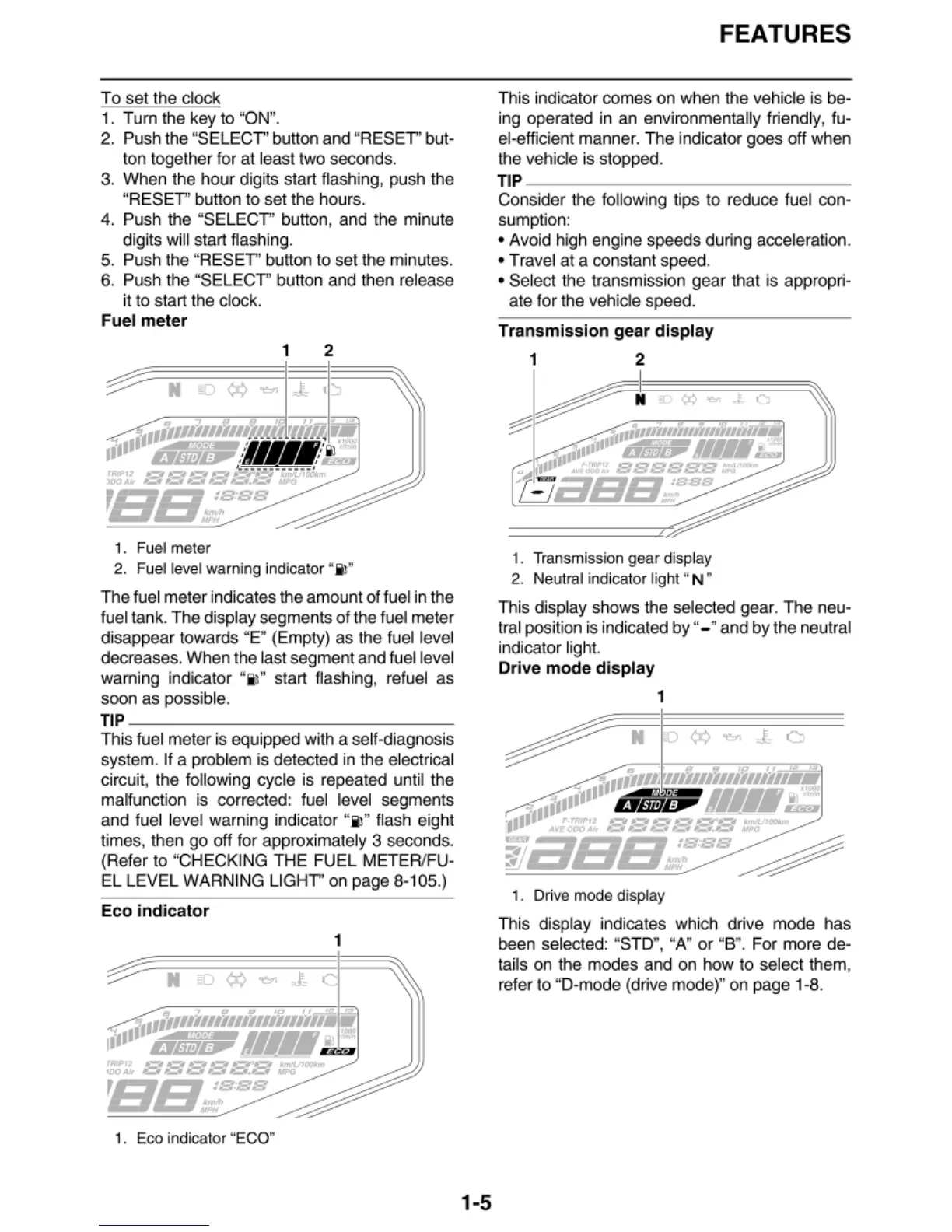
Fuel
meter
1 2
1.
Fu
el
meter
2. F
ue
l l
eve
l
warn
ing
in
dicat
or
"
il
"
The fuel meter indicates the amount of fuel
in
t
he
fuel tank. The display segments of the fuel meter
disappear t
owa
rds "E" (Empty)
as
the fuel level
decreases. When the last segment and fuel level
wa
rn
ing indicat
or
"i l" start flas
hi
ng,
re
fuel
as
soon as possible.
TIP
~~~~~~~~~~~~~~
This fuel meter is
eq
uipped with a self-diagnosis
system. If a problem is detected in the electrical
circui
t,
the foll
ow
ing cycle is repeated until the
ma
lfunction is
co
rre
ct
ed: fuel level segments
and fuel level warning indicator "
il
" flash eight
times, then go off for appr
ox
imately 3 seconds.
(Refer to "CHECKING THE FUEL MET
ER
/FU-
EL LEVEL WARNING LIGHT" on page 8
-1
05.)
Eco
indicator
1
1.
Eco
in
di
ca
tor "
ECO
"
1-5
FEATURES
T
hi
s indicator comes on when the vehicle is be-
in
g operated in an environmentally friendl
y,
fu-
el-efficient manner. The indicator goes off when
the vehicle is stopped.
TIP
~~~~~~~~~~~~~~
Consider t
he
fo
ll
owing tips to reduce fuel con-
sumption:
•
Av
oid high engine speeds during acceleration.
• Travel at a const
an
t speed.
• Select the transmission gear that is appropri-
ate for the vehicle speed.
Tran
s
mission
gear
disp
l
ay
1 2
~
~
(x)~.0
~~
'"
...
"
:::::---
,,,111111111111111111111n.111
•"'''
___._,Jl
•••••
"
11
111
BDN/I1fl"'
tr••••~
0
f•IJll
,
~
-~
SSEIBBB
...
'
-
~
ass;~se
1.
Tra
nsmission gear di
sp
l
ay
2.
Ne
utral indicator
li
gh
t "N •
T
hi
s display shows t
he
se
le
cted gear. The neu-
tr
al
position is indicated by " - • and
by
the neutral
in
dicat
or
ligh
t.
Drive
mode
d
isplay
1
1 . Dri
ve
mo
de displ
ay
This display
in
dicates which drive mode has
been
se
l
ec
ted: "S
TD
",
"A" or "B". For more de-
tails on the modes and on how to select them,
refer to "D-mode (drive mode)" on page 1-8.


 To Next Page