Mult
i-
fun
ct
io
n d
is
play
1
,,,;,111i111'i1.
111J'i11iil1••
.
111
111il
111
idiYZP
Wiii
k;.
11
11•
""
..
.-.
000
.;;if
&J
....,,
¥jaEIEl
~
;:ss
1.
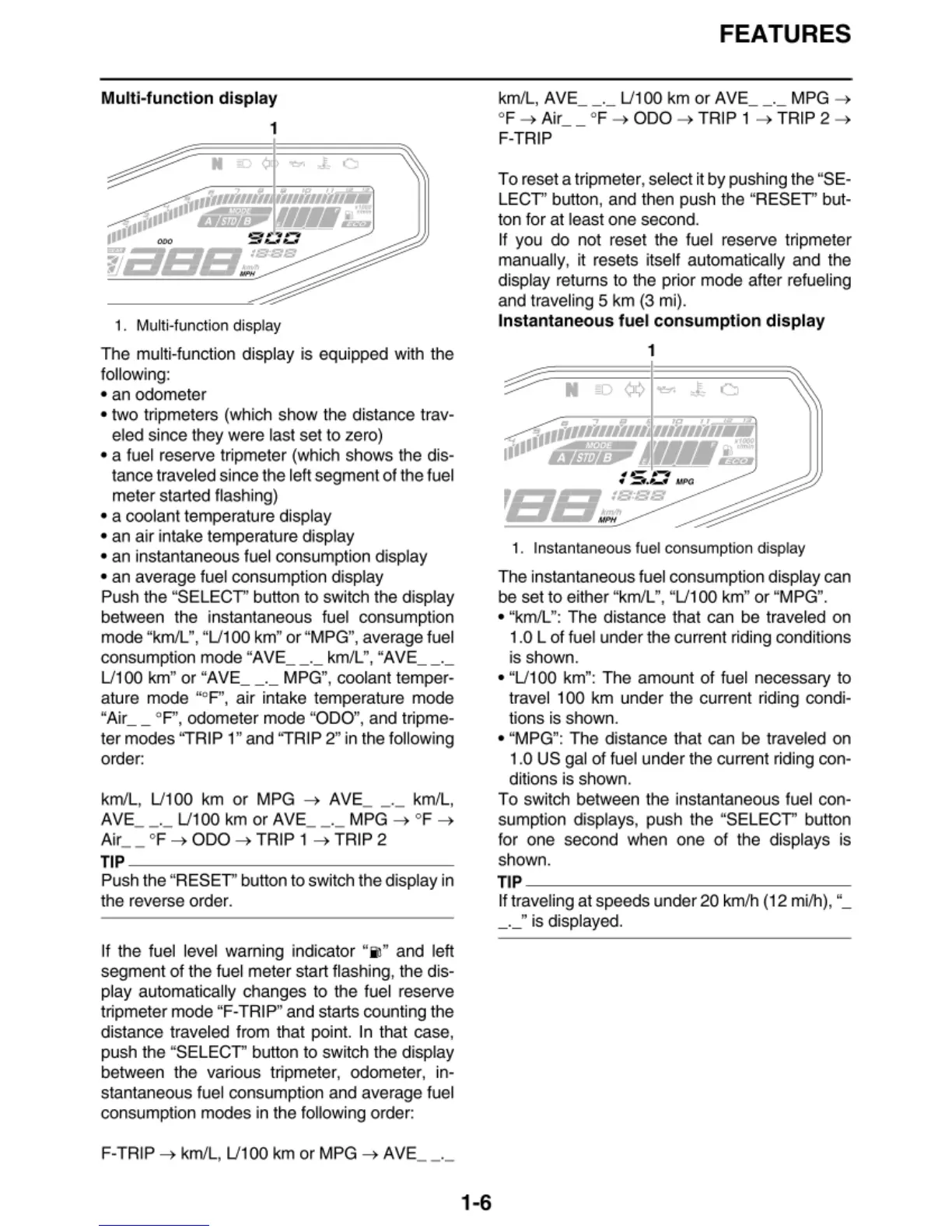
Mu
lti-funct
ion
display
T
he
multi-function displ
ay
is equipped wi
th
the
fo
ll
owi
ng
:
• an odometer
• two tripmete
rs
(w
hich show the distance
tr
av-
eled since they were last set
to
zero)
• a fuel reserve tripmeter (which shows the dis-
tance traveled since the left segment
of
t
he
fuel
meter started flash
in
g)
• a coolant temperature displ
ay
• an air intake temperatu
re
display
• an instantaneous fuel consumption display
• an average fuel consumption display
Push the "SELECT" button to switch the display
between the instantaneous fuel consumpti
on
mode
"k
m/L",
"U
100 km" or "MPG", average fuel
consumption mode "AVE
__
._ km
/L
",
"AVE
__
._
U100 km" or "AVE
__
._ MPG
",
coolant temper-
ature mode "°F
",
air intake temperature mode
"Air
__
0
P', odometer mode "ODO", and tripme-
ter modes "TRIP 1" and "TRIP 2"
in
the fo
ll
owing
orde
r:
km/L,
U100
km or MPG
-+
AVE_ - ·- km/L,
AVE
__
._
U100
km or AVE
__
._ MPG
-+
°F
-+
A
ir
__
°F-+
ODO
-+TRIP
1
-+
TRIP 2
TIP
---------------
Push the "RESET'' button to switch the display in
the reverse order.
If the fuel level warning indicat
or
"iil" and left
segment
of
t
he
fuel met
er
start fl
as
hin
g,
the dis-
play automatica
ll
y changes to the fuel reserve
tripmeter mode "F-TRIP" and sta
rt
s counting t
he
distance traveled from that poin
t.
In that case,
push the "SELECT" button to switch the di
sp
lay
between the va
ri
ous tripmeter, odometer, in-
stantan
eo
us fuel consumption and average fuel
consumption modes in the following order:
F-TRI
P-+
km/
L,
U10
0 km
or
M
PG-+
AVE
__
._
1-6
FEATURES
km/L, AVE
__
._
U100
km or AVE
__
._
M
PG
-+
°F
-+
Air
__
°F
-+
ODO
-+
TRIP 1
-+
TRIP 2
-+
F-TRIP
To
reset a tripmeter, select it
by
pushing the "SE-
LECT'' button, and then push the "RESET'' but-
t
on
for at
le
ast one secon
d.
If you
do
not reset the fuel reserve tripmeter
manually, it resets itself automatica
ll
y and the
di
sp
l
ay
retu
rn
s to the p
ri
or
mode after refue
li
ng
and trave
li
ng
5 km
(3
mi).
Insta
ntaneo
us
fue
l c
on
s
umpt
i
on
di
s
pl
ay
1
~,.,,,,,,,,7,,,1,,,J
11ii11ii11llli
11
111
ti1il;>;;
A'
Wll
li:!
·s·--
•
-
~
lalP(;
'E/B~sss
1. Instantaneous
fuel
consumpt
ion
d
isplay
The instantaneous fuel consumpti
on
di
sp
l
ay
can
be set to either "km/L", "
U100
km"
or
"MPG".
• "km/L": The distance that can be traveled
on
1.0 L of fuel under the current rid
in
g conditions
is shown.
• "U 100 km": The amount of f
ue
l necessary to
t
ra
vel 100 km under the current
ri
ding condi-
t
io
ns is shown.
• "MPG": The distance that can be traveled on
1.0 US
ga
l of fuel under the current rid
in
g con-
ditions is shown.
To
sw
itch between the instantaneous fuel con-
sumption displays, push the "SELECT'' button
f
or
one second when one of the di
sp
lays is
shown.
TI
P
---------------
lf traveling at speeds under 20 km/h (12 mi/h
),
"_
_._" is displayed.


 To Next Page