Product Manual - ZMORPH FAB back to table of content
>>
104
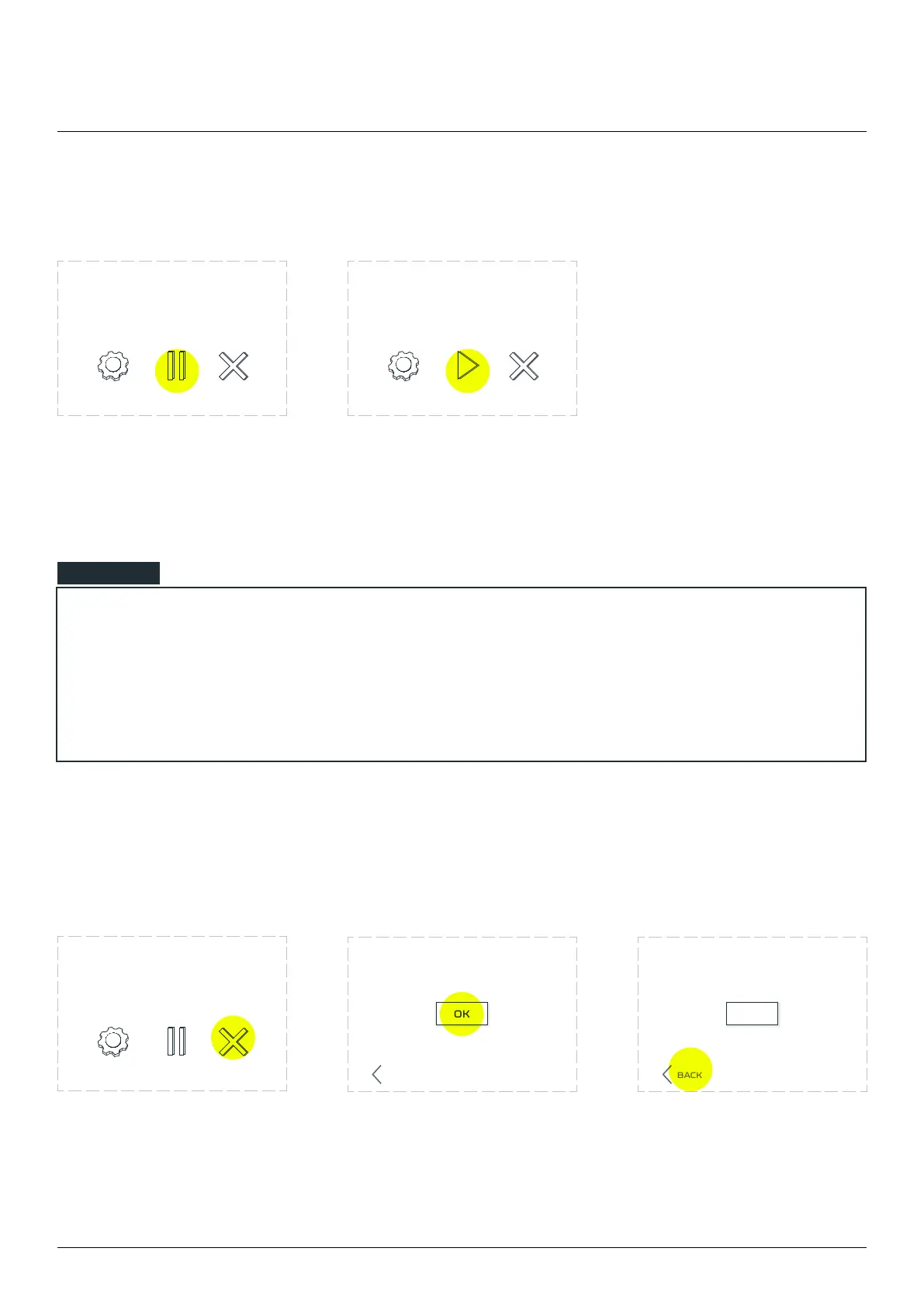
While the machine is running,
press the ‘PAUSE’ button on
the screen to stop printing.
Choose ‘PLAY’ to continue
printing. The printer will
resume the printout exactly
where it was stopped.
12.14 Pause and resume printing
12.15 Abo Printing
NOTE
If the Pause was long, the heat from the nozzle might have melted a small portion of the printed
model or the spilling material from the nozzle may have settled at the nozzle stopping place.
Pause mode has no time limit. During its duration, the extruder maintains the same temperature all
3D printing workow
To stop the print choose
‘ABORT’
The printer will ask you to
abort the printing process. To
do so, choose ‘OK’.
If you do not want to abort the
printing choose ‘BACK’.
OK
BACK
OK
BACK
ABORTSETTINGS ABORTSETTINGS PLAY
example.gcode
progress 20% 0h34m elapsed
example.gcode
progress 20% 0h34m elapsed
ABORTSETTINGS
example.gcode
progress 20% 0h34m elapsed
Are you sure
you want to abo
Are you sure
you want to abo



 To Next Page