Product Manual - ZMORPH FAB back to table of content
>>
124
CNC milling workow
13.6 CNC milling le staing (with calibration)
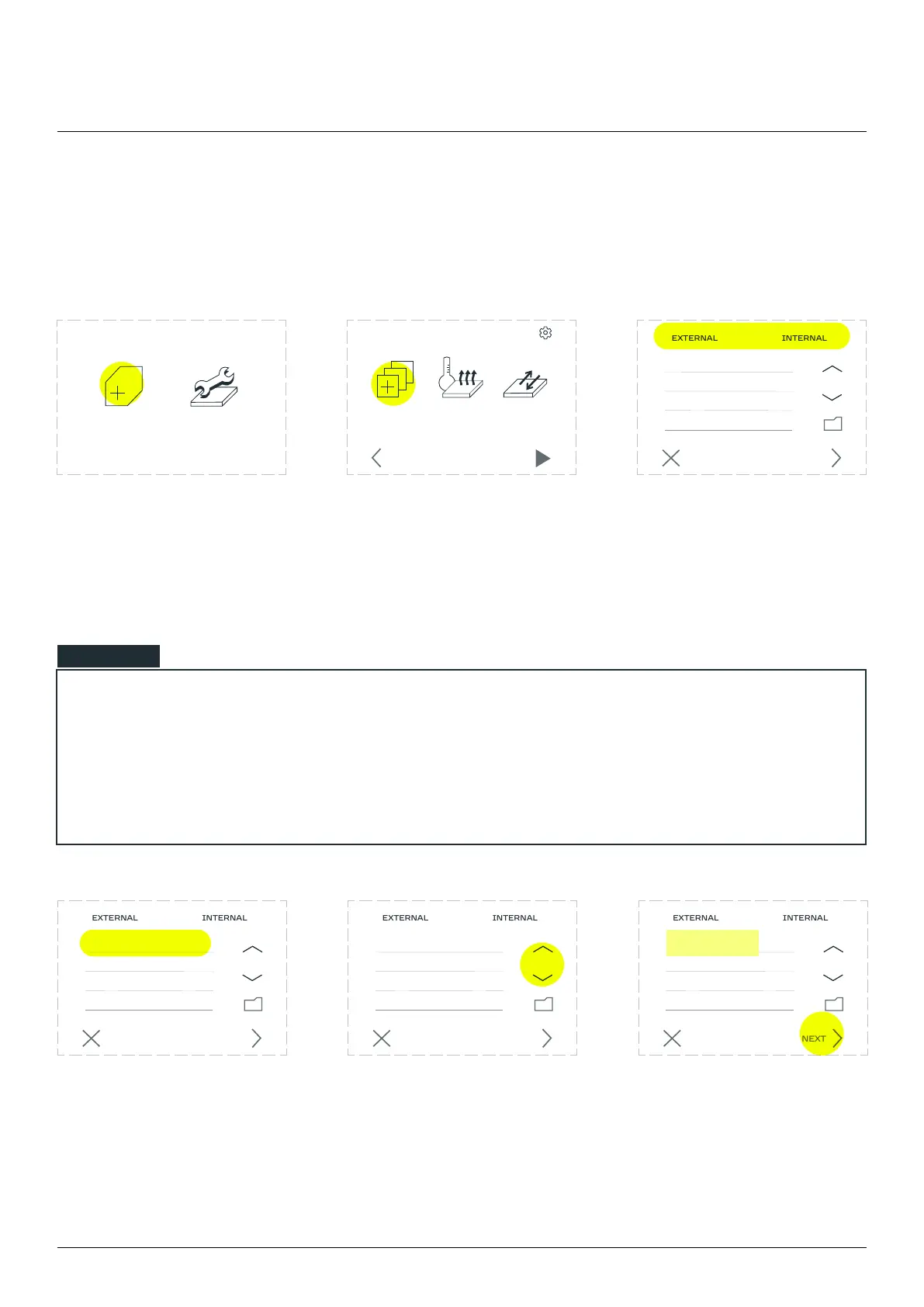
Enter the ‘NEW JOB’ menu. Go to the ‘CHOOSE FILE’
section.
Files uploaded to the internal
SD card are located in the
to the SD card are located in
the ‘EXTERNAL’ tab.
Select the prepared G-code
is not visible on the list
press the up/down arrow
buttons to navigate through
Exiting the folder is done by
selecting the folder icon.
NOTE
If the user inserted the external SD card the screen should jump forward to the ‘CHOOSE FILE’
section screen on the ‘EXTERNAL’ directory.
NEW JOB’ menu the screen will go
directly to the ‘CHOOSE FILE’ section.
NEW JOB MAINTENANCE
CANCEL NEXT
CHOOSE
FILE
PREHEAT
PRINTER
MOVE
BED
SETTINGS
STARTBACK
CANCEL NEXT
CANCEL NEXT
CANCEL NEXT
example.gcode
example.gcode example.gcode
example.gcode



 To Next Page