Product Manual - ZMORPH FAB back to table of content
>>
65
3D printing workow
12.6 Automatic detection of missing lament
a new one, the print will be resumed from the paused moment.
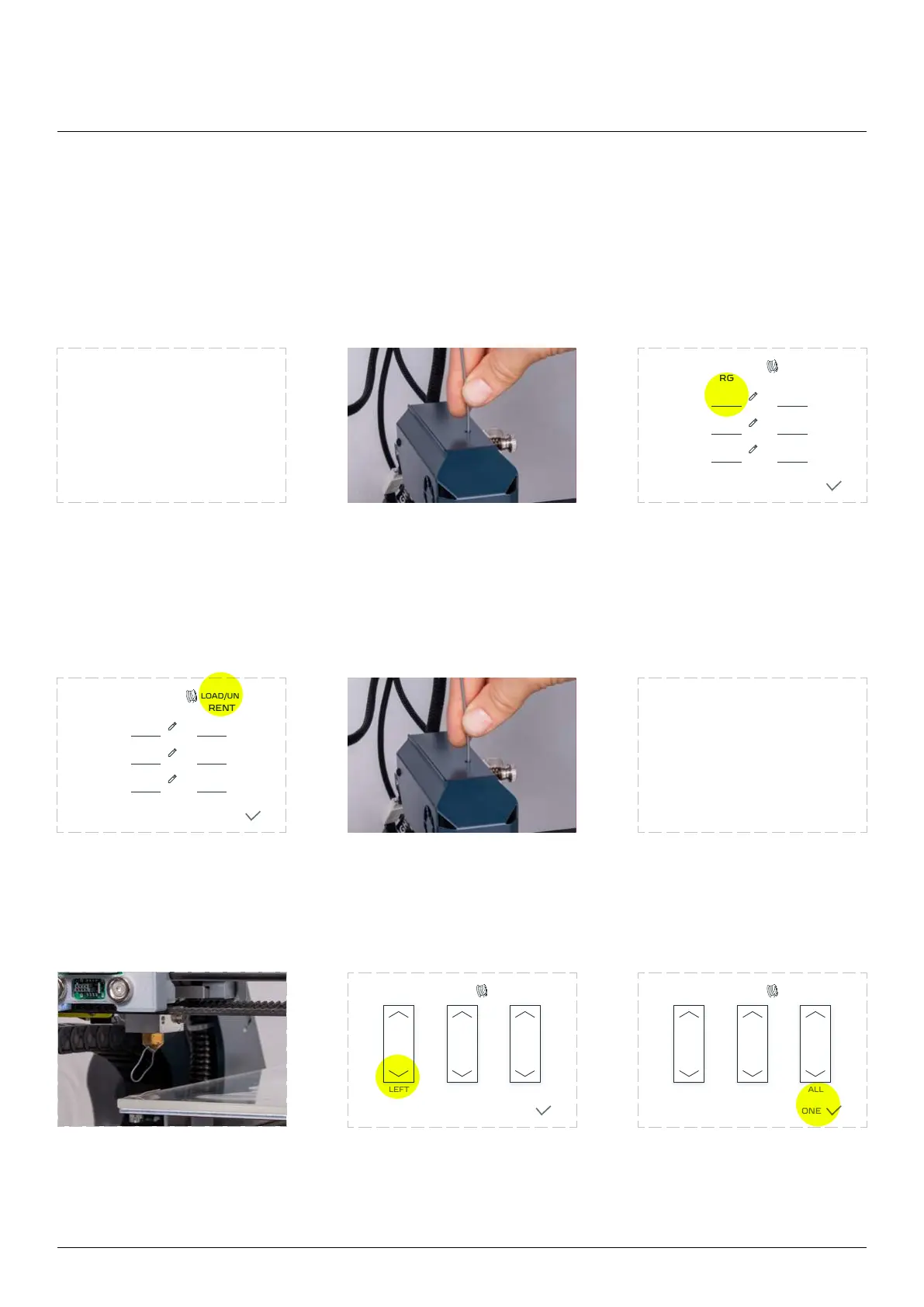
When the extruder runs out
the Zmorph Fab automatically
procedure.
Remove the leftover material. The extruder will cool down
automatically. Set the correct
extruder temperature and go
to the ‘LOAD/UNLOAD’ menu.
Tap the ‘LOAD/UNLOAD’ menu
and wait until the extruder
reach the proper temperature.
into the guide.
The extruder will
automatically start feeding
out of the nozzle.
Tap the feed button if
necessary
Remove the extruded
material. Click ‘DONE’, the
extruder will continue to work
from where it stopped.
LOAD/UNLOADTEMPERATURES
DONE
TARGET
LEFT
RIGHT
BED
CURRENT
LOAD/UNLOAD
LEFT RIGHT ALL
TEMPERATURES
DONE
LOAD/UNLOADTEMPERATURES
DONE
TARGET
LEFT
RIGHT
BED
CURRENT
LOAD/UNLOAD
LEFT RIGHT ALL
TEMPERATURES
DONE
The material is runnig out.
Preparing for lament change
Please remove leover material
Please wait,
loading material
23



 To Next Page