Product Manual - ZMORPH FAB back to table of content
>>
57
3D printing workow
you feel it has been grabbed
by the extruder drive gear.
out of the nozzle. Tap the
feed button again
if necessary
12.4 Removing the lament
Single Extruder Toolhead 1.75
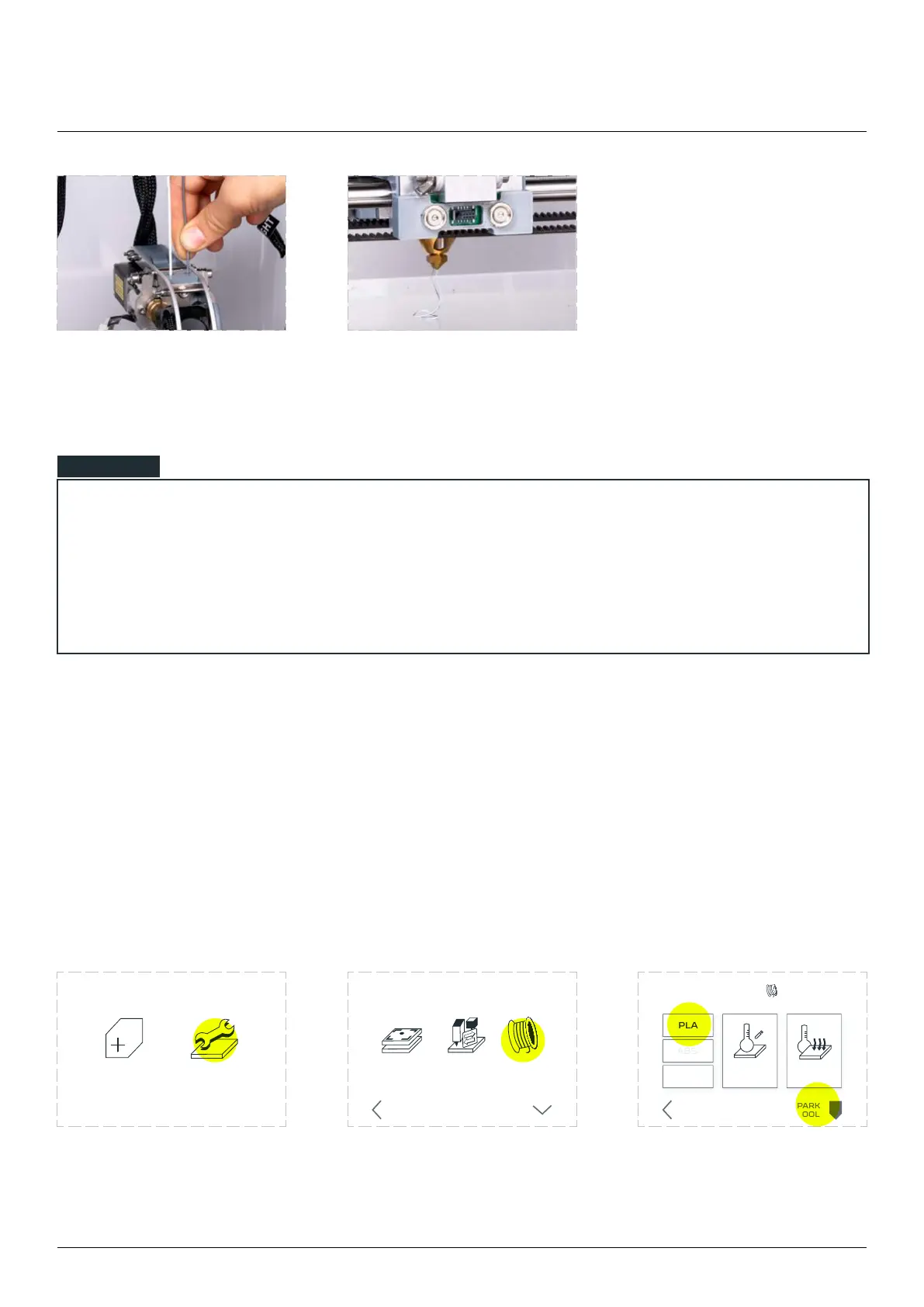
To preheat the extruder, follow these steps
Choose the ‘MAINTENANCE’
from the LCD touchscreen
menu.
Choose ‘LOAD FILAMENT’. Choose ‘PARK TOOL’, wait for
the machine to position the
toolhead. When done, choose
‘PLA’ to preheat the material.
NOTE
NEW JOB MAINTENANCE
LOAD
FILAMENT
CHANGE
TOOL
CALIBRATE
3D PRINTING
BACK MORE
LOAD/UNLOAD
CUSTOM
TEMPERATURE
COOL
DOWN
TEMPERATURES
PARK
TOOL
BACK



 To Next Page