Product Manual - ZMORPH FAB back to table of content
>>
56
3D printing workow
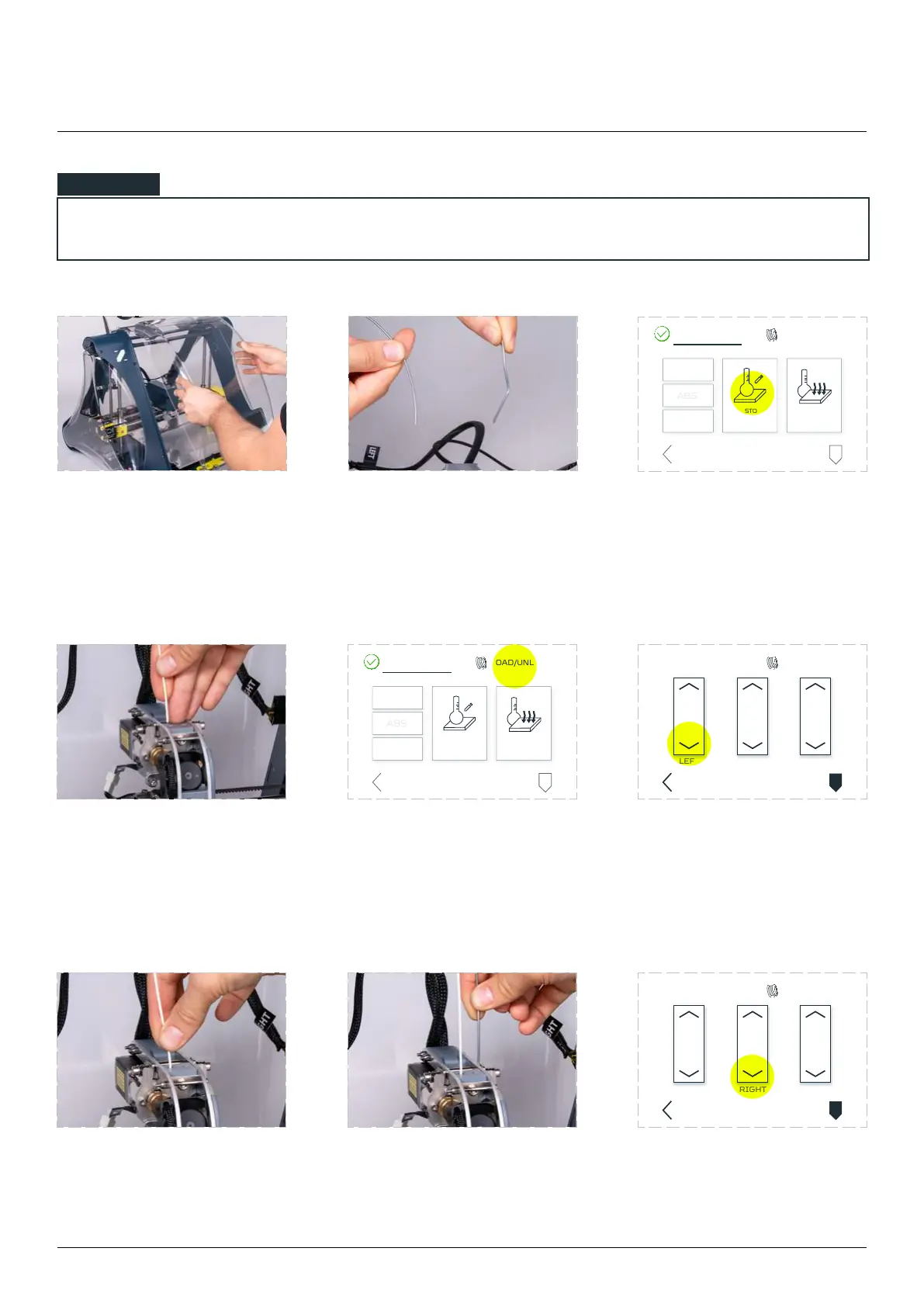
up or cut its end
Wait till extruder reaches the
proper temperature. The yellow
‘TEMPERATURES’ sign will change
colour from yellow to green.
left side guide hole on top of
the extruder.
Tap the ‘LOAD/UNLOAD’
menu.
Tap the bottom arrow on the
with LEFT description to do that.
until you feel it has been
grabbed by the extruder
drive gear.
into the right side
guide hole on top of the
extruder.
Tap the bottom arrow on the
RIGHT description to do that
LOAD/UNLOAD
PARK
TOOL
CUSTOM
TEMPERATURE
COOL
DOWN
TEMPERATURES
BACK
LOAD/UNLOAD
PARK
TOOL
CUSTOM
TEMPERATURE
COOL
DOWN
TEMPERATURES
BACK
LEFT RIGHT ALL
LOAD/UNLOADTEMPERATURES
PARK
TOOL
BACK
LEFT RIGHT ALL
LOAD/UNLOADTEMPERATURES
PARK
TOOL
BACK
NOTE



 To Next Page