Devices 97
Modbus/TCP settings
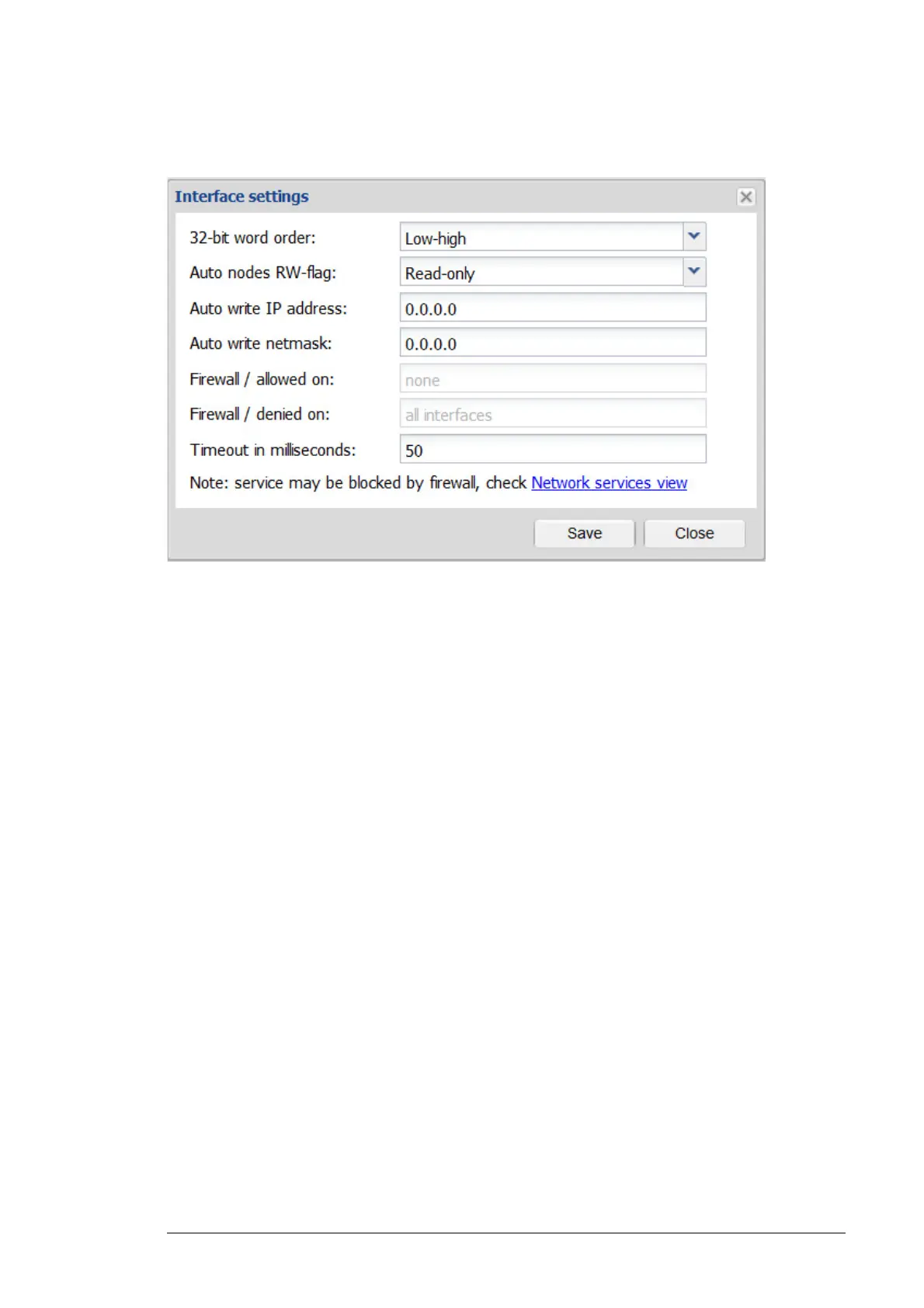
The figure below shows the Interface settings dialog box of the Modbus/TCP gateway tab.
• 32-bit word order is a drop-down list for selecting the most or least significant word
order for 32-bit values. There are 2 options:
• Low-high
• High-low
• Auto nodes RW-flag is a drop-down list for enabling or disabling write access. There
are 2 options:
• Read-only
• Read-write
• Auto write IP address is a text box where the IP address of the Modbus/TCP master
can be specified.
• Auto write netmask is a text box where the netmask for Modbus/TCP master IP
address can be specified.
• Firewall / allowed on shows the network interfaces on which Modbus/TCP gateway
access is enabled. Changes can be done in Settings -> Network services ->
Firewall settings.
• Firewall / denied on shows the network interfaces on which Modbus/TCP gateway
access is disabled. Changes can be done in Settings -> Network services ->
Firewall settings.
• Timeout in milliseconds is a text box where the user can specify the maximum
waiting time for a response given to an individual Modbus/TCP request. If the
response hasn't arrived in the allotted time, Modbus error 0x06 - Slave Device Busy
is sent back to the master.
When the master's request contains a range of values, the timeout is applied to each value
separately.




 To Next Page