4-6 I/O Communication and Control 5702269-C
Advanced Energy
®
PIN DESCRIPTIONS
This table lists the pin numbers and DeviceNet pin names. See the DeviceNet
Specification (revision 2.0) for definitions of these pin names.
ROTARY SWITCHES: BAUD RATE AND ADDRESSING
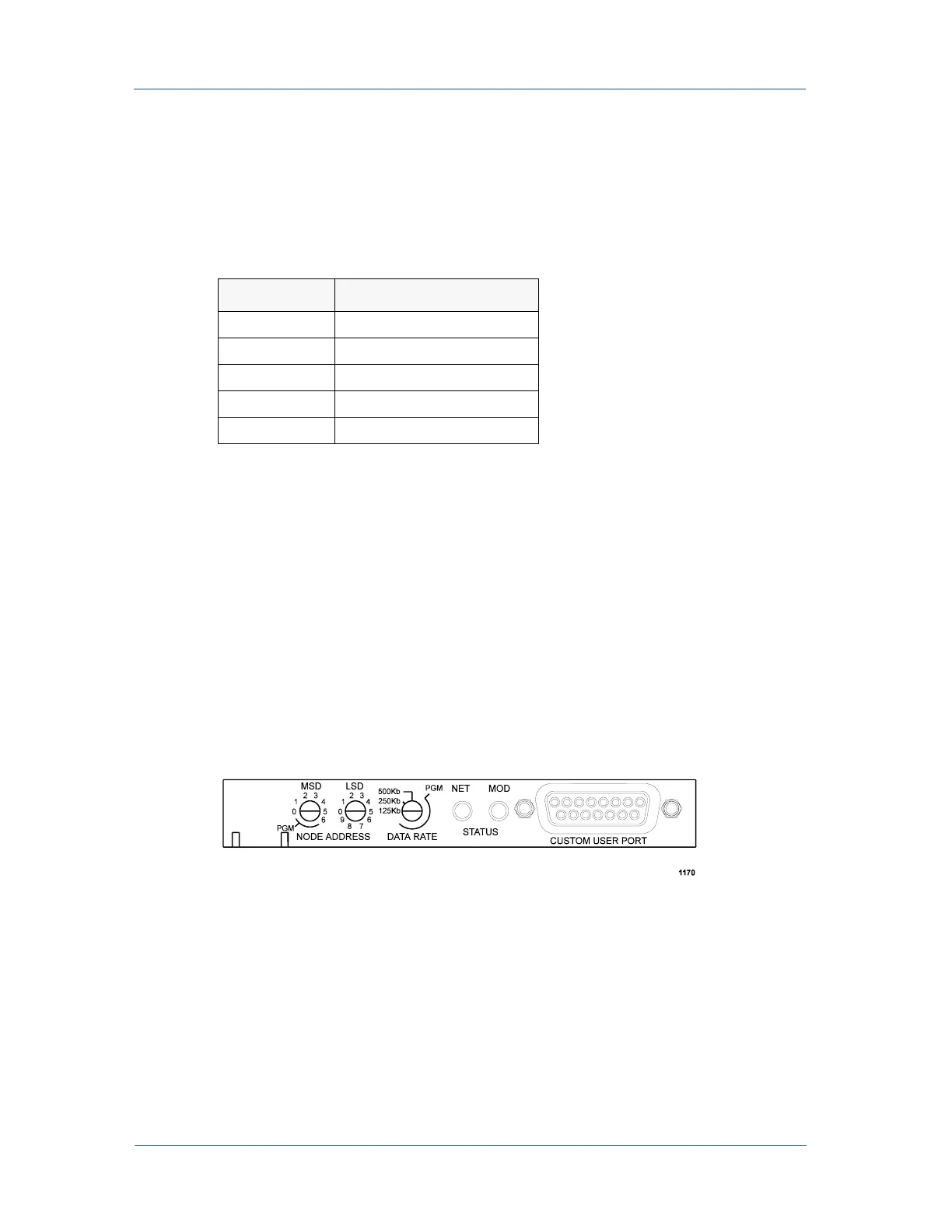
The DeviceNet interface features three rotary switches, located on the rear of the
Pinnacle Plus+ unit, which are read each time the DeviceNet interface powers up (see
Figure 4-3).
Use the DATA RATE switch to select a baud rate: 125, 250, or 500 kbaud
(0 = 125, 1 = 250, 2 = 500 kbaud). The default is 500 kbaud. A switch setting in the
“PGM” region lets you configure the baud rate via DeviceNet.
Note: If your dual Pinnacle Plus+ unit has two DeviceNet cards (one for each side), it
is important that you set the DATA RATE for both sides to the same setting as
the DeviceNet network setting. Any card not set to the network setting will fault
when the network is brought up.
Figure 4-3. DeviceNet rotary switches and LEDs
Table 4-2. DeviceNet
™ Pin Descriptions
Pin Number Pin Name
1Drain
2V+
3V-
4CAN_H
5CAN_L



 To Next Page