Section 7 Common Commands
7-14
∗STB? Read Status Byte Command
(Returns the current value of the status byte including the MSS bit)
■ Format
∗STB?
■ Application example
30 WRITE @108 : “∗STB?”
40 READ @108 : STBV
50 PRINT STBV
■ Explanation
The ∗STB? command returns the total of the status register value assigned binary
weights and MSS summary message value as <NR1 NUMERIC RESPONSE
DATA>.
■ Response message
A response message (<NR1 NUMERIC RESPONSE DATA>) is an integer rang-
ing from 0 to 255. It is the total of status byte register bit values. Status byte
register bits 0 to 5 and 7 is assigned weights 1, 2, 4, 8, 16, 32, and 128 respec-
tively, and the MSS (Master Summary Status) bit is assigned weight 64. The
MSS indicates that there is at least one reason for requesting a service.
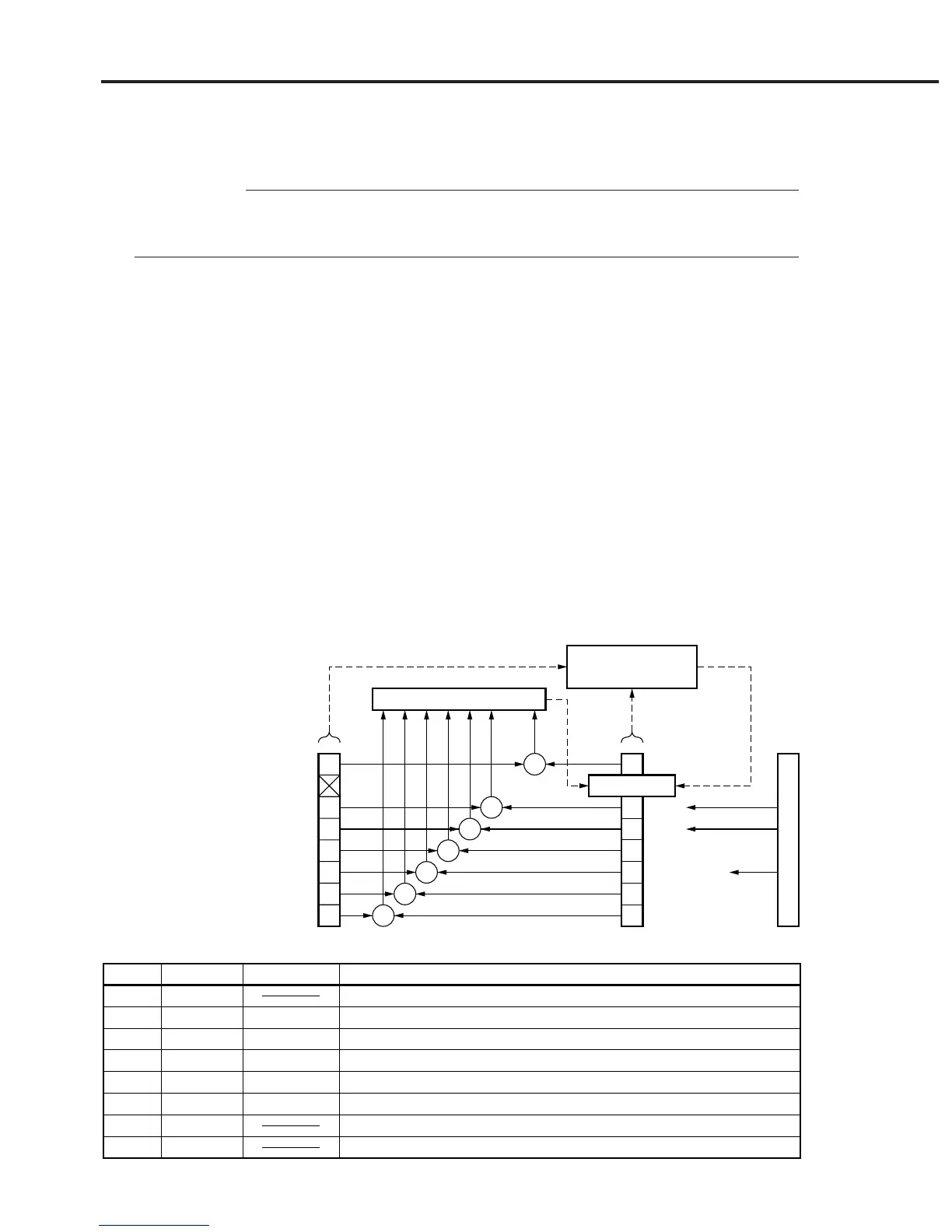
MS9710C’s status byte register conditions are summarized in the table below.
Logical OR
Service Request
Generation
Not used
ESB
MAV
ESB (ERROR)
ESB (END)
Not used
Not used
7
5
4
3
2
1
0
7
5
4
3
2
1
0
&
&
&
&
&
&
&
Status Byte RegisterService Request Enable Register
MSS 6 RQS
disabled=0, enabled=128 (2
7
)
Not used
disabled=0, enabled=32 (2
5
)
disabled=0, enabled=16 (2
4
)
disabled=0, enabled=8 (2
3
)
disabled=0, enabled=4 (2
2
)
disabled=0, enabled=2 (2
1
)
disabled=0, enabled=1 (2
0
)
Status summary message
Status byte register conditions
0 = Not used.
0 = No service is not requested. 1 = A service is requested.
0 = No event service has occurred. 1 = An event status has occurred.
0 = Data does not exist in the output queue.
1 = Data exists in the output queue.
0 = No event status has occurred. 1 = An event status has occurred.
0 = No event status has occurred. 1 = An event status has occurred.
0 = Not used.
0 = Not used.
Bit weights
128
64
32
16
8
4
2
1
Bit
7
6
5
4
3
2
1
0
Bit name
MSS
ESB
MAV
ESB (ERROR)
ESB (END)
∗STB
Query













 To Next Page