6-31
[1] [2]
[3]
[4]
[5]
[6]
[7]
[8]
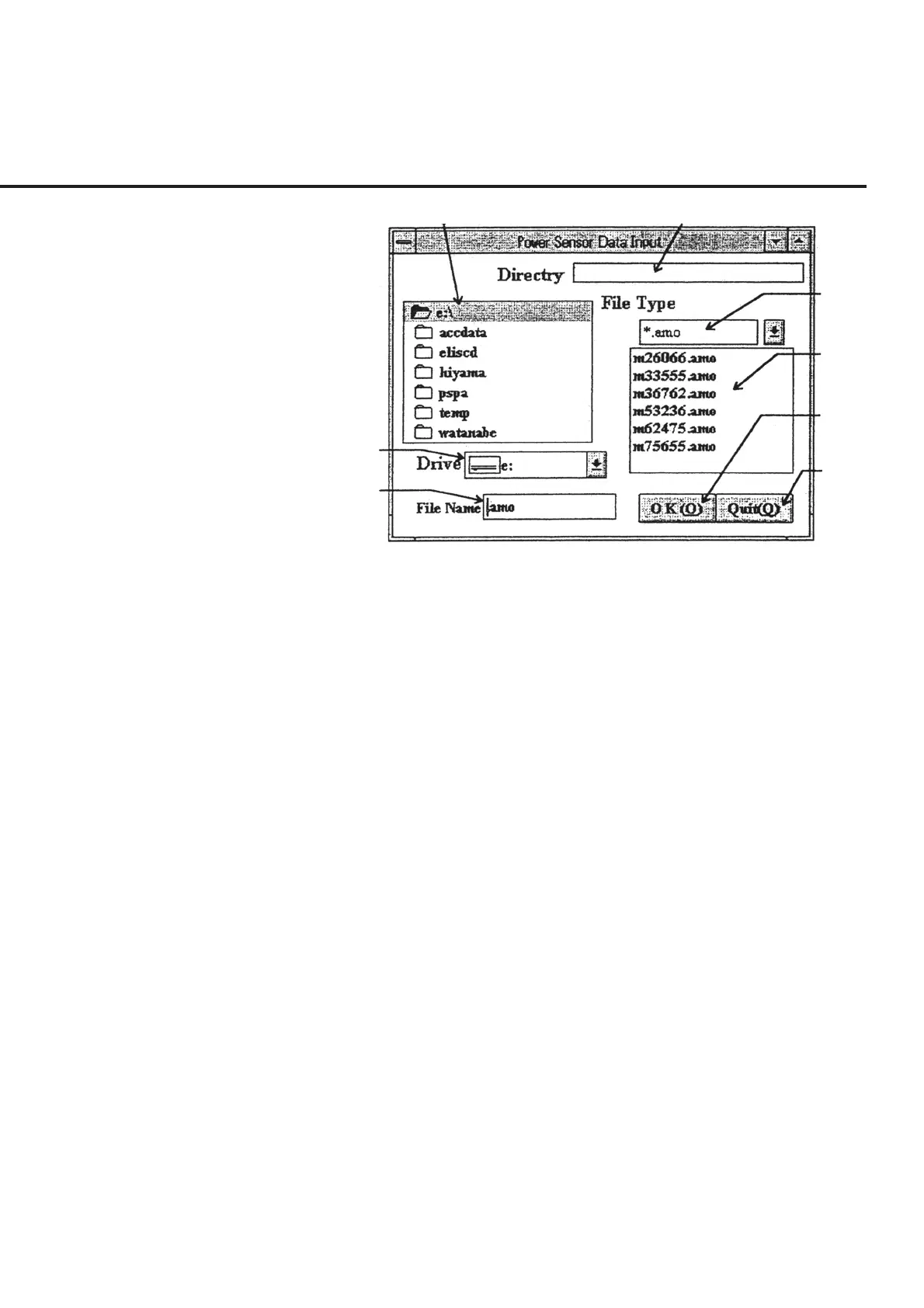
Fig. 6-26 Power Sensor Serial Number Registration Screen
Register a new serial number or select a data file already registered by following the
instructions below.
(1) Select the power sensor type that is to be the target of editing in the same manner
as described in (1) of 6.6.10 “Inputting Power Sensor Cal Factor.” The grid not
displayed (not used for selected measurement) cannot be selected.
(2) Select “Data_Select” in section [1] on the same screen. This causes the “Power
Sensor Serial Number Registration Screen,” shown in Fig. 6-26, to be displayed
together with the extension of data files corresponding to the sensor type selected
in (1).
(3) Select the disk drive to store a new data file to be registered or a disk drive that
stores an already registered data file to be selected from section [7]. This causes
a list of directories to be displayed in section [1].
(4) Select a directory that stores a data file to be used or that will store a new data file
to be registered from section [1]. If the directory selected has data files already
registered, they are displayed in list in section [4].
(5) When a relevant serial number is found in the list of section [4], select the num-
ber. Or, to register a new number, input a serial number in section [8]. This
causes the path leading to the data file to be displayed in section [2].
6.6 Operation



 To Next Page