6-13
6.6 Operation
6.6.4 Setting Output Destination of Measured Results
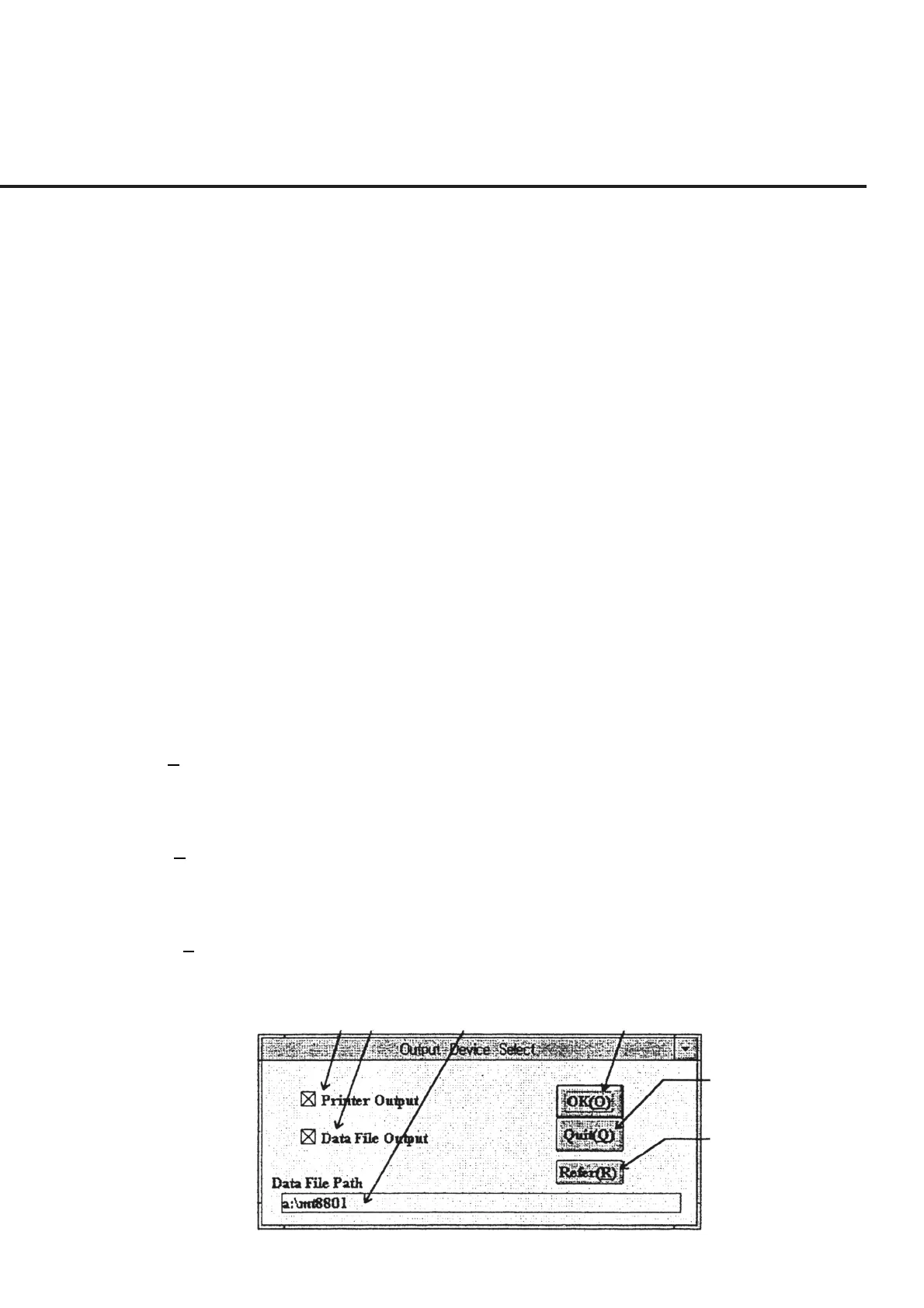
When “Out Device Set” in section [18] is selected from “List of Setup Items” shown in
Fig. 6-5, the “Measured Result Output Device Selection Screen,” shown in Fig. 6-9, is
displayed together with the current set values. The following section shows the names
of control functions on this screen as well as an outline of these functions.
[1] Printer Output (printer output selection section)
Check this box to output the measured results by graph display together with the worst
value from the printer.
[2] Data File Output (Data file output selection section)
Check this box to output the correction values calculated from the measured values into
the data file. When this section is selected, the currently set output directory is dis-
played in section [3], while at the same time enabling selection of the “Refer” button of
section [6].
[3] Data File Path (Data file path display section)
This section displays the output directory of currently selected data file. To measure
only one DUT, set the path so that the data is output to the “MT8801” directory. When
other directories are selected, the operation results in an error. See 6.7.4 “Items Con-
firmed Before Start of Measurement” for more information on the matters needing
confirmation prior to measurement starts.
[4] OK (O) (“OK” button) This button is used when the setting has been modified. After a message requesting
confirmation of devices not selected appears, the screen returns to the “Initial Menu
Screen” shown in fig. 6-4.
[5] Quit (Q) (“Quit” button) This button is used when the setting has been viewed only for confirmation or to return
the modified setting to the initial status. Clicking this button causes the modified infor-
mation to return to the original information (stored in the initial file).
[6] Refer (R) (“Refer” button) This button is used to change the output directory of the data file displayed in section
[3]. See 6.6.5 “selecting Data File Storage Directory” for more information on how to
change the directory.
[1] [2] [3] [4]
[5]
[6]
Fig. 6-9 Measured result Output Device Selection Screen



 To Next Page