Section 7 Inspection Software
7-4
7.5 Outline of Displayed Screen
7.5.1 Initial Menu Screen
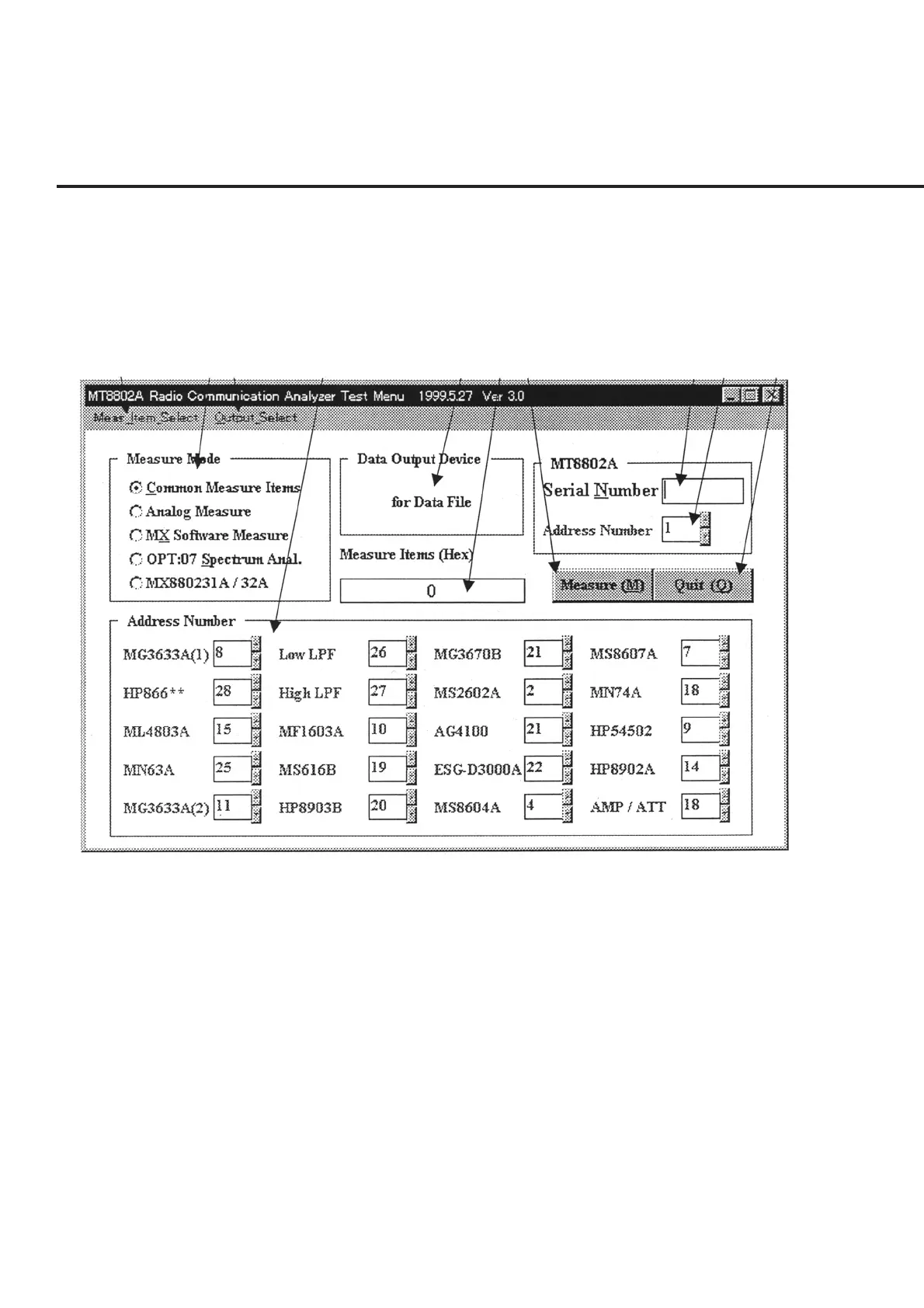
When this program starts normally, the “Initial Menu Screen” shown in Fig. 7-1 to-
gether with initial data is displayed. The names of various controls and a brief sum-
mary of their functions are described in the following section.
[1] [2] [3] [4] [5] [6] [7] [8] [9] [10]
Fig. 7-1 Initial Menu Screen
[1] “Meas_Item_Select” bar Displays the Measurement Item Selection screen for the measurement field selected
from item [2] “Measurement Mode”. See paragraph 7.5.10 “Measurement Item Selec-
tion Screen” for more information on the displayed screen.
[2] Measurement Mode (Measurement field display and selection field)
Displays the measurement field of the equipment under test.
[3] “Output_Select” bar Used for changing the output destination of measured results shown in item [5] “Data
Output Device”. See paragraph 7.6.1 “Selection of Output Destination of Measured
Results.”



 To Next Page