Section 7 Inspection Software
7-6
7.5.2 Output Device Select (Measured Results Output Destination Se-
lection) Screen
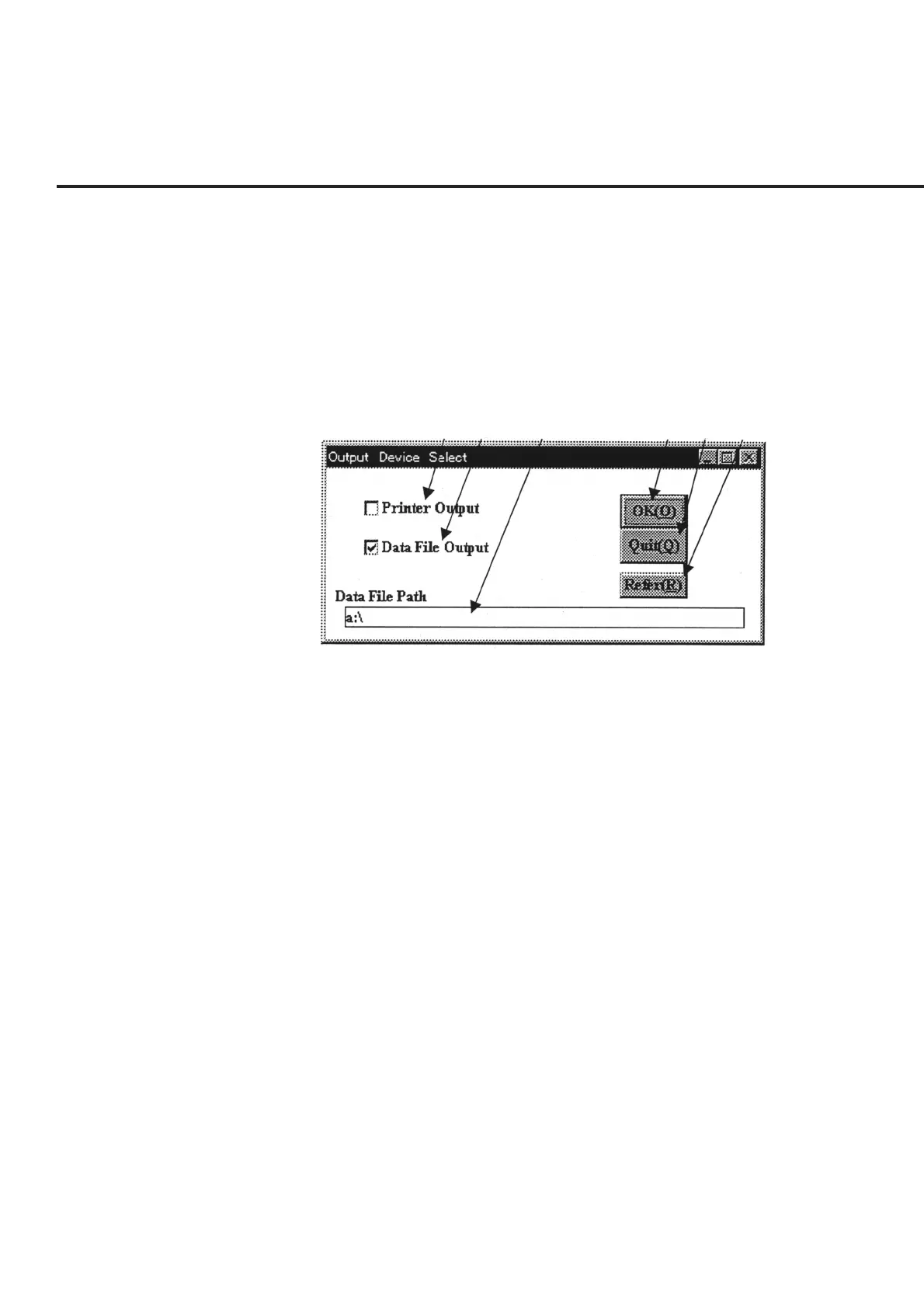
Selection of item [3] “Output_Select” on the “Initial Menu” screen shown in Fig. 7-1
displays the “Measured Results Output Destination Selection Screen” shown in Fig. 7-
2 together with the current settings. Output to the selected device is automatically
performed by each measurement field when a measurement is completed.
The following section describes the name and gives a brief summary of the function of
each control effective on this screen.
[1] [2] [3] [4] [5] [6]
Fig. 7-2 Measured Results Output Destination Selection Screen
[1] Printer Output (Printer output selection field)
Select when the measured results are to be outputted to the printer. The figure above
shows a state where this item is not selected.
[2] Data File Output (Data file output selection field)
Select when the measured results are to be saved in a data file. When this item is
switched into the selected state, item [3] “Data File Path” area is highlighted and the
selection of item [6] “Refer” button is enabled.
[3] Data File Path (Data file path display field)
Displayed when “Data File Output” of item [2] is selected, and displays the output
destination of the currently set data file. Use the item [6] “Refer” button to make the
changes.
[4] “OK” button Used when a setting is changed. A confirmation message appears when some of the
devices remain unselected, and the screen returns to the “Initial Menu” screen shown in
Fig. 7-1.
[5] “Quit” button Returns the screen to the “Initial Menu” screen shown in Fig. 7-1. Forcibly returns the
settings to their original values when any settings are changed.
[6] “Refer” button Displayed when item [2] “Data File Output” is selected, and is used to change the
output destination of the data file indicated in item [3] “Data File Path”. See paragraph
7.6.2 “Selection of Directory for Data File Output” for more information.



 To Next Page