7-7
7.5 Outline of Displayed Screen
7.5.3 Path Check (Data File Output Directory Selection) Screen
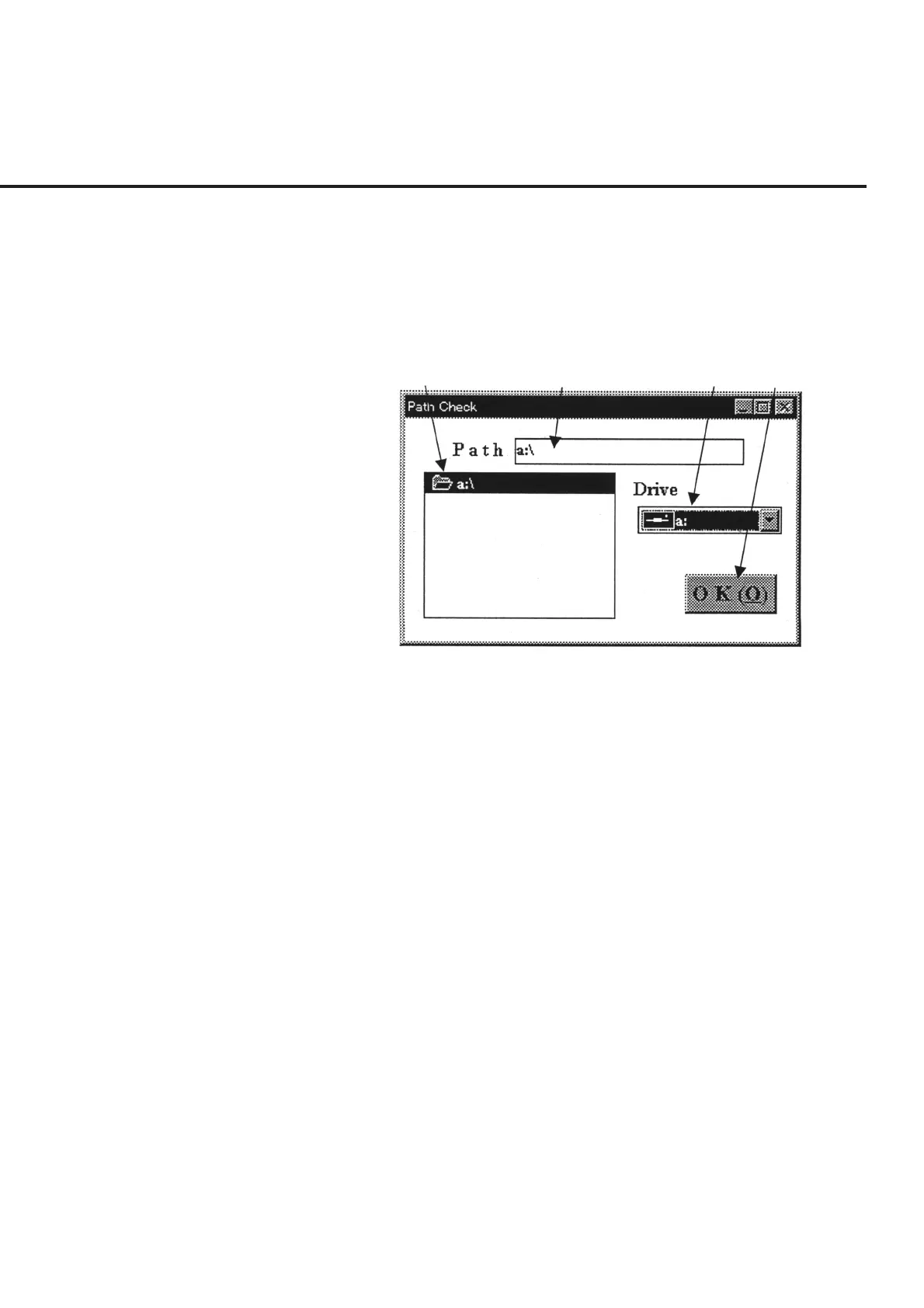
This screen is displayed when item [6] “Refer” button is selected on the “Measured
Results Output Destination Selection Screen” shown in Fig. 7-2, and enables the selec-
tion of the destination of data file output and the creation of a new directory.
The following section describes the name and gives a brief summary of the function of
each control effective on this screen.
[1]
[2] [3] [4]
Fig. 7-3 Data File Path Selection Screen
[1] Directory List Box Lists the contents of the disk drive selected in “Drive” of item [3].
[2] Path (File path display and input field)
Displays the path to the data file output directory currently selected. A new directory
can also be created via direct key input. See paragraph 7.6.2 “Selection of Data File
Output Directory “ for more information.
[3] Drive (Disk drive display and selection field)
Displays the disk drive to which the data file is outputted. Selection of this item causes
a list of directories to be displayed in item [1].
[4] “OK” button Returns the screen to the “Measured Results Output Destination Selection Screen”
shown in Fig. 7-2. If the output destination was changed; item [3] “Data File Path”,
described in Fig. 7-2 of the same screen, displays the newly set path.



 To Next Page