Section 6 Correction Software
6-18
6.6.6 Setting Specification Data
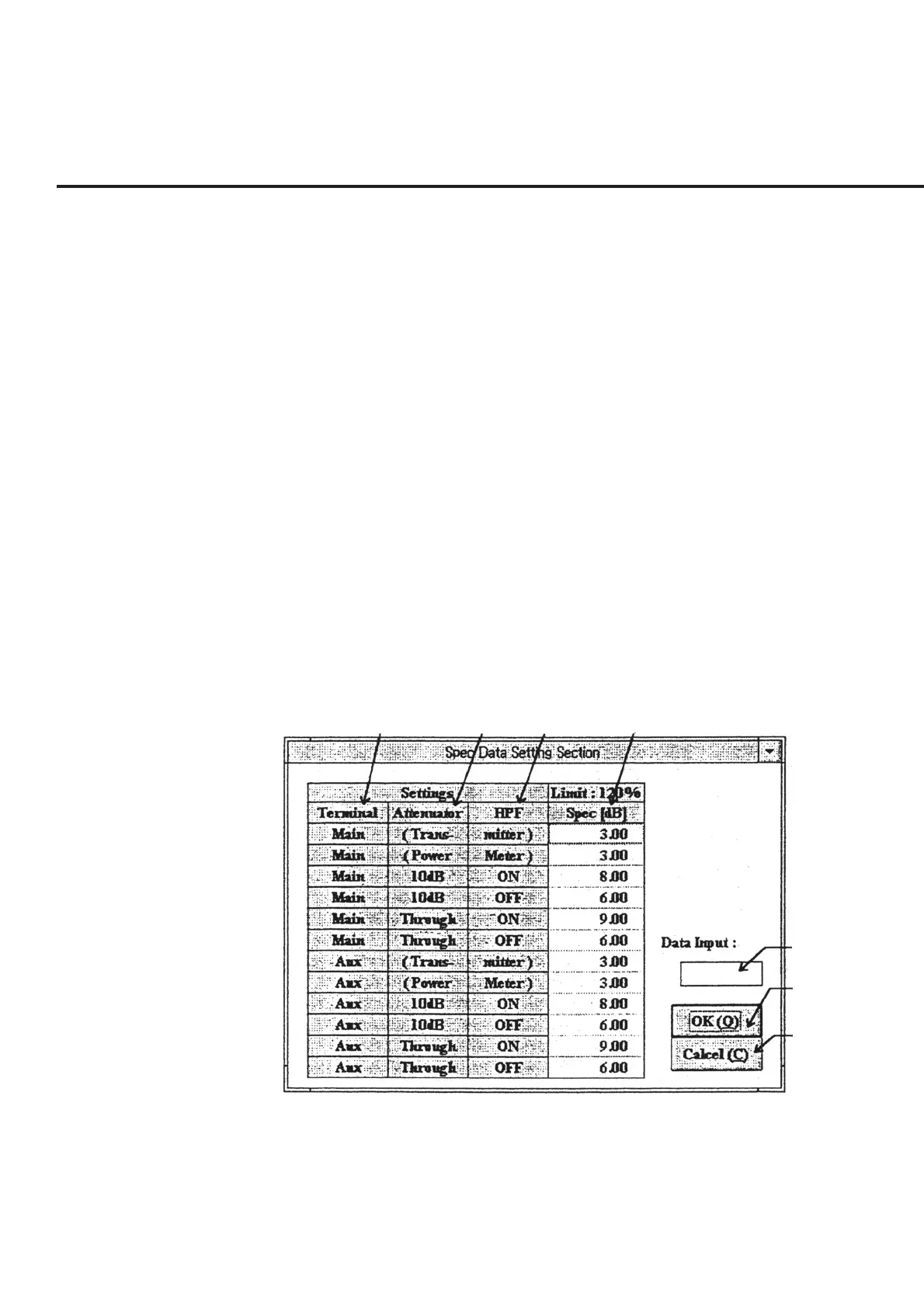
When “Spec Set” in section [20] is selected from “List of Setup Items,” shown in Fig.
6-5, the “Specification Data Input Screen,” shown in Fig. 6-15, is displayed together
with the default setting. The following section shows the names of control functions on
this screen as well as an outline of these functions.
[1] Terminal (Measurement terminal display section)
This section displays the input terminal for each measurement item.
[2] Attenuator (Attenuator display section)
This section displays the attenuator setting for each measurement item. The setting
displayed for each measurement item becomes effective during measurement.
[3] HPF (High pass filter display section)
This section displays the high pass filter setting for each measurement item. The set-
ting displayed for each measurement item becomes effective during measurement.
[4] Limit (Specification Data display section)
This section displays the scale (Specification Data) for the graph display of the items to
which the setting of sections [1] to [3] is applied. See input data in section [5] to
modify the scale setting.
[1] [2] [3] [4]
[5]
[6]
[7]
Fig. 6-15 Specification Data Input Screen



 To Next Page