6-15
6.6 Operation
6.6.5 Selecting Data File Storage Directory
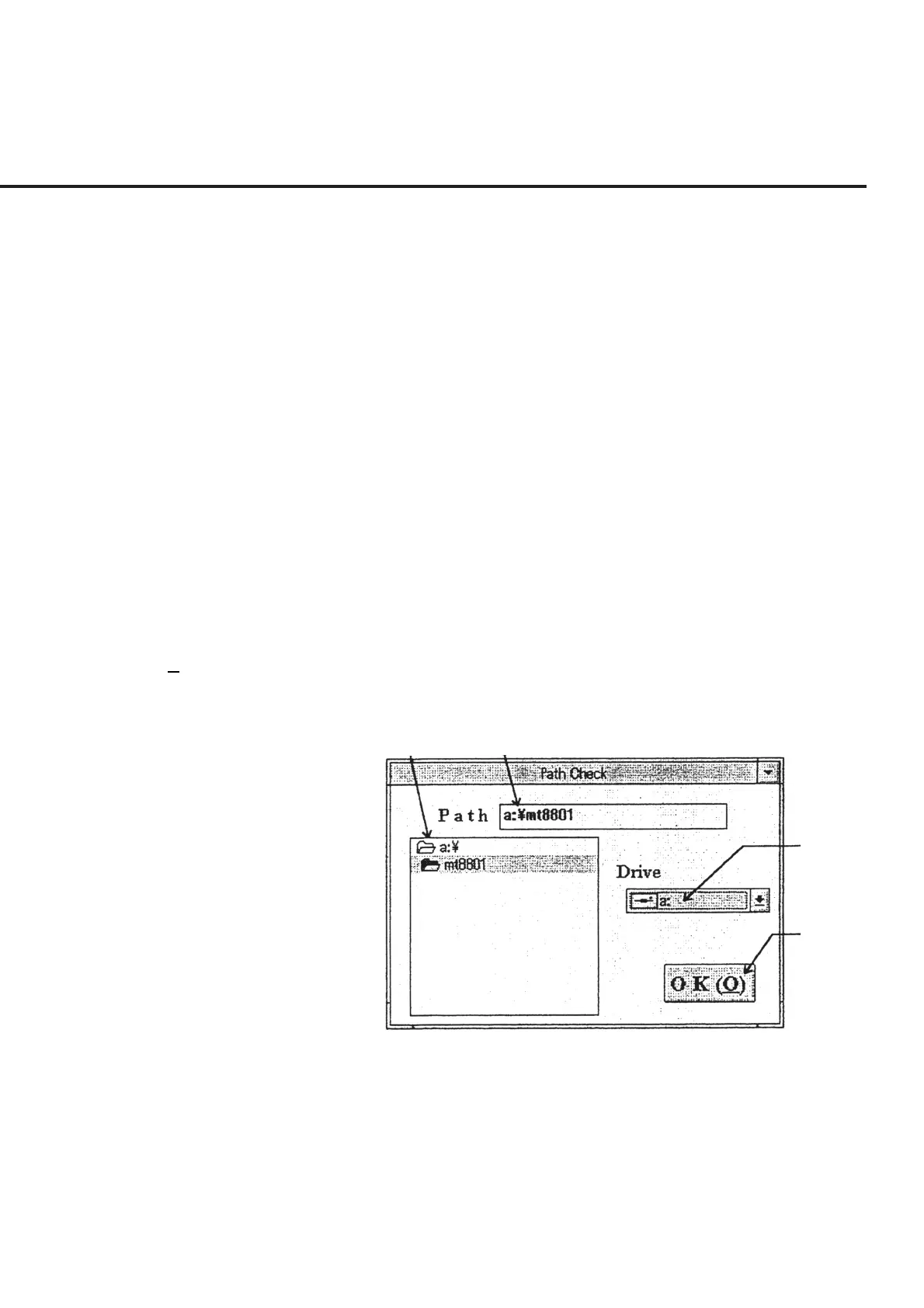
When the “Refer” button of section [6] is selected in 6.6.4 “Setting Output Destination
of Measured Results,” the “Data File Storage Directory Selection Screen,” shown in
Fig. 6-11, is displayed together with the current set values. The following section
shows the names of control functions on this screen as well as an outline of these func-
tions.
[1] Directory selection section This section displays the details of the disk drive selected in section [3]. Used to select
a directory to store the data file. When a directory is selected, the path of the output file
is displayed in section [2].
[2] Path (Path display and input section)
This section displays the path of the data file selected in section [1] and [3]. When no
relevant directory exists in section [1], a directory can be created.
[3] Drive (Disk drive selection section)
This section enables selection of the disk drive to store the data file. The details of the
disk drive selected in this section are displayed in section [1].
[4] OK (O) (“OK” button) Clicking this button causes the screen to return to the “Measured Result Output Device
Selection Screen” shown in Fig. 6-9, where the path to the directory selected is dis-
played in section [3].
[1] [2]
[3]
[4]
Fig. 6-11 Data File Storage Directory Selection Screen



 To Next Page