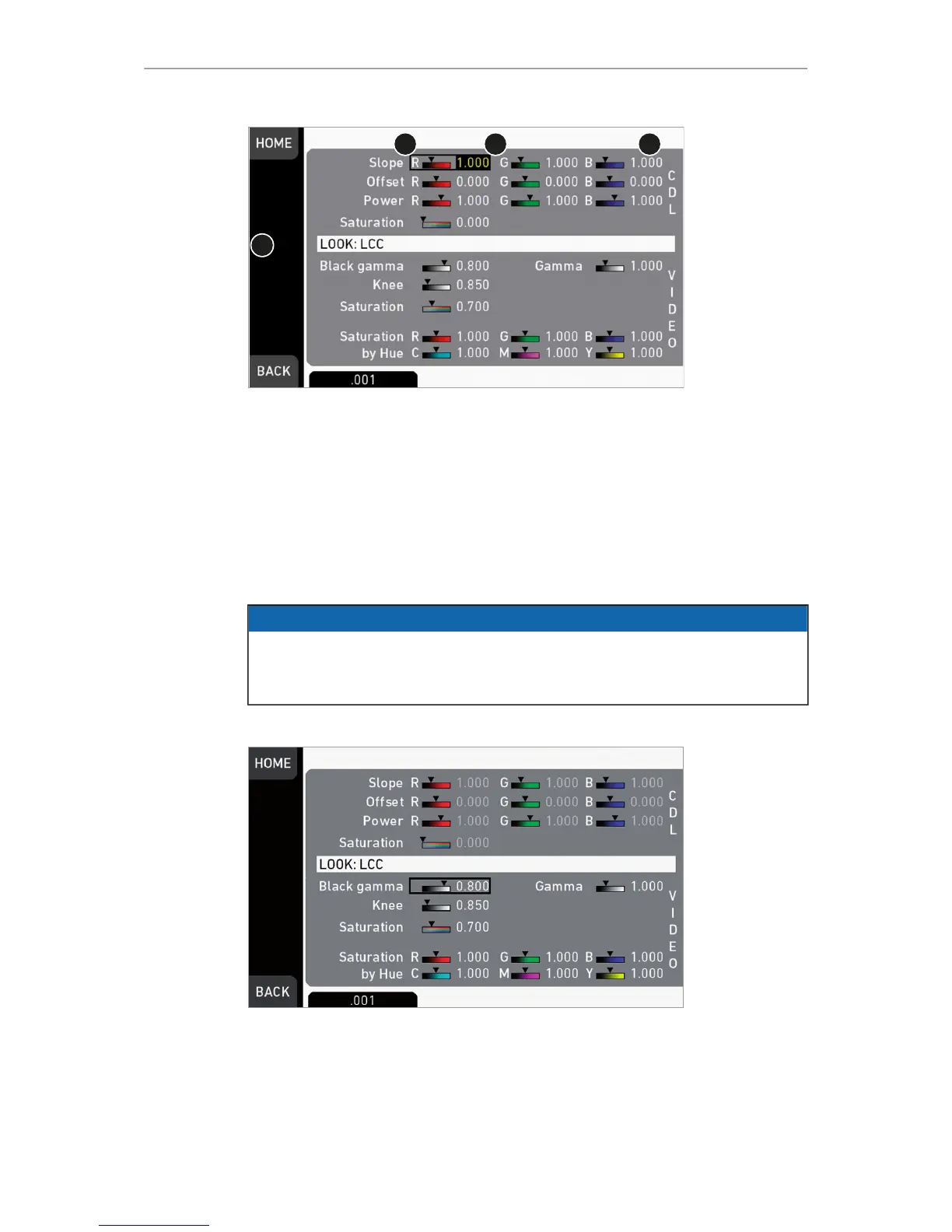
14. A yellow-on-black font (3) marks the edit mode.
15. Confirm the new value by pressing the jogwheel (1).
16. Edit more parameters if required.
17. After editing: Press SAVE (2).
18. To revert all changes: Press UNDO CHANGES (4).
19. Note: Recording while editing will save all changes automatically.
13.8.8 LOOK parameters
NOTICE
A look file contains different parameters for image alterings.
User-defined looks may contain a non-editable 3D LUT instead of video
parameters. Import of looks with 3D LUTs requires the premium license.
HOME > LOOK > SET LOOK > SET PARAM.
Slope, Offset, Power, Saturation affect ASC CDL images under Log C.
Black Gamma, Gamma, Knee, Saturation, Saturation by Hue affect VIDEO images.
ASC CDL parameters are applied to the image before VIDEO parameters. Please
refer to the ARRI white paper on color parameters (for download at www.arri.com).
Note: All look transforms, including ASC CDL, are applied in the conversion from Log
C to Video color space. When you choose Log C as gamma for an image path, the
clean Log C image is routed to this path.



 To Next Page