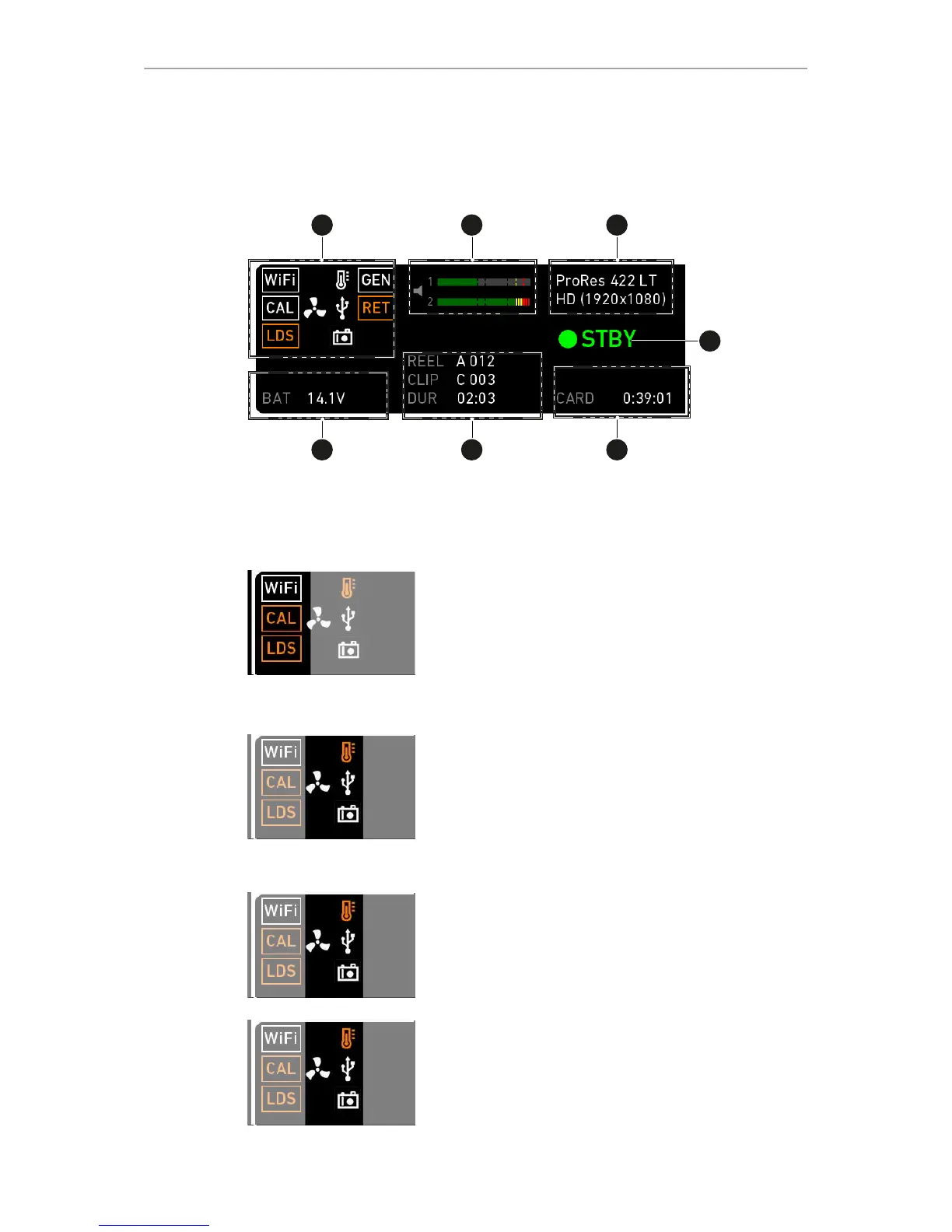
1 Status icons 5 Card status
2 Audio meters 6 Recording status
3 Codec/resolution 7 Battery voltage
4 Camera status
WiFi, CAL and LDS icons
WiFi: Camera WiFi is active.
CAL: Info on lens motor calibration:
•
Orange: Lens motor calibration required
•
White: Lens motor calibration active
LDS: Indicates an error on the LDS interface.
Temperature icon
Alerts on sensor temperature issues:
•
Black: Warning
•
Orange: Error
•
Red: System temperature error (see INFO >
System status)
Fan icon
Icon color shows the fan noise status:
•
Grey: About to increase above 20 dBa.
•
Orange: Higher than 20 dBa.
USB icon
Icon color shows USB memory status:
•
White: Ready
•
Gray: Read only
•
Orange: Not usable



 To Next Page