Touch Screen Devices
Telligence
12PM000224A / 10 August 2022 / Ver. H
Upgrade Priority
While on a call, you can upgrade its alert to a higher priority. For example, when a patient with
chest pains calls for assistance, you may want to upgrade the call alert to Code Blue.
Depending on your system configuration, the dome lights may also begin to flash or flash
faster.
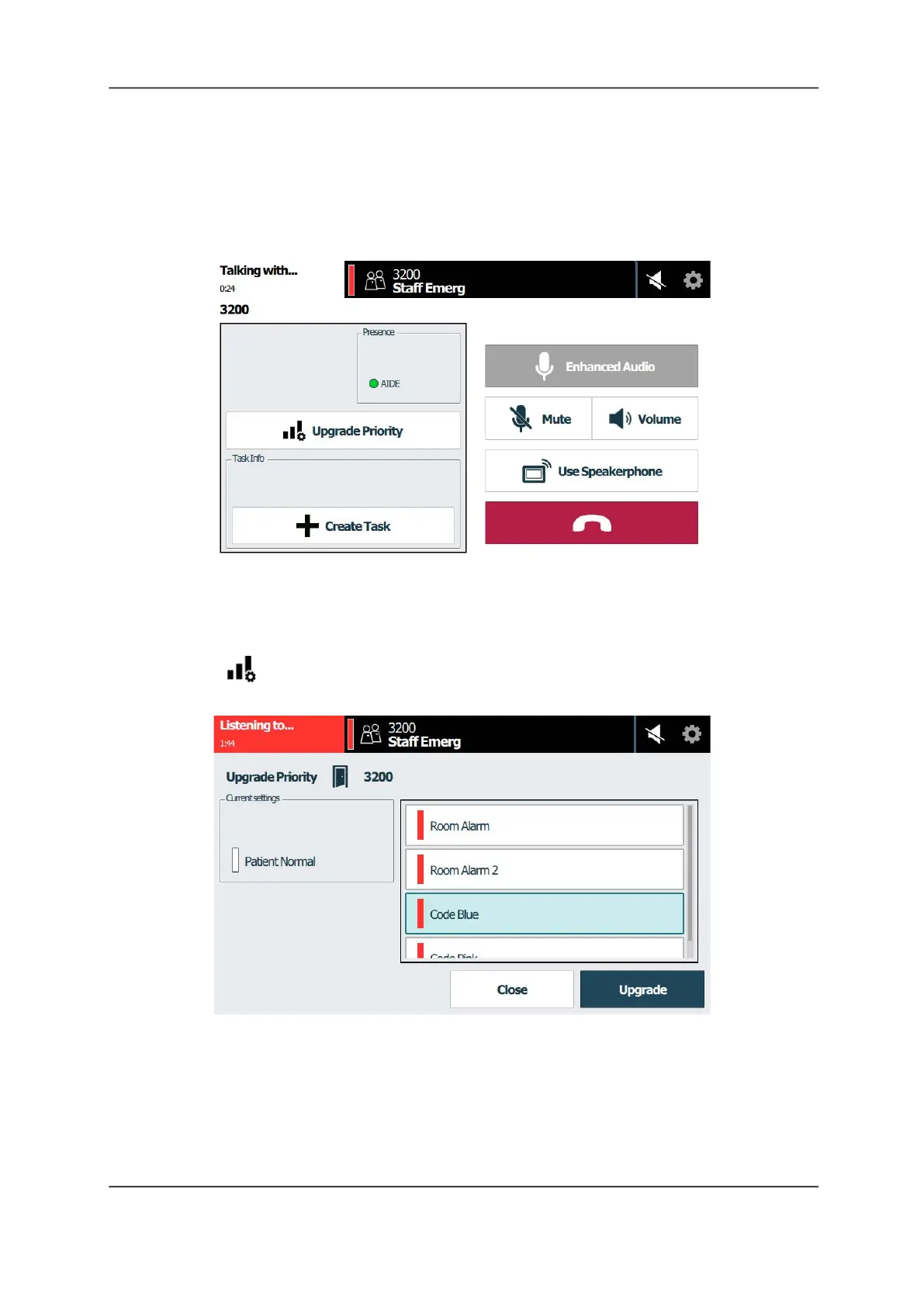
Figure 13: Call Screen
To upgrade a call to a higher priority:
1. Answer a call alert displaying on the Alert list. The Call screen displays, as shown above.
2. Tap Upgrade Priority. The Upgrade Priority screen displays.
Figure 14: Upgrade Priority Screen
3. Scroll through the list and tap to select a new priority.
4. Tap Upgrade.
Note: When you upgrade a call alert, a new alert appears on the Alert List screen in addition
to the original alert.
5. To cancel, tap Close.



 To Next Page