Room Devices
Telligence
57PM000224A / 10 August 2022 / Ver. H
Patient Call Devices
Patients can place nurse call requests from handsets, pillow speakers, pull cords, or call
stations. Patients can hear responses from staff members on their handsets, pillow speakers, or
Speech modules when the speech function is available in the system.
The sections that follow describe Telligence system handsets and pillow speakers, and explain
how nursing staff and patients use them to communicate.
Handsets and Pillow Speakers
Handsets and pillow speakers let patients call the nurse station, control room lighting, operate
sun blinds, and control the television. The speaker sounds voice audio from the nursing staff,
as well as audio from entertainment sources. Some handset models rely on Speech modules to
communicate with the nurse station. The 14-button handsets and pillow speakers use built-in
speakers and microphones for communications. The 1-, 3-, and 7-button handsets require
speaker modules for voice communications.
Handsets and pillow speakers plug into SafeConnect sockets on bedside modules and patient
stations.
Handset Controls
Handset buttons and capabilities differ depending upon the model, but all place nurse calls in a
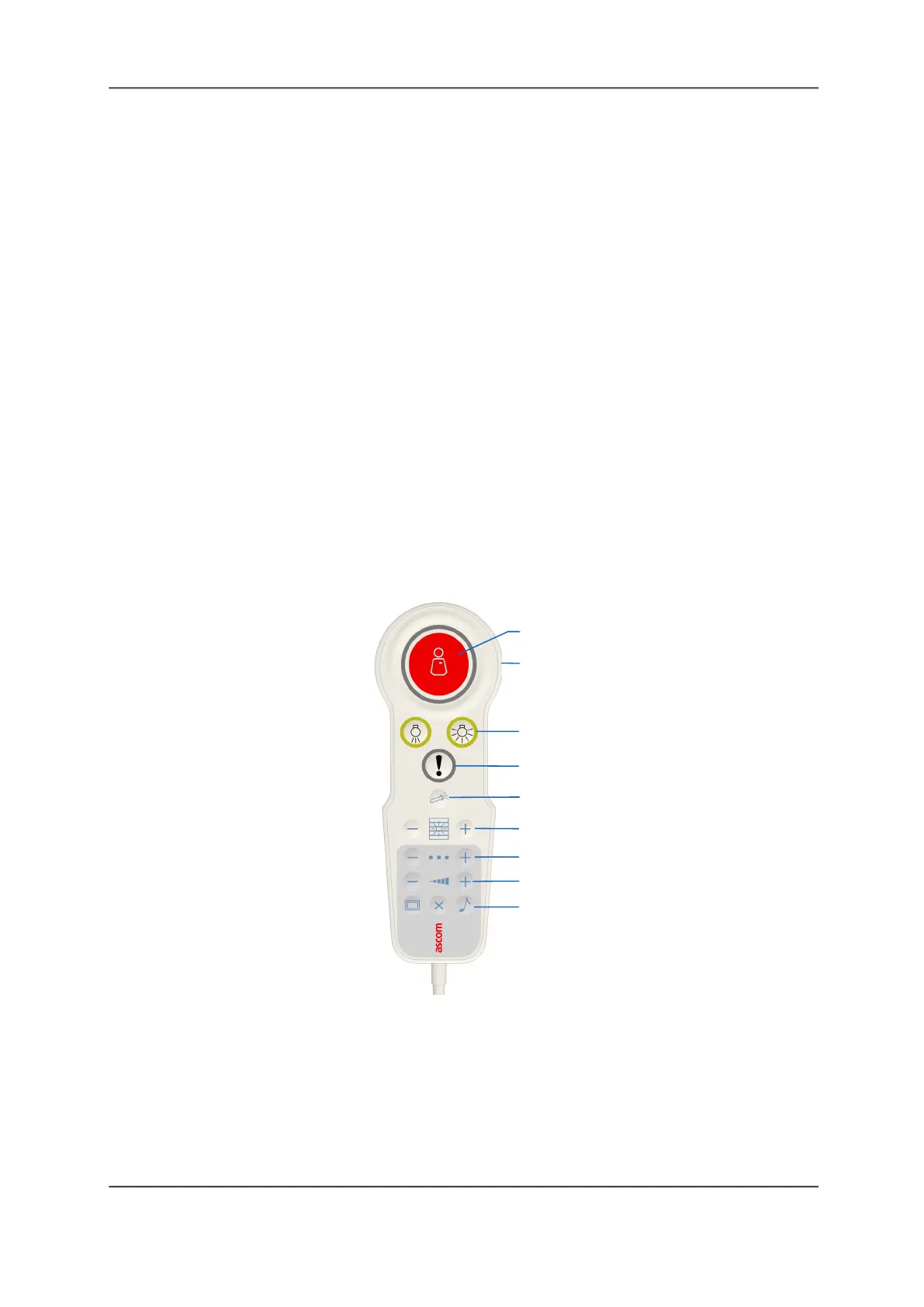
similar manner. This section introduces handset functionality using the handset shown in the
following figure.
Figure 59: Handset Controls
Legend:
(1) Nurse Call: Press to place a nurse call request. The Nurse Call button is backlit for use in
darkened rooms. It has three raised dots for easy identification by visually impaired individuals.
See “Placing a Call From a Handset or Pillow Speaker” on page 60 for more information about
placing nurse calls from handsets.
(2) Microphone (rear): For voice communication with the staff console.
(3) Lighting Control: Two button controls that allow patients to control the room lighting.
(4) Service Call: Sends requests for routine service calls.
(1)
(3)
(4)
(5)
(6)
(7)
(8)
(9)
(2)



 To Next Page