48 Avaya 374x DECT Telephones - User Guide 02/2016
l Max current consumption is 1,9/0,9 A when supplied with 110/230 VAC.
Note: The IPBL current consumption is 0,3 A and is included in max current consumption.
For more information of power consumption of the RFPs, see Appendix B: Update Script for
Configuration of Kerberos Clients on page 161.
Pin the IPBL Cable
All data cables used for the IPBL is standard CAT5 unshielded cable. It is assumed that
installation personnel know how to crimp these connectors to a cable.
Synchronization Cable
The maximum cable length between two IPBLs must not exceed 2000 meters.
l Cut the cable to the correct length.
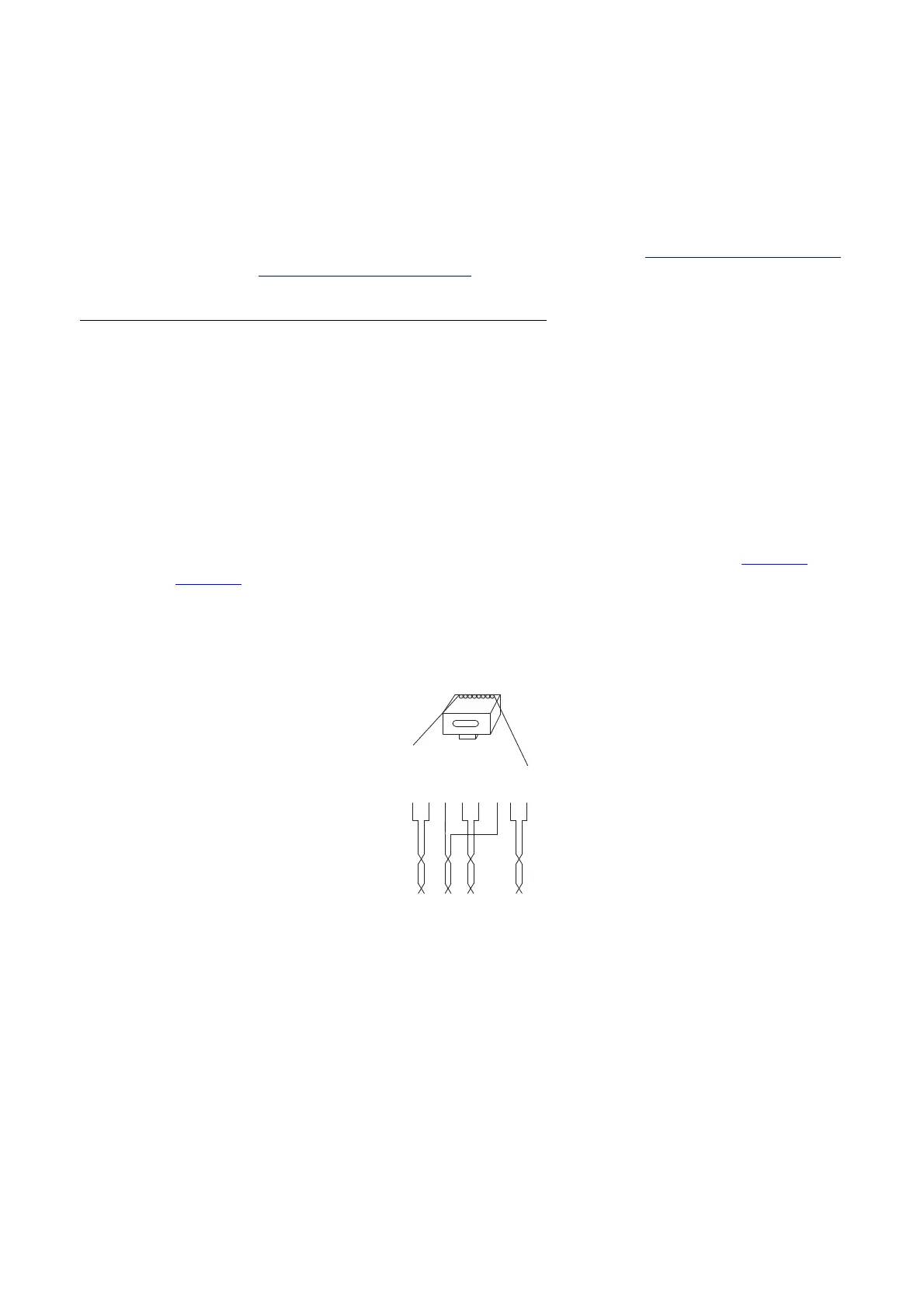
l Connect the cable to a RJ45 modular jack. For information on pinning, see figure 12 and
figure 13
.
l Label the cable.
Sync IN
Figure 17. Connector pinning of the Sync IN cable
Figure 12.
RJ45
modular jack
Sign Tx +
Sign Tx -
Sign Rx +
Rx +
Rx -
Sign Rx -
Tx +
Tx -
Sign = Signalling
Rx = Reciever data pair
Tx = Transmitter data pair
026
15432678



 To Next Page