PAGE 25
Windows PC Software
4.5 Operation via the Windows PC Software
In the following chapter all functions of the PC Software are described in de-
tail.
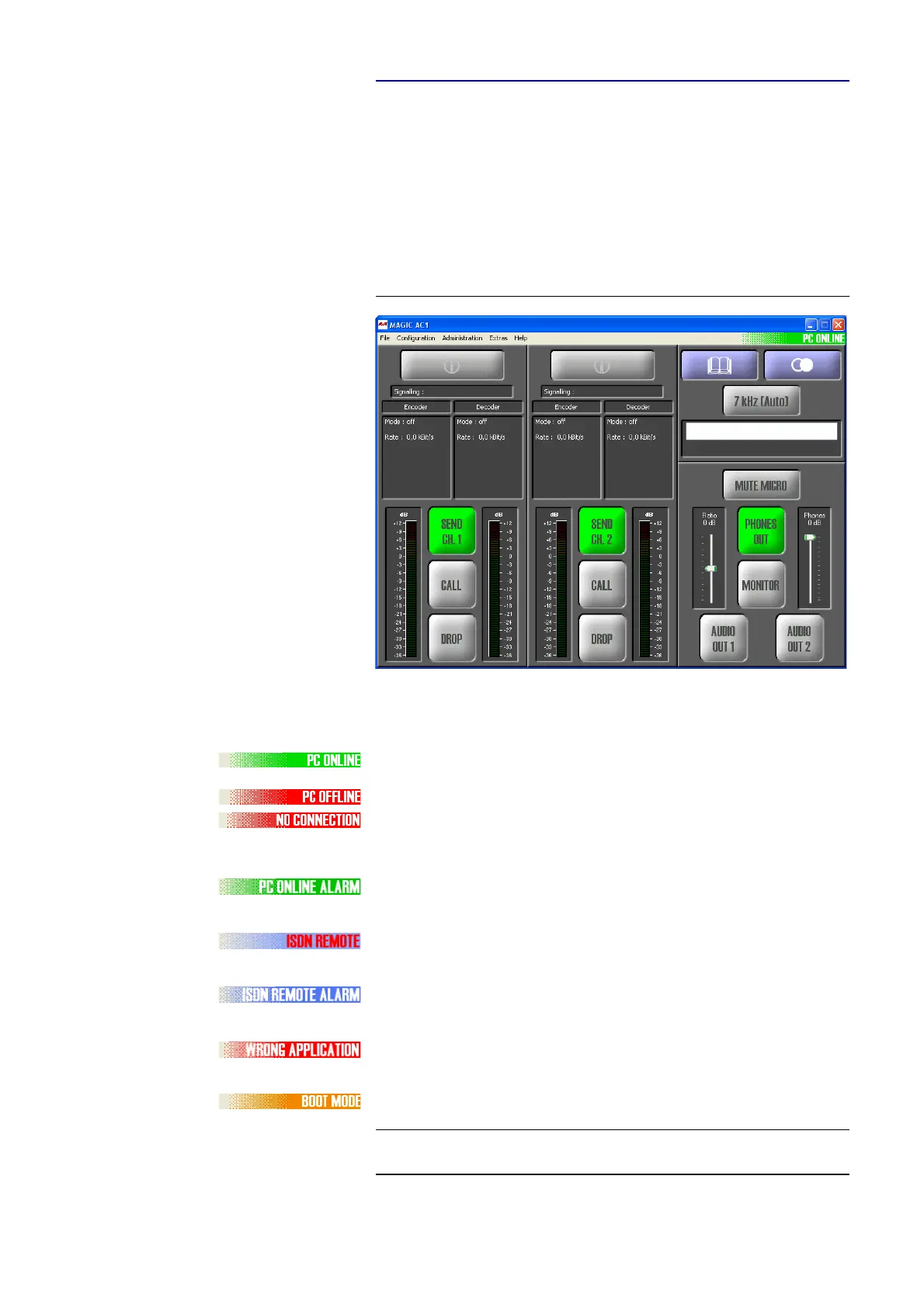
4.5.1 The MAGIC DC7/AC1 XIP main window
After starting the MAGIC DC7/AC1 XIP Software the main window (in the
ISDN mode) is automatically displayed.
FIG. 7 MAIN WINDOW IN THE ISDN MODE
The connection status between the PC and the system is displayed in the up-
per right corner of the window:
PC ONLINE: Connection to the PC is ok
PC OFFLINE or NO CONNECTION: Connection to the PC is faulty
The following status messages are also possible:
PC ONLINE ALARM: An alarm has occured
(see System Monitor, blinking green-darkgreen)
ISDN REMOTE: A remote connection is established
(blinking red-white))
ISDN REMOTE ALARM: An alarm in the remote system has occured (blin-
king blue-darkblue)
WRONG APPLICATION: You are using the software with the wrong unit (e.g.
MAGIC TH2)
BOOT MODE: No valid firmware on the system (orange). Please download
the latest software (see CHAPTER 4.8.6).
TIP
If you click on the status message, the System Monitor is displayed which
shows the system status in detail (see CHAPTER 4.9.1).



 To Next Page