PAGE 121
Option: MAGIC DC7/AC1 Keypad
6.4 Functions of the Keypad
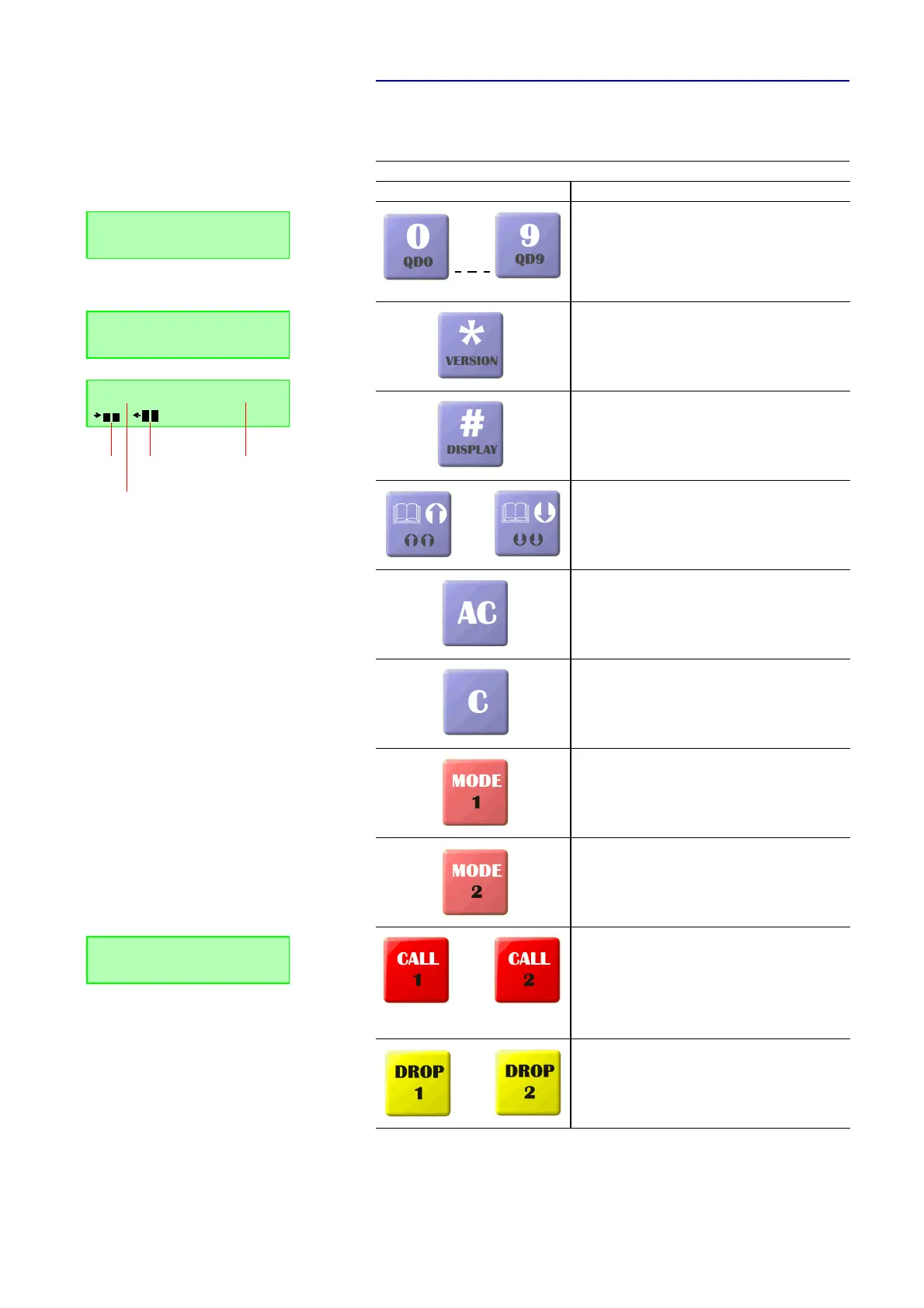
Below the functions of the keypad are listed in table form.
TAB. 4 FUNCTIONS OF KEYS
Key Function
Numerical block to enter the calling number 0 .. 9.
When the SHIFT button (^ symbol in the display) is pres-
sed, a saved quick dial number QD0 ... QD9 is called. If no
calling number is programmed, the message No QD assi-
gned! (No quick dial number assigned!). The Shift mode is
left automatically after a quick dial key is pressed.
* key to enter a special function at a telephone system.
When the SHIFT button (^ symbol in the display) is pres-
sed, the current firmware Version of the system is dis-
played. The Shift mode is left automatically after the key
is pressed.
# key to enter a special function at a telephone system.
When the SHIFT button (^ symbol in the display) is pres-
sed, the display switches between calling number and le-
vel meter in the second line. The Shift mode is left auto-
matically after the key is pressed.
Via these keys, a telephone book entey can be selected.
The cursor can be moved up and down in steps of 1.
When the SHIFT button (^ symbol in the display) is pres-
sed, the cursor moves in steps of 5. The Shift mode is left
automatically after the key is pressed.
By pressing the button AC the entered calling number is
deleted completely.
By pressing the button C the last numerical character of
the entered calling number is deleted.
The button Mode 1 allows you to select the Transmission
Modes for the first connection. To select the next available
mode, please press the key again (see CHAPTER4.7.2.2.1,
Page 61).
The button Mode 2 allows you to select the transmission
mode telephone or 7- Hz for the second connection. A se-
cond connection is only possible, if for the first connection
only one B channel is used (see CHAPTER4.7.2.2.1,
Page 61).
To establish a connection, please enter first the desired
calling number. Then, select the required transmission
mode with the Mode 1/2 buttons. By pressing the button
CALL 1/2 tht calling number is dialled.
If the calling number consists of more than 8 numerical
characters, the last eight characters plus a „.
“ placed in
front are displayed.
By pressing the button DROP 1 respectively DROP 2, connec-
tion 1 or connection 2, respectively, is dropped.
DISCON. Telephone
5271130
DISCON. 7 KHZ G.7
SW-Version: 1.322
Connect TEL
Sende-
pegel
Empfangs-
pegel
Übertragunsgs-
modus
Leitungs-
zustand
DISC 15K. |CONN 7 K.
|.78772245



 To Next Page