PAGE 130
Option: Remote Control Software
8.2 The integrated S
0
Monitor
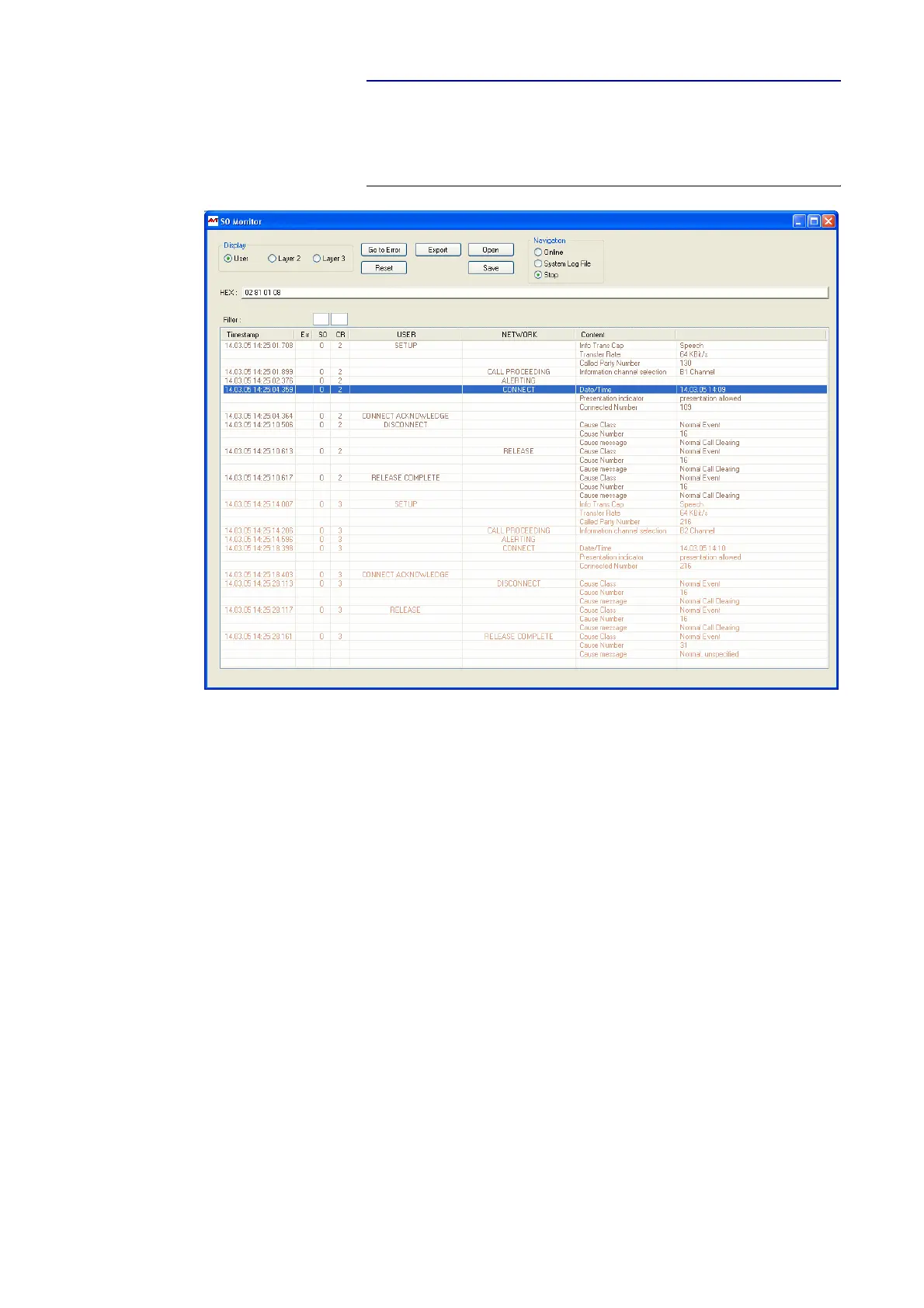
The integratedS0 Monitor allows a detailed analyse of the D channel proto-
col.
FIG. 86 S
0
MONITOR USER (USER VIEW)
• The D channel protocol can be analyzed Online or via the System Log
File stored in the system. You can select the desired operating mode under
Navigation. Stop stops the current logging.
•The option Display switches between the User, Layer 2 and Layer 3 dis-
play. The User view displays a summary of the most important informa-
tion. Of course, for experts the options Layer 2 and Layer 3 are also infor-
mative.
• Errors in the log file are displayed red-shaded. Via the button Go to Error
the next error in the log file is displayed.
•The button set resets the display window.
• With the use of the Export key the log file can be exported in the currently
selected read-out as RTF (Rich Text Format). This file can be read with MS
WORD for instance.
•Via the Open button a previously stored log file can be opened and analy-
sed offline.
• By pressing the button Save the current log file is stored as binary file.
• In the line HEX the binary data of the currently selected log file line is dis-
played in hexadecimal form.



 To Next Page