52 BD High Throughput Sampler User’s Guide
Displaying Keyword Results in the Plate Layout
If keywords were assigned to the plate, clicking on a keyword in the Keywords
list toggles the plate layout to show the Keywords Analysis view. Each keyword is
shown as a different color. If a keyword was assigned a range of values, a value is
displayed in each well. Different values of the same keyword are shown in
various shades of the keyword color. If a well has no value assigned, the well is
white. To revert back to the default Analysis view, click the keyword in the
Keywords list.
Use the Keyword Analysis view to display keyword values for all wells that were
assigned the selected keyword. The Keyword list displays all keywords that were
used in the current experiment. When you choose a keyword, the plate layout
shows keyword values and corresponding background colors. Wells are colored
according to keyword assignments.
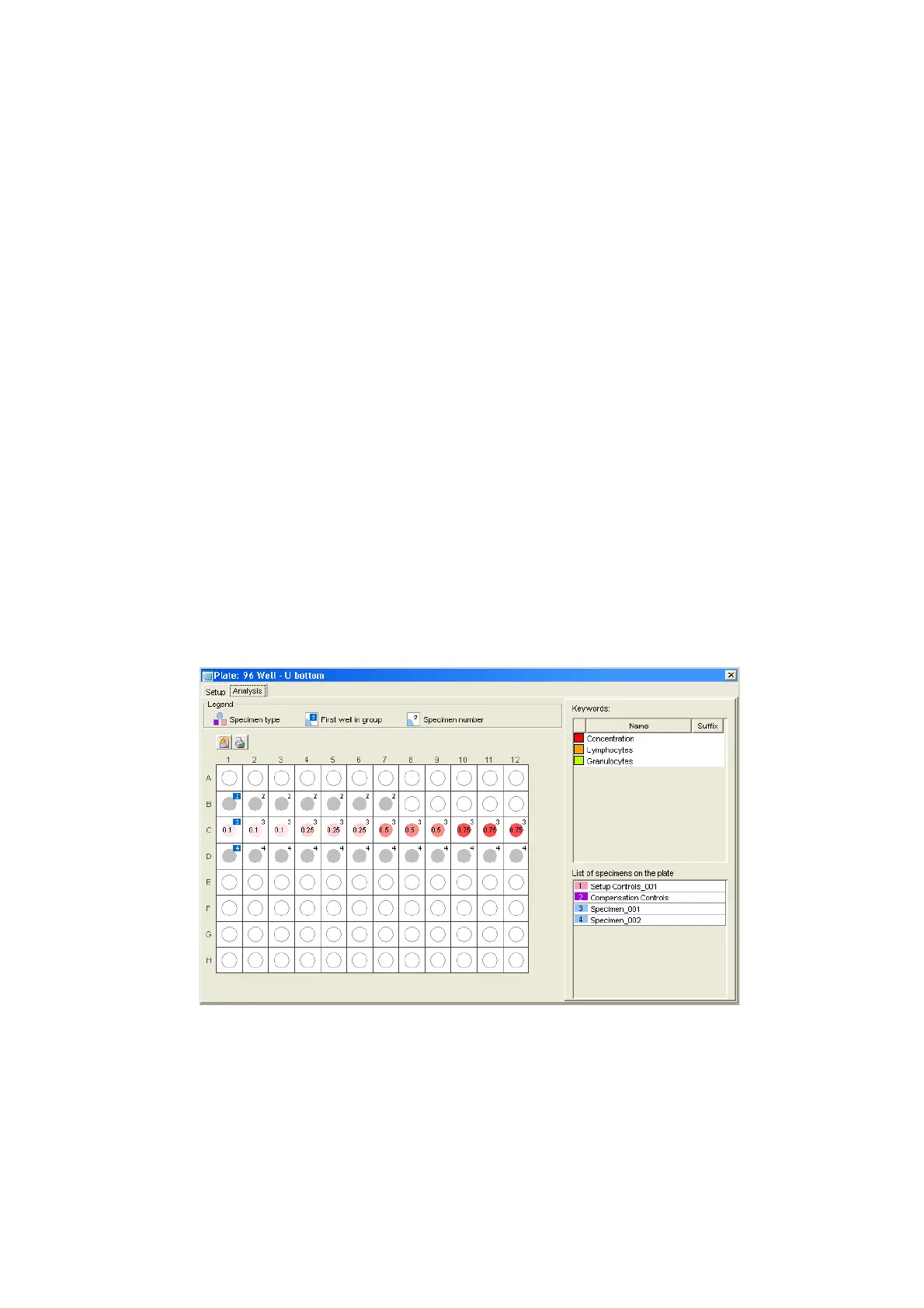
For example, Figure 2-6 displays values for the keyword Concentration. In this
example, four different concentrations were assigned to wells on the plate. The
Keyword Analysis view shows the concentration value assigned to each well.
Figure 2-6 Keyword Analysis view











 To Next Page